

Flow Pad
Shryas Bhurat Productivity iPhoneiPadiPod touch
Flow Pad is a free Productivity app for iPhone and iPad by Shryas Bhurat. Rated 5.0/5 from 1 ratings. Requires iOS 26.0. Updated August 17, 2026.
- Rating
- 5.0
- 1 ratings
- Price
- Free
- on the App Store
- Size
- 2 MB
- Age 17+
- Updated
- Aug 17
- 2026 · v4.2
Screenshots


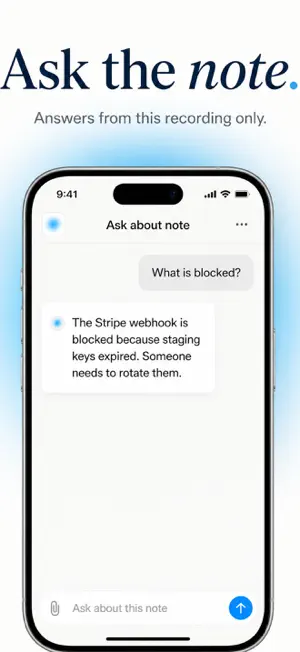
About Flow Pad
Flow Pad is a private notes app for iPhone and iPad. Record by voice or write notes, then get on-device transcription, summaries, and a chat to ask questions about any note, no account, no data sent off your device. RECORD • Full-screen recorder with live waveform • Pause and resume; tap Done to save as a note in your Notes list • On-device speech-to-text (Apple Speech); transcript appears in the note SUMMARIZE • On-device summarization (Apple Foundation Models when available, or built-in extractive summary) • Each note gets a summary, key highlights (bullets), and action items with checkboxes • Tap “Generate summary” in the note if it wasn’t created yet ASK ABOUT THIS NOTE • “Ask about this note” at the top of each note opens a chat • Ask anything about that note; answers use only its summary, transcript, and content—on device • Input bar stays just above the keyboard so you can type and send easily WRITE NOTES • Create written notes (title + body) from the Notes screen (+ menu: Record or Write Note) • Add headings, bullet lists, and photos from your library • Same summarization and “Ask about this note” as voice notes ORGANIZE & FIND • Notes list with “Search notes”; grouped by Today, Yesterday, and date • Pin notes to the top; full-text search across titles, summaries, and transcripts • Swipe or context menu to delete; Pin, Copy, Share from the list or the note’s ⋯ menu NOTE DETAIL • Editable title; audio playback with waveform and progress • Summary, key highlights, action items (tap to mark done), transcript, written content • One-tap copy (summary, transcript, or all) and share PRIVACY • Recording, transcription, summarization, and Q&A all happen on your device • No account or sign-in; microphone for recording, Speech Recognition for transcription, Photo Library, only if you add photos Flow Pad: voice and written notes, on-device AI, and ask anything about your notes—without sending your data elsewhere.
What’s new
Version 4.2 · Updated August 17, 2026
Smarter on-device summaries, still fully private. • Voice and written notes now produce clearer summaries, key highlights, and action items • Action items stay faithful to what you actually said. No invented to-dos • Short notes like “call Priya” and “buy milk” are captured as tasks • Ask about this note is more accurate, with suggested follow-up questions • Names, dates, and numbers are kept in the summary • Recording, transcription, and AI still run on your iPhone. Nothing is sent to us
App privacy
The developer, Shryas Bhurat, reported these privacy practices to Apple.
Data Not Collected
The developer does not collect any data from this app.
Alternatives to Flow Pad
Looking for apps like Flow Pad? Here are 6 similar apps on the App Store. The highest rated is Snippets: Quick Markdown Notes (5.0/5), and all 6 are free to download.
-
 CopyPasta - Clipboard History
-
 PromptWallet AI Prompt Library
-
 Ambi AI
-
 Save Button App
-
 TensorChat: Private AI
1.0
TensorChat: Private AI
1.0
-
 Snippets: Quick Markdown Notes
5.0
Snippets: Quick Markdown Notes
5.0
| App | Rating | Price | Last updated | Compare |
|---|---|---|---|---|
| Flow Pad | 5.0 / 5 (1 rating) | Free | August 17, 2026 | |
| CopyPasta - Clipboard History | – | Free | Mar 26, 2026 | Compare |
| PromptWallet AI Prompt Library | – | Free | Jul 8, 2026 | Compare |
| Ambi AI | – | Free | Mar 31, 2026 | Compare |
| Save Button App | – | Free | Apr 21, 2026 | Compare |
| TensorChat: Private AI | 1.0 / 5 (1) | Free | May 13, 2026 | Compare |
| Snippets: Quick Markdown Notes | 5.0 / 5 (2) | Free | Jan 4, 2026 | Compare |
Compare Flow Pad with the top alternatives: ratings, updates, ASO score and keyword gaps →