

LiveAssistant
leng xiangjun Utilities iPhoneiPadiPod touch
LiveAssistant is a free Utilities app for iPhone and iPad by leng xiangjun. Requires iOS 17.6. Updated October 9, 2026.
- Price
- Free
- on the App Store
- Size
- 197 MB
- Age 4+
- Updated
- Oct 9
- 2026 · v2.1
Screenshots


About LiveAssistant
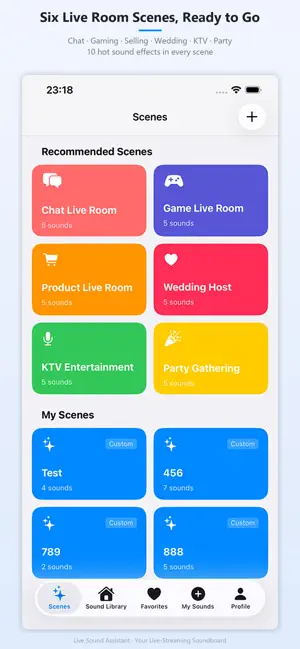
# Streamer Sound Assistant - Exclusive Live Stream Sound Library Streamer Sound Assistant is a professional sound effect player built for streamers and content creators. It provides abundant preset sound effects and custom audio uploads to instantly energize your live stream room. ## Main Features 1. **Diverse Preset Scenarios** Ready-made scenarios including chat, gaming, sales live streams, wedding hosting, KTV and parties. Each scenario comes with 10 popular sound effects to meet various live streaming needs. 2. **Custom Personal Scenarios** Create your own scenarios, add or remove sound effects, edit names and descriptions to build your personalized sound library. 3. **Smart One-Click Playback** One-click continuous playback for sound effects in a scenario. Enjoy smooth transitions and improve live stream interaction efficiency. 4. **Clear VIP Benefits** VIP-only sound effects are marked with golden crown icons. Non-VIP users will be guided to the purchase page upon tapping, protecting VIP users and offering upgrade access. 5. **Handy Scenario Management** The app opens directly to the scenario page for quick selection. You can easily add or delete sound effects inside scenarios. ## Preset Sound Effects - Host: applause, cheers, guest greetings - Mic Rap: DJ mixes, rhythmic beats - Funny: comic laughs, quirky tones - Game: victory, defeat, kill cues - Life: daily ambient sounds ## Custom Sound Upload - Upload your local audio files - Rename sound effects freely - Delete unused sounds with one click ## Favorites Management - One-click favorite sound effects - Fast access to frequently used sounds - Custom sound folders ## Clean UI - Clear categories for fast sound lookup - Simple one-click playback - Real-time playback status display ## Usage Scenarios - Shopping live streams: boost purchasing atmosphere - Entertainment live streams: liven up your stream - Gaming live streams: enrich audience interaction - Chat live streams: add fun to conversations - Talent live streams: match performance rhythm End User License Agreement (EULA):* https://www.apple.com/legal/internet-services/itunes/dev/stdeula/ About Subscriptions: Once the subscription is confirmed, the fee will be charged to your Apple ID account. The subscription will automatically renew unless you cancel auto-renewal at least 24 hours before the end of the current subscription period. Your account will be charged the next renewal fee within 24 hours before the end of the current subscription period. You can manage, turn off auto-renewal, or cancel your subscription at any time in your App Store account settings.
What’s new
Version 2.1 · Updated October 9, 2026
· Added backup & restore: one-tap backup/restore of "My Favorites" and "My Sound Effects", which can be saved to a local file so data isn't lost when switching devices or reinstalling · Added external keyboard shortcuts for "My Favorites": press 1-9, 0, a-x to directly play the corresponding favorite, press again to stop · Optimized startup and page-switching smoothness, fixed lag in some cases · Fixed the issue where "My Sound Effects" could not be recovered after being unexpectedly lost; optimized UI color contrast
App privacy
The developer, leng xiangjun, reported these privacy practices to Apple.
Data Not Collected
The developer does not collect any data from this app.
Alternatives to LiveAssistant
Looking for apps like LiveAssistant? Here are 6 similar apps on the App Store. The highest rated is 极简音效助手-2026音效猫主播必备软件 (3.5/5), and all 6 are free to download.
-
 LiveFX: Soundboard & Sounds
-
 极简音效助手-2026音效猫主播必备软件
3.5
-
 小河音效助手
-
 YX任务考核
-
 KinCall: Family Call Reminder
-
 音效助手
| App | Rating | Price | Last updated | Compare |
|---|---|---|---|---|
| LiveAssistant | – | Free | October 9, 2026 | |
| LiveFX: Soundboard & Sounds | – | Free | Oct 21, 2026 | Compare |
| 极简音效助手-2026音效猫主播必备软件 | 3.5 / 5 (2) | Free | Feb 10, 2026 | Compare |
| 小河音效助手 | – | Free | Jul 21, 2026 | Compare |
| YX任务考核 | – | Free | Jan 15, 2026 | Compare |
| KinCall: Family Call Reminder | – | Free | Jul 8, 2026 | Compare |
| 音效助手 | – | Free | Jul 25, 2026 | Compare |
Compare LiveAssistant with the top alternatives: ratings, updates, ASO score and keyword gaps →