

Listen Party
NH Studios, LLC Music iPhoneiPadiPod touch
Listen Party is a free Music app for iPhone and iPad by NH Studios, LLC. Rated 4.7/5 from 13 ratings. Requires iOS 17.0. Updated September 14, 2026.
- Rating
- 4.7
- 13 ratings
- Price
- Free
- on the App Store
- Size
- 18 MB
- Age 12+
- Updated
- Sep 14
- 2026 · v1.0.5
Screenshots



About Listen Party
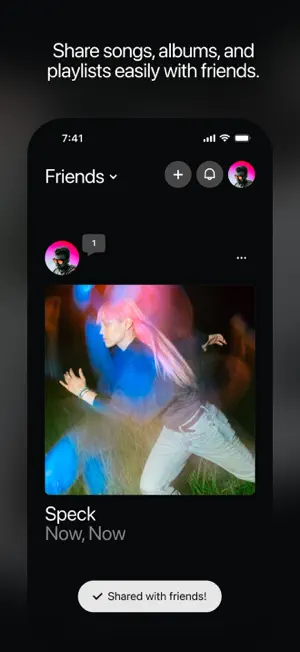
Listen Party is a social music app for you and your friends. Share and play songs, albums, and playlists in-app using Apple Music and Spotify, even if you and your friends use different services. It's free to use and there are no ads. How it works: • Create an account • Connect Apple Music or Spotify • Follow or invite friends • Tap to play any song, album, or playlist in the app • React, comment, save anything you love • Build collections of songs, artists, albums, and playlists • Make playlists together • Never miss when your friends share by adding a widget to your home screen Cross-platform sharing and playing in-app: A friend on Apple Music can share a song that plays for you even if you use Spotify, and vice versa. You use the subscription you already pay for. Even if you don't have a subscription you can still play 30 second clips of the music. Free! Listen Party is free to use. There's an optional Fan tier ($4.99/month or $49.99/year) to support development. It's entirely optional, and nothing is gated behind it. Questions? Visit listenparty.app or email [email protected] — SUBSCRIPTION TERMS • Fan tier: $4.99 per month or $49.99 per year • Payment is charged to your Apple ID account at confirmation of purchase • Subscription auto-renews unless auto-renew is turned off at least 24 hours before the end of the current period • Your account will be charged for renewal within 24 hours prior to the end of the current period • Manage or cancel subscriptions in Settings → Apple ID → Subscriptions on your iPhone Website: https://listenparty.app Terms of Use: https://listenparty.app/terms Privacy Policy: https://listenparty.app/privacy Support: https://listenparty.app/support
Ratings & reviews
4.7
13 ratings
What’s new
Version 1.0.5 · Updated September 14, 2026
New home screen widgets! You can now add a widget to your phone's home screen to see the latest music shared from your friends. How-to: 1. Simply long-press on your Home Screen. 2. Tap the paintbrush icon in the top left corner and select "Add Widget" from the menu. 3. Search for "Listen Party" and add the widget.
App privacy
The developer, NH Studios, LLC, reported these privacy practices to Apple.
Data Linked to You
The following data, which may be collected and linked to your identity, may be used for the following purposes:
- Contact Info: Email Address, Name
- User Content: Photos or Videos, Other User Content
- Identifiers: User ID
- Usage Data: Product Interaction
Used for: App Functionality
Alternatives to Listen Party
Looking for apps like Listen Party? Here are 6 similar apps on the App Store. The highest rated is Listening Party: Playlists (5.0/5), and 5 of the 6 are free to download.
-
 Listening Party: Playlists
5.0
Listening Party: Playlists
5.0
-
 SwiftTune
-
 Album Ally
-
 Soye Player
1.0
Soye Player
1.0
-
 Museé: Album Art Gallery
5.0
Museé: Album Art Gallery
5.0
-
 MusicCovered Mobile
5.0
MusicCovered Mobile
5.0
| App | Rating | Price | Last updated | Compare |
|---|---|---|---|---|
| Listen Party | 4.7 / 5 (13 ratings) | Free | September 14, 2026 | |
| Listening Party: Playlists | 5.0 / 5 (1) | Free | Oct 4, 2026 | Compare |
| SwiftTune | – | Free | May 29, 2026 | Compare |
| Album Ally | – | Free | Sep 26, 2025 | Compare |
| Soye Player | 1.0 / 5 (1) | Free | Sep 6, 2026 | Compare |
| Museé: Album Art Gallery | 5.0 / 5 (1) | Free | Oct 16, 2026 | Compare |
| MusicCovered Mobile | 5.0 / 5 (1) | 3.99 USD | Oct 10, 2026 | Compare |
Compare Listen Party with the top alternatives: ratings, updates, ASO score and keyword gaps →