

GridBar: Tile Shelf & Macros
Jonas Hoettler Utilities iPhoneiPadiPod touchMac
GridBar: Tile Shelf & Macros is a free Utilities app for iPhone and iPad by Jonas Hoettler. Requires iOS 18.0. Updated September 19, 2026.
- Price
- Free
- on the App Store
- Size
- 3 MB
- Age 4+
- Updated
- Sep 19
- 2026 · v1.5
Screenshots

About GridBar: Tile Shelf & Macros
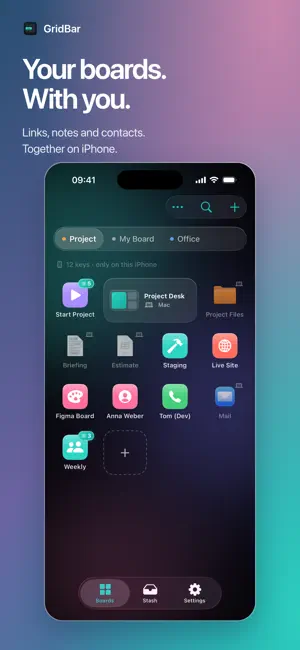
Your boards. Now in your pocket. GridBar on the Mac is a board of keys you summon with a hotkey. This is the same board on your iPhone and iPad — your keys, in the order you built them, one tap away. WHAT A TAP DOES Links open. Calls dial. Mails start with the subject already filled in. Apple Shortcuts run. One tap, one thing, no menu diving. YOUR FIRST BOARD ARRIVES ON ITS OWN Sync is no longer Pro-only. The first board you built on the Mac mirrors here without Pro, so this app opens on your own keys instead of an empty grid. Pro carries every further board, the stash and your workspaces. WHAT STAYS AT THE DESK App launches, file paths, workspaces and keystrokes have no phone equivalent. Those keys keep their place in the grid but sit dimmed with a Mac badge, so you always know what travels and what waits at the desk. THE STASH COMES ALONG Copy something on the Mac and it is here seconds later. Tap text to copy it, tap a link to open it, share an image straight out of the row. Paste on the phone and it is back on the desk when you sit down. BUILD RIGHT HERE Add link, call, mail and Shortcut keys on the phone — name, color, done. They sync back to every Mac you own. ASK THE SYSTEM Every key the phone can fire is something the system understands. Run it from the Shortcuts app, ask Siri, or start it from Spotlight without opening GridBar first. A BOARD PER CONTEXT Work, home, studio. Switch from the toolbar, pull down to fetch the latest from iCloud. SYNC YOU CAN TRUST Boards and stash mirror between Mac, iPhone and iPad through your own iCloud account. Backups before every merge, newest edit wins, and a message in plain language if anything ever cannot sync. WORKS ON ITS OWN No Mac required to start. Build a board here, and it is waiting when you install GridBar on the desk. GRIDBAR PRO One unlock lifts every cap: boards and keys without limit, routines, Shortcut keys, and sync for every board and the stash. It covers Mac and iOS together. PRIVATE BY DESIGN Native Swift. No telemetry, no account, no servers of ours. Your boards live on your devices and in your iCloud. Made by Balane. Feedback: [email protected] Support: [email protected] Terms of Use (EULA): https://www.apple.com/legal/internet-services/itunes/dev/stdeula/
What’s new
Version 1.5 · Updated September 19, 2026
GridBar 1.5 • A fresh glass design for your boards, stash and settings on iPhone and iPad. • Add links and file references with your own names and notes. • Search across boards, including titles, sources and notes. • Info keys keep useful text and reference numbers ready to copy with a tap. • A new Shortcuts action lets you send a link to GridBar for confirmation. • Improved iCloud sync and consistent board ordering across your devices. Feedback or questions? [email protected]
App privacy
The developer, Jonas Hoettler, reported these privacy practices to Apple.
Data Not Collected
The developer does not collect any data from this app.
Alternatives to GridBar: Tile Shelf & Macros
Looking for apps like GridBar: Tile Shelf & Macros? Here are 6 similar apps on the App Store.
-
 Ruyi-Personal life assistant
-
 魔法指令
-
 PC Controller: Remote Mouse
-
 FlickMouse
-
 Shortcut Launcher Widget
-
 KeyBindControl
| App | Rating | Price | Last updated | Compare |
|---|---|---|---|---|
| GridBar: Tile Shelf & Macros | – | Free | September 19, 2026 | |
| Ruyi-Personal life assistant | – | Free | Sep 18, 2026 | Compare |
| 魔法指令 | – | Free | Mar 20, 2026 | Compare |
| PC Controller: Remote Mouse | – | Free | Oct 13, 2026 | Compare |
| FlickMouse | – | Free | Apr 3, 2026 | Compare |
| Shortcut Launcher Widget | – | Free | Oct 5, 2026 | Compare |
| KeyBindControl | – | Free | Jun 21, 2026 | Compare |