

Widgetik: Moon Phase Widget
ANDREI RUSTI Utilities iPhoneiPadiPod touch
Widgetik: Moon Phase Widget is a free Utilities app for iPhone and iPad by ANDREI RUSTI. Rated 4.6/5 from 76 ratings. Requires iOS 18.
- Rating
- 4.6
- 76 ratings
- Price
- Free
- on the App Store
- Size
- 29 MB
- Age 4+
- Updated
- Nov 19
- 2026 · v3.9
Screenshots
Save to Pinterest


About Widgetik: Moon Phase Widget
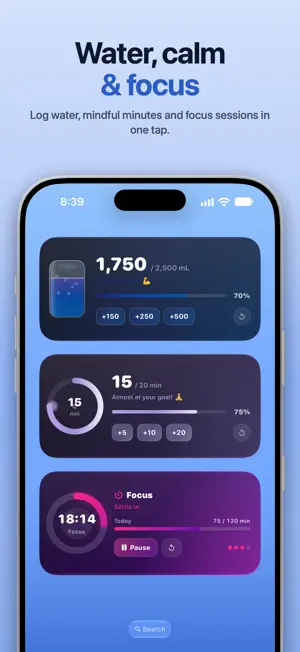
Beautiful, interactive widgets for your Home Screen, Lock Screen and iPad. Log water, check off habits and tasks, start a focus session or feed your aquarium fish right from the widget, without opening the app. Then make every widget your own with colors, gradients and fonts, or let your wallpaper show through. HABITS & WELLNESS • Habit Tracker: tick off daily habits with a tap and keep your streak going. • Habit Streak: your current streak and this week at a glance. • Habit Counter (Premium): count sets, reps or any daily goal, one tap at a time. • Hydration: log water in one tap and follow your daily goal. • Mindfulness: track meditation, breathing and mindful minutes. • Focus Timer (Premium): start, pause and reset focus sessions from the widget, and follow the countdown on the Lock Screen and in the Dynamic Island. • Step Counter: your daily steps from Apple Health. PLAN YOUR DAY • Agenda & Day Planner (Premium): see what's on now, how long until your next event, and the days ahead. • Daily Dashboard: the time, your next countdown and three tiles you choose: steps, water, mindfulness, your monthly goal or a habit. • Interactive Checklist: keep tasks, routines and groceries on your Home Screen and check them off there. • Event Countdown: count down to trips, birthdays, exams and big moments. • Upcoming Birthdays (Premium): upcoming birthdays, ages and days remaining. • Month Calendar and Week Strip: the month or the current week at a glance. • Progress Tracker: see how much of the day, week, month, season or year has passed, also as a Live Activity, or set month and year goals and log them with a tap. CLOCKS • Digital Watch, Analog Watch and Emoji Clock: a clock face in your style. • World Clock: the time in the cities you care about. JUST FOR FUN • Aquarium: a small tank of fish to feed and keep clean. • Cat: a little cat that gets up to mischief all day. Pet it, feed it and play with it. • Zen Garden (Premium): water your plant and watch it grow. • Daily Quote and Daily Inspiration: a fresh quote every day. • Photo: pin a favorite photo or rotate through a collection. • Sun & Daylight: sunrise, sunset, golden hour and day length for your city. • Moon Phase: follow the current lunar phase. • Battery: your battery level at a glance. LOCK SCREEN, CONTROL CENTER & IPAD • Lock Screen widgets for the date, calendar, progress, steps, water, battery, world time and sunrise or sunset. • Control Center controls to log water, check off a habit or start a focus session. • Extra Large widgets on iPad for Agenda, Aquarium, Cat and Daily Dashboard, and for most widgets on iPhone with iOS 27. MAKE IT YOURS Choose solid colors or gradients, themes, fonts and text colors, and see every change in a live preview. With Transparent Backgrounds (Premium), nearly every widget blends into your wallpaper: take two screenshots and Widgetik lines each widget up with the wallpaper behind it. APPLE HEALTH Widgetik uses HealthKit to show your steps and, if you turn it on, to save water you log in Widgetik to Apple Health. WIDGETIK PREMIUM Widgetik is free to download and includes ads. A one-time Premium purchase removes ads and unlocks Agenda, Upcoming Birthdays, Habit Counter, Focus Timer, Zen Garden, extra fonts, custom text colors and Transparent Backgrounds. No subscription. Your habits, health data, calendar and photos stay on your device.
Ratings & reviews
4.6
76 ratings
What’s new
Version 3.9 · Updated November 19, 2026
Widgetik 3.9 counts the days since a date that matters, puts the books you're reading on Daily Dashboard and keeps every tap you make on a widget. What's New: • Days Since: Event Countdown has a new style that counts up from a date in the past, like the day you met or became friends. It shows the number of days, the same time in years, months and days, and the date it started. Add two initials and they appear in circles joined by a heart. • Books on Daily Dashboard: Any book from Reading Tracker can appear on Daily Dashboard, with the pages read, how far along you are, and today's pages or the day you'll finish. Put two books next to your yearly reading goal, for example. • Each Book Keeps Its Look: In Reading Tracker, every book now has its own theme, background and font. Before, changing one book's color changed them all. • Widget Taps Are Kept: Habits ticked off, goals counted up with + and water or mindful minutes added from a widget, Control Center or Siri are no longer undone by the app, even when it's open next to your widgets on iPad or Mac. • Water Across Midnight: If the app stays open past midnight, Hydration starts the new day at 0 and Apple Health gets the right total, never two for the same day. • Safer Edits: Switching a Reading Tracker book between pages and chapters now asks before it clears the book's numbers, so it can't be marked finished and counted toward your reading goal by mistake. A Focus Timer session keeps the length it started with, even if you change the duration while it runs. • Fixes: Progress Tracker's Season no longer crashes with the Hebrew, Ethiopic or Coptic calendar, and its Week option names the day your week starts on. Upcoming Birthdays counts birthdays and ages correctly when your iPhone uses another calendar, and a 29 February birthday falls on the 28th in other years. Thank you for using Widgetik!
App privacy
The developer, ANDREI RUSTI, reported these privacy practices to Apple.
Data Used to Track You
The following data may be used to track you across apps and websites owned by other companies:
- Identifiers: Device ID
Data Linked to You
The following data, which may be collected and linked to your identity, may be used for the following purposes:
- Location: Coarse Location
- Identifiers: Device ID
- Usage Data: Product Interaction
Used for: Third-Party Advertising, Developer’s Advertising or Marketing, Analytics, App Functionality
Data Not Linked to You
The following data, which may be collected but is not linked to your identity, may be used for the following purposes:
- Usage Data: Advertising Data
- Diagnostics: Performance Data, Other Diagnostic Data, Crash Data
Used for: Third-Party Advertising, Developer’s Advertising or Marketing, Analytics, App Functionality
Alternatives to Widgetik: Moon Phase Widget
Looking for apps like Widgetik: Moon Phase Widget? Here are 6 similar apps on the App Store. The highest rated is Device Status⁺ CPU x Monitor z (4.8/5), and all 6 are free to download.
-
 MiniFolder App Folder Launcher
4.7
-
 Jinx - System-Wide Ad Blocker
4.6
-
 Device Status⁺ CPU x Monitor z
4.8
-
 NanoJet: Save & Organize Files
4.7
-
 Battery Life Health: Pro Check
4.4
-
 (Not Boring) Timer
4.8
| App | Rating | Price | Last updated | Compare |
|---|---|---|---|---|
| Widgetik: Moon Phase Widget | 4.6 / 5 (76 ratings) | Free | November 19, 2026 | |
| MiniFolder App Folder Launcher | 4.7 / 5 (127) | Free | Nov 19, 2026 | Compare |
| Jinx - System-Wide Ad Blocker | 4.6 / 5 (196) | Free | Nov 9, 2026 | Compare |
| Device Status⁺ CPU x Monitor z | 4.8 / 5 (207) | Free | Nov 11, 2026 | Compare |
| NanoJet: Save & Organize Files | 4.7 / 5 (156) | Free | Nov 20, 2026 | Compare |
| Battery Life Health: Pro Check | 4.4 / 5 (13) | Free | Nov 2, 2026 | Compare |
| (Not Boring) Timer | 4.8 / 5 (2,898) | Free | Oct 23, 2026 | Compare |