

TimeCal: Tasks, Schedule & Log
筱彤 余 Productivity iPhoneiPadiPod touch
TimeCal: Tasks, Schedule & Log is a free Productivity app for iPhone and iPad by 筱彤 余. Rated 5.0/5 from 1 ratings. Requires iOS 14.0. Updated May 15, 2026.
- Rating
- 5.0
- 1 ratings
- Price
- Free
- on the App Store
- Size
- 56 MB
- Age 4+
- Updated
- May 15
- 2026 · v1.0.4
Screenshots


About TimeCal: Tasks, Schedule & Log
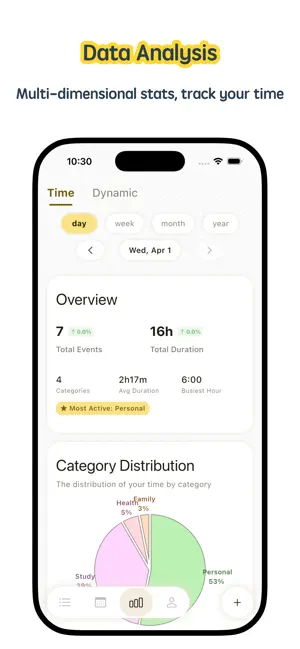
TimeCal combines task planning, time tracking, and habit building in one focused workspace. Fewer switches, less noise, and a clearer rhythm for your day. How you can use TimeCal • Clear your mental load, then prioritize what matters Capture everything on your mind and quickly rank tasks by priority, so you can act on what truly matters first. • Run your day with clarity From morning to night, see what to move forward and what you already finished—stay busy without feeling scattered. • Adjust plans as your day changes When priorities shift, schedules move, or tasks need to be rescheduled, you can adapt smoothly without losing momentum. • Let data reveal where your time goes Use multi-dimensional stats and trend views to find your peak hours, spot time drains, and review your routines with evidence. • Build habits with visible progress Track consistency on a monthly calendar and turn “sometimes” into “consistently” with small, measurable wins. • Enter focus mode in one tap Start a timer and get into the zone quickly with a clean interface that minimizes distractions. Why TimeCal works for the long run • Clean design and intuitive interactions • A complete loop for tasks, planning, focus, habits, and insights • Cross-device collaboration and better schedule continuity • More than logging—continuous optimization of how you spend time Whether you are a student, a professional, or a freelancer, TimeCal is built to be a reliable long-term companion for your time. Auto-Renewable Subscription Payment will be charged to your Apple ID account at confirmation of purchase. Subscriptions renew automatically unless auto-renew is turned off at least 24 hours before the end of the current period. Your account will be charged for renewal within 24 hours prior to the end of the current period. You can manage or turn off auto-renew in your Apple ID account settings after purchase. If you experience a payment issue, please email your Apple ID and proof of purchase to [email protected]. Privacy Policy: https://uxsyr9xrl46.feishu.cn/wiki/RTthwgG6niQKmxkgVIacpl2snrZ Terms of Service: https://uxsyr9xrl46.feishu.cn/wiki/QHRjwJMMOiepgTk47JEcU5MJnPh Contact us: [email protected]
What’s new
Version 1.0.4 · Updated May 15, 2026
What's New: - Added support for setting a startup tab. - Fixed some known issues. Recent Updates: - TimeCal is a simple and easy-to-use time management tool.
App privacy
The developer, 筱彤 余, reported these privacy practices to Apple.
Data Linked to You
The following data, which may be collected and linked to your identity, may be used for the following purposes:
- Purchases: Purchase History
Used for: Analytics, App Functionality
Alternatives to TimeCal: Tasks, Schedule & Log
Looking for apps like TimeCal: Tasks, Schedule & Log? Here are 6 similar apps on the App Store. The highest rated is Loopi - Habits & Little Wins (5.0/5), and all 6 are free to download.
-
 Infidreams
-
 Photo Eraser - Remove bg
-
 Cat Wallpapers - 4K
4.7
-
 Felix Universal App
-
 鲁班工业品
-
 Loopi - Habits & Little Wins
5.0
| App | Rating | Price | Last updated | Compare |
|---|---|---|---|---|
| TimeCal: Tasks, Schedule & Log | 5.0 / 5 (1 rating) | Free | May 15, 2026 | |
| Infidreams | – | Free | Sep 30, 2026 | Compare |
| Photo Eraser - Remove bg | – | Free | Nov 10, 2024 | Compare |
| Cat Wallpapers - 4K | 4.7 / 5 (14) | Free | Dec 24, 2025 | Compare |
| Felix Universal App | – | Free | Oct 3, 2025 | Compare |
| 鲁班工业品 | – | Free | May 27, 2024 | Compare |
| Loopi - Habits & Little Wins | 5.0 / 5 (2) | Free | Oct 10, 2026 | Compare |