

VoiceScroll - Teleprompter
Sangkwun Kang Utilities iPhoneiPadiPod touchMac
VoiceScroll - Teleprompter is a free Utilities app for iPhone and iPad by Sangkwun Kang. Rated 3.3/5 from 12 ratings. Requires iOS 17.0.
- Rating
- 3.3
- 12 ratings
- Price
- Free
- on the App Store
- Size
- 13 MB
- Age 4+
- Updated
- Oct 22
- 2026 · v2.0.15
Screenshots

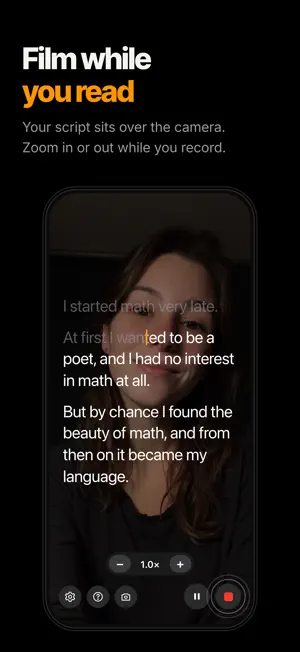
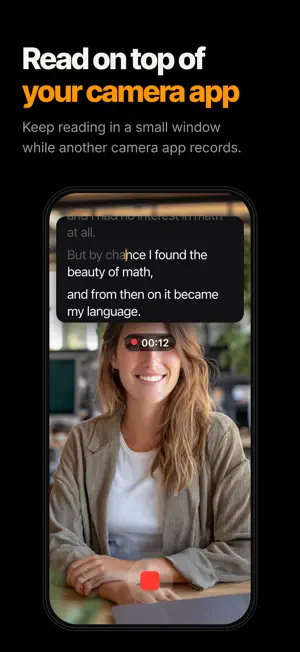

About VoiceScroll - Teleprompter
VoiceScroll is a voice-activated teleprompter that scrolls your script as you speak. Paste your script, tap Start, and speak. Speed up, slow down, or pause, and the script stays with you. THREE WAYS TO SCROLL • Voice — the script keeps pace as you speak. Choose Fast response or High accuracy (iOS 26 or later, selected languages). • Auto-scroll — a set speed, no speaking needed. • Remote & Buttons — start, pause, and step one word back or forward with a Bluetooth keyboard or a remote that sends key presses. On iPad, a mouse wheel steps through words too. Not available while floating over other apps. THREE PROMPTER MODES • Just read the script — for a separate camera or a live talk. Mirror horizontally or vertically to read straight off teleprompter glass. • Record in this app — your script sits over the camera. Film in portrait or landscape (16:9). Adjust zoom and switch between the front and back cameras mid-recording. Orientation stays locked while you record, so the video never flips. • Float over other apps — keep reading in a small window while another camera app records. AFTER YOU RECORD IN THE APP • Captions — your script becomes captions timed to your voice, in the style you pick. Videos recorded with Auto-scroll need iOS 26 or later for captions. • Silence — listen to each pause and cut the ones you don't want. • Save — the edited video goes to Photos. • Unsaved videos — close without saving and the video stays in the app (7 days, up to 3 per script, by default). EASY TO READ • The word you're on fills in as you read; what you've read turns gray. • Reading box — drag it to your lens height and set its width. • Change text size, line height, letter spacing, and alignment even while reading. Pinch to resize text (14–80 pt, up to 160 pt on iPad). • Tap any word to jump there. • Script Directions — notes in square brackets, like [smiling], are skipped by voice tracking and shown briefly when you reach them. • My Scripts — search by title or text and pick up where you stopped. MADE FOR • Video and short-form creators • Presentations, lectures, and sermons • Toasts, event hosting, and recorded job interviews • Narration and read-aloud practice 34 LANGUAGES Recognizes 34 languages, including English, Korean, Japanese, Chinese (Simplified, Traditional, Cantonese), German, French, Spanish, and Portuguese. Arabic and Hebrew display right to left. The language is detected from your script. PRIVATE BY DEFAULT By default, speech recognition runs on your device, and your voice and the text of your scripts stay on it. If you turn on Online recognition, languages without an on-device model are recognized by Apple's servers. No ads. No account. VoiceScroll does not collect your scripts. FREE AND PRO Every feature is free for scripts up to 300 characters. VoiceScroll Pro removes the length limit. Choose a yearly or monthly subscription, or a one-time Lifetime purchase. A sample script is included, so you can try it the moment you install. For iPhone and iPad. Terms of Use (EULA): https://www.apple.com/legal/internet-services/itunes/dev/stdeula/
Ratings & reviews
3.3
12 ratings
What’s new
Version 2.0.15 · Updated October 22, 2026
• Fixes: on iOS 17 and 18, the app could freeze when you opened a page in Settings.
App privacy
The developer, Sangkwun Kang, reported these privacy practices to Apple.
Data Linked to You
The following data, which may be collected and linked to your identity, may be used for the following purposes:
- Purchases: Purchase History
- Location: Coarse Location
- Identifiers: Device ID
- Usage Data: Product Interaction
Used for: Analytics
Data Not Linked to You
The following data, which may be collected but is not linked to your identity, may be used for the following purposes:
- Diagnostics: Crash Data, Performance Data, Other Diagnostic Data
Used for: App Functionality
Alternatives to VoiceScroll - Teleprompter
Looking for apps like VoiceScroll - Teleprompter? Here are 6 similar apps on the App Store. The highest rated is Smartphone Teleprompter (5.0/5), and all 6 are free to download.
-
 VoicePrompter AI Teleprompter
4.0
VoicePrompter AI Teleprompter
4.0
-
 ScrollVox - AI Teleprompter
4.9
ScrollVox - AI Teleprompter
4.9
-
 Voice Teleprompter Lite
2.8
Voice Teleprompter Lite
2.8
-
 Beast Floating Teleprompter
3.7
Beast Floating Teleprompter
3.7
-
 Smartphone Teleprompter
5.0
Smartphone Teleprompter
5.0
-
 TeleScroll Voice
2.6
TeleScroll Voice
2.6
| App | Rating | Price | Last updated | Compare |
|---|---|---|---|---|
| VoiceScroll - Teleprompter | 3.3 / 5 (12 ratings) | Free | October 22, 2026 | |
| VoicePrompter AI Teleprompter | 4.0 / 5 (2) | Free | Sep 5, 2026 | Compare |
| ScrollVox - AI Teleprompter | 4.9 / 5 (34) | Free | Sep 10, 2026 | Compare |
| Voice Teleprompter Lite | 2.8 / 5 (37) | Free | Oct 22, 2026 | Compare |
| Beast Floating Teleprompter | 3.7 / 5 (6) | Free | Oct 14, 2026 | Compare |
| Smartphone Teleprompter | 5.0 / 5 (1) | Free | May 27, 2026 | Compare |
| TeleScroll Voice | 2.6 / 5 (8) | Free | Mar 16, 2025 | Compare |