

Kromameter
Mounif Fatayri Graphics & Design iPadMac
Kromameter is a paid Graphics & Design app for iPad and Mac by Mounif Fatayri. Requires iOS 17.0. Updated August 8, 2026.
- Price
- 2.99 USD
- on the App Store
- Size
- 4 MB
- Age 4+
- Updated
- Aug 8
- 2026 · v1.6
Screenshots



About Kromameter
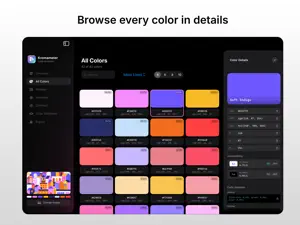
Kromameter turns any image into powerful color intelligence. 100% on-device, no data collected. Built for designers, developers, and anyone who cares about color, it analyzes images and transforms them into detailed palettes, harmonies, and accessibility insights you can actually use. • Extract Colors Instantly Drop an image into Kromameter and it analyzes up to 50,000 pixels to build a rich, accurate palette. The app identifies the colors that truly define your image and organizes them for easy exploration. Supports PNG, JPEG, HEIC, TIFF, WebP, PSD, PDF, and GIF. • Explore Your Palette The Overview dashboard reveals the color story of your image. See dominant colors, coverage percentages, and a full breakdown of the hues detected in the analysis. The All Colors view lets you explore every clustered color individually and copy any color instantly. • Generate Beautiful Palettes Kromameter automatically generates small, medium, and large palettes from your image. It also creates harmony based palettes using complementary, triadic, and analogous relationships. Need full control? The Custom Palette Builder allows you to pick any combination of extracted colors and copy them together in one tap. • Understand Color Harmony The Harmony view places your colors on an interactive color wheel and generates balanced color sets based on color theory. Explore complementary, analogous, triadic, tetradic, split complementary, and more. A visual overview grid lets you compare every harmony at a glance. • Check Accessibility Contrast The built in Contrast Checker measures WCAG contrast ratios between any two colors from your palette. This makes it easy to design interfaces that remain readable and accessible. • Simulate Color Blindness Preview how your palette appears across eight different vision types including Deuteranopia, Protanopia, Tritanopia, Achromatopsia, and more. Compare original and simulated colors side by side or review all vision types in a single overview to catch accessibility issues early. • Export Anywhere Bring your palette directly into your workflow with eleven export formats including SwiftUI, CSS, JSON, XML, and design token formats. Export formats include: SwiftUI and UIKit or AppKit CSS Variables and SCSS JSON and HEX lists XML Style Dictionary Figma Tokens and Tokens Studio Swatch list (TXT) Copy colors instantly or save files directly on Mac. On iPad, share your exports through the system share sheet to Files, AirDrop, or any compatible app. • Built for Mac and iPad Kromameter is a fully native SwiftUI app designed specifically for macOS and iPadOS. It feels fast, intuitive, and perfectly at home on both platforms.
What’s new
Version 1.6 · Updated August 8, 2026
Thank you for using Kromameter. In this version we fixed a minor issue and improved the app experience.
App privacy
The developer, Mounif Fatayri, reported these privacy practices to Apple.
Data Not Collected
The developer does not collect any data from this app.
Alternatives to Kromameter
Looking for apps like Kromameter? Here are 6 similar apps on the App Store. The highest rated is Real Paint mixing tools PRO (4.9/5), and 4 of the 6 are free to download.
-
 Real Paint mixing tools
4.2
Real Paint mixing tools
4.2
-
 Real Paint mixing tools PRO
4.9
Real Paint mixing tools PRO
4.9
-
 Mural Maker by Da Vinci Eye
3.8
Mural Maker by Da Vinci Eye
3.8
-
 ToonSquid
4.6
ToonSquid
4.6
-
 Adobe Capture: Illustrator, Ps
4.8
Adobe Capture: Illustrator, Ps
4.8
-
 Infinite Painter
4.1
Infinite Painter
4.1
| App | Rating | Price | Last updated | Compare |
|---|---|---|---|---|
| Kromameter | – | 2.99 USD | August 8, 2026 | |
| Real Paint mixing tools | 4.2 / 5 (19) | 12.99 USD | Aug 31, 2026 | Compare |
| Real Paint mixing tools PRO | 4.9 / 5 (30) | Free | Aug 31, 2026 | Compare |
| Mural Maker by Da Vinci Eye | 3.8 / 5 (361) | Free | Oct 8, 2026 | Compare |
| ToonSquid | 4.6 / 5 (1,336) | 9.99 USD | Oct 30, 2026 | Compare |
| Adobe Capture: Illustrator, Ps | 4.8 / 5 (24,318) | Free | Nov 28, 2023 | Compare |
| Infinite Painter | 4.1 / 5 (10,193) | Free | Oct 22, 2026 | Compare |
Compare Kromameter with the top alternatives: ratings, updates, ASO score and keyword gaps →