

Vipe: All-in-One Video Player
Jun Utilities iPhoneiPadiPod touch
Vipe: All-in-One Video Player is a free Utilities app for iPhone and iPad by Jun. Rated 4.1/5 from 16 ratings. Requires iOS 15.0. Updated September 27, 2026.
- Rating
- 4.1
- 16 ratings
- Price
- Free
- on the App Store
- Size
- 138 MB
- Age 4+
- Updated
- Sep 27
- 2026 · v2.0.4
Screenshots


About Vipe: All-in-One Video Player
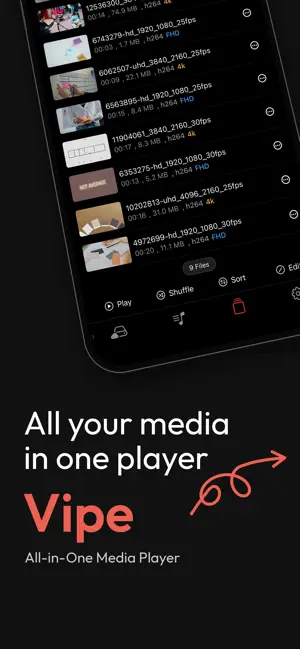
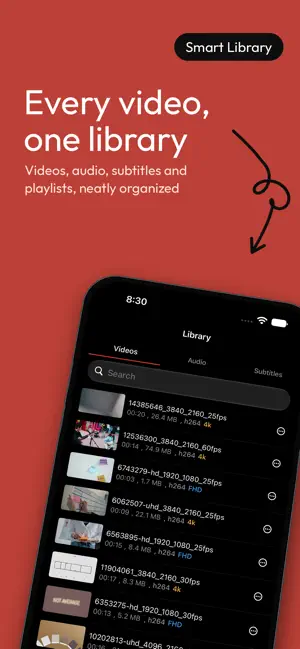
Vipe - All-in-One Media Player Vipe is an all-in-one media app that lets you play and manage videos, audio, and subtitles from network servers, cloud storage, and local files in one place. Connect to various network servers such as SMB, FTP, Plex, NFS, and SFTP to browse and play your video and audio files directly. In addition to network sources, you can import media files from the Files app, Dropbox, and Wi-Fi file transfer. iTunes File Sharing is also supported for convenient file management with your computer. All imported files can be managed within Vipe. Organize your content with separate video and audio libraries, and use playlists to arrange and enjoy your media in your preferred order. Vipe also includes a dedicated subtitle library that allows you to manage all your subtitle files in one place, providing a more convenient viewing experience with extensive subtitle support. Supports major subtitle formats including SRT, WebVTT, ASS/SSA, and SMI, as well as embedded subtitle tracks. You can freely switch subtitle tracks during playback. Customize subtitles with detailed style settings such as font size, color, outline, and background. Subtitle timing can also be adjusted with time offsets to perfectly synchronize subtitles with your video. With preferred language settings, Vipe can automatically select your preferred subtitle track. Automatically generated subtitles and automatically translated subtitle tracks are also clearly distinguished for easier management. The resume playback feature automatically saves your playback position, allowing you to continue watching videos exactly where you left off. The built-in player provides essential features for everyday viewing. Player usability has been improved with easier seek bar navigation, brightness adjustment, and more intuitive controls. Background playback and Picture-in-Picture (PiP) are supported, allowing you to continue enjoying your media while using other apps. Video, audio, playlist, and subtitle libraries display the total number of items, making content management easier. Vipe supports a wide range of media formats and codecs, including H.264/AVC, H.265/HEVC, MPEG-4, AV1, AAC, MP3, FLAC, ALAC, Opus, Vorbis, and WAV. You can also extract MP3 audio from locally stored video files. Actual playback availability may vary depending on the file format, container, device environment, and system decoder support. Key Features • SMB, FTP, Plex, NFS, and SFTP network connections • Import media from Files app, Dropbox, and Wi-Fi transfer • iTunes File Sharing support • Video and audio library management • Dedicated subtitle library management • Support for SRT, WebVTT, ASS/SSA, SMI, and embedded subtitles • Subtitle customization and synchronization adjustment • Automatic subtitle selection based on preferred language • Clear distinction between generated and translated subtitle tracks • Resume playback support • Playlist support • Background playback and Picture-in-Picture support • Improved player controls and UI • Total item count display for each library • Wide range of video/audio formats and codecs • MP3 audio extraction from local video files • Continuous bug fixes and stability improvements
Ratings & reviews
4.1
16 ratings
What’s new
Version 2.0.4 · Updated September 27, 2026
iOS 27 support and bug fixes
App privacy
The developer, Jun, reported these privacy practices to Apple.
Data Used to Track You
The following data may be used to track you across apps and websites owned by other companies:
- Location: Coarse Location
- Identifiers: Device ID
- Usage Data: Product Interaction, Advertising Data
- Diagnostics: Crash Data, Performance Data
Data Linked to You
The following data, which may be collected and linked to your identity, may be used for the following purposes:
- Location: Coarse Location
- Identifiers: Device ID
- Usage Data: Product Interaction, Advertising Data
- Diagnostics: Performance Data
Used for: Third-Party Advertising
Data Not Linked to You
The following data, which may be collected but is not linked to your identity, may be used for the following purposes:
- Diagnostics: Crash Data
Used for: Third-Party Advertising
Alternatives to Vipe: All-in-One Video Player
Looking for apps like Vipe: All-in-One Video Player? Here are 6 similar apps on the App Store. The highest rated is NanoJet: Save & Organize Files (4.7/5), and all 6 are free to download.
-
 Nex File: File Manager
3.8
Nex File: File Manager
3.8
-
 Noise Reducer Audio Enhancer .
2.4
Noise Reducer Audio Enhancer .
2.4
-
 UnblockPiP: Float Video Player
4.0
UnblockPiP: Float Video Player
4.0
-
 AudioWeaver: Audio Cleaner
4.3
AudioWeaver: Audio Cleaner
4.3
-
 Flow: DNS Manager
4.5
Flow: DNS Manager
4.5
-
 NanoJet: Save & Organize Files
4.7
NanoJet: Save & Organize Files
4.7
| App | Rating | Price | Last updated | Compare |
|---|---|---|---|---|
| Vipe: All-in-One Video Player | 4.1 / 5 (16 ratings) | Free | September 27, 2026 | |
| Nex File: File Manager | 3.8 / 5 (13) | Free | Oct 21, 2026 | Compare |
| Noise Reducer Audio Enhancer . | 2.4 / 5 (5) | Free | Apr 10, 2026 | Compare |
| UnblockPiP: Float Video Player | 4.0 / 5 (4) | Free | Sep 9, 2026 | Compare |
| AudioWeaver: Audio Cleaner | 4.3 / 5 (6) | Free | Oct 12, 2026 | Compare |
| Flow: DNS Manager | 4.5 / 5 (15) | Free | Sep 26, 2026 | Compare |
| NanoJet: Save & Organize Files | 4.7 / 5 (150) | Free | Oct 24, 2026 | Compare |