

PayTask: Bills & To-Do Tracker
Emre Keles Finance iPhoneiPadiPod touch
PayTask: Bills & To-Do Tracker is a free Finance app for iPhone and iPad by Emre Keles. Requires iOS 17. Updated September 25, 2026.
- Price
- Free
- on the App Store
- Size
- 12 MB
- Age 4+
- Updated
- Sep 25
- 2026 · v1.2
Screenshots


About PayTask: Bills & To-Do Tracker
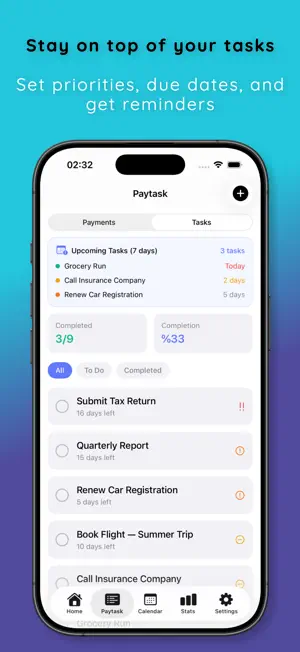
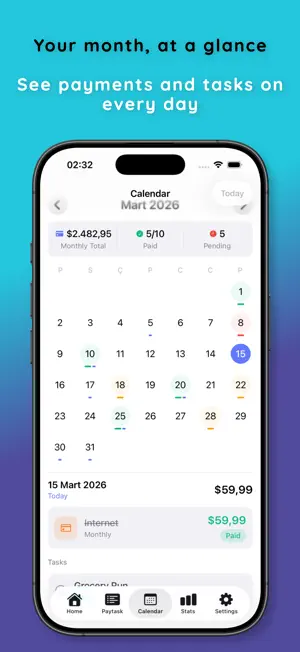
Never miss a bill or a deadline. PayTask keeps your recurring payments and your to-do list in one place, reminds you before every due date, and works completely offline — no account needed. BILLS & PAYMENTS Rent, subscriptions, utilities, loan installments — add any recurring bill once. Add your rent, subscriptions, utilities, loan installments and any recurring payment. PayTask reminds you before the due date and tracks what's paid and what's pending each period. • Monthly, weekly, yearly or one-time payments • Pick the exact day (or weekday) each payment repeats • Started paying months ago? Set the first payment date in the past and record the earlier periods with the amounts you actually paid • Payment history per period — see, adjust or undo any recorded payment • Installment plans: see every installment before you save, edit individual amounts, track progress • Multi-currency — each payment keeps its own currency • Reminders: same day, 1, 2, 3 days or 1 week before, at the time you choose • Mark as paid straight from the notification TASKS Stay on top of your to-do list. Add tasks with due dates and priority levels, get reminded before deadlines and check off what you've completed. • Due dates (optional) and four priority levels • Reminder notifications • Tags and notes • Completion rate tracking CALENDAR See all your payments and tasks in a clean monthly calendar. Know exactly what's due on any given day. STATS What you paid this month, per-currency totals, task completion rate and your most used tags. PRIVACY FIRST Your data never leaves your device. No account required. No cloud sync. Everything is stored locally using Apple's secure on-device storage. • 100% offline • No account or sign-in required • No tracking or analytics • Face ID / Touch ID app lock • Free JSON backup & restore via the Files app SUBSCRIPTION PayTask requires a subscription. Try everything free for 3 days with the yearly plan, or choose monthly or a one-time lifetime purchase. Cancel anytime in your Apple ID settings. • Unlimited payments and tasks • Monthly spending chart — what you actually paid over the last 6 months • Repeating tasks — weekly, monthly or yearly • Free trial converts to a paid subscription unless cancelled before it ends Payments & Tasks, Sorted. Terms of Use: https://www.apple.com/legal/internet-services/itunes/dev/stdeula/
What’s new
Version 1.2 · Updated September 25, 2026
• Redeem offer codes right in the app (Settings → Redeem Code) • Subscription status now updates instantly • Bug fixes and improvements
App privacy
The developer, Emre Keles, reported these privacy practices to Apple.
Data Not Collected
The developer does not collect any data from this app.
Alternatives to PayTask: Bills & To-Do Tracker
Looking for apps like PayTask: Bills & To-Do Tracker? Here are 6 similar apps on the App Store. The highest rated is BillStack (5.0/5), and all 6 are free to download.
-
 Paylendar: Payment Planner
-
 BillStack
5.0
BillStack
5.0
-
 Plumb Wallet: Budget & Expense
-
 Bill Organizer: Pocketbill
-
 Next Due: Bill Planner
-
 Currency Convert Kit AI
5.0
Currency Convert Kit AI
5.0
| App | Rating | Price | Last updated | Compare |
|---|---|---|---|---|
| PayTask: Bills & To-Do Tracker | – | Free | September 25, 2026 | |
| Paylendar: Payment Planner | – | Free | Oct 21, 2026 | Compare |
| BillStack | 5.0 / 5 (1) | Free | Sep 17, 2026 | Compare |
| Plumb Wallet: Budget & Expense | – | Free | Oct 24, 2026 | Compare |
| Bill Organizer: Pocketbill | – | Free | Sep 21, 2026 | Compare |
| Next Due: Bill Planner | – | Free | Oct 24, 2026 | Compare |
| Currency Convert Kit AI | 5.0 / 5 (4) | Free | Jun 1, 2026 | Compare |