

Live Subtitles – ScriptCreek
Incrk Technologies Inc. Productivity iPhoneiPadiPod touch
Live Subtitles – ScriptCreek is a free Productivity app for iPhone and iPad by Incrk Technologies Inc. Requires iOS 18.6. Updated September 17, 2026.
- Price
- Free
- on the App Store
- Size
- 17 MB
- Age 4+
- Updated
- Sep 17
- 2026 · v2.0
Screenshots

About Live Subtitles – ScriptCreek
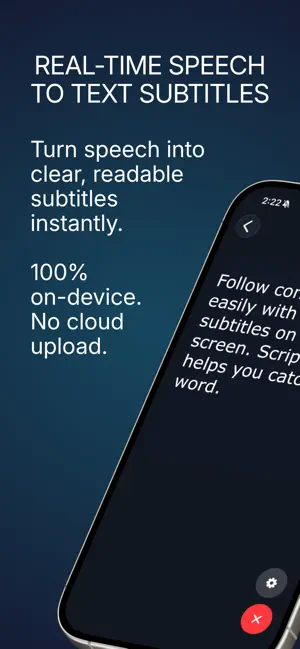
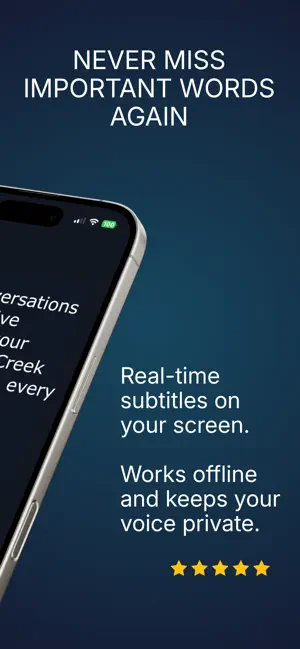
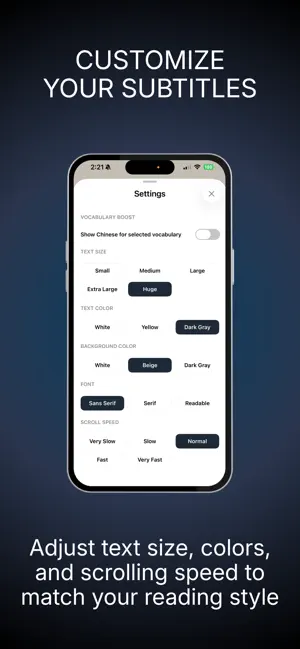
Private live subtitles powered by on-device speech recognition. Follow conversations with fast, private live subtitles that stay entirely on your device. ScriptCreek converts speech into clear, readable live subtitles in real time using Apple's on-device speech recognition. Audio is processed locally on your device, so your conversations are never uploaded to the cloud. Whether you're in a business meeting, on a phone or video call, attending a lecture, or having everyday conversations with family and friends, ScriptCreek helps you follow spoken conversations with instant, automatic subtitles that are easy to read. FEATURES • Instant live subtitles for spoken conversations • Automatic subtitles generated in real time • Private on-device speech recognition with no cloud audio upload • Automatic punctuation and capitalization for easier reading • Adjustable text size, colors, background, and subtitle position • Clean, distraction-free full-screen live subtitle mode • Local subtitle history stored privately on your device • Fast, lightweight, and easy to use PERFECT FOR • Business meetings and team discussions • Phone and video calls • Classes, lectures, and seminars • Interviews and networking • Everyday conversations with family and friends • Language learning and listening practice • Hearing support and accessibility • Live presentations and events WHY SCRIPTCREEK • Fully on-device processing for greater privacy • No cloud audio upload • Fast real-time subtitle generation • Designed for clear, readable live subtitles • Works anywhere Apple's speech recognition is supported PRIVACY FIRST Your privacy comes first. Speech is processed entirely on your device using Apple's on-device speech recognition. Audio is never uploaded to the cloud. If you choose to save subtitle history, it remains stored locally on your own device. DISCLAIMER Subtitle accuracy may vary depending on background noise, accents, speaking speed, microphone quality, and the capabilities of Apple's speech recognition technology. Generated subtitles are intended to help you understand spoken conversations and should not be considered a complete or perfectly accurate transcript. Privacy Policy: https://scriptcreek.incrk.com/privacy Terms of Use: https://scriptcreek.incrk.com/terms
What’s new
Version 2.0 · Updated September 17, 2026
Updated the UI for a cleaner, more polished experience, with bug fixes and usability improvements.
App privacy
The developer, Incrk Technologies Inc., reported these privacy practices to Apple.
Data Linked to You
The following data, which may be collected and linked to your identity, may be used for the following purposes:
- Location: Coarse Location
- Identifiers: Device ID
- Usage Data: Product Interaction, Advertising Data
Used for: Third-Party Advertising
Alternatives to Live Subtitles – ScriptCreek
Looking for apps like Live Subtitles – ScriptCreek? Here are 6 similar apps on the App Store. The highest rated is Voice Translator: Talk & Go (5.0/5), and all 6 are free to download.
-
 Live Subtitles: AI Translator
4.9
Live Subtitles: AI Translator
4.9
-
 Voice Translator: Talk & Go
5.0
Voice Translator: Talk & Go
5.0
-
 Transly - Live Translator
4.7
Transly - Live Translator
4.7
-
 TransBud-Live AI Translator
5.0
TransBud-Live AI Translator
5.0
-
 Echo Focus
3.0
Echo Focus
3.0
-
 Voxter Live Translation
| App | Rating | Price | Last updated | Compare |
|---|---|---|---|---|
| Live Subtitles – ScriptCreek | – | Free | September 17, 2026 | |
| Live Subtitles: AI Translator | 4.9 / 5 (9) | Free | Oct 23, 2026 | Compare |
| Voice Translator: Talk & Go | 5.0 / 5 (3) | Free | Jul 17, 2026 | Compare |
| Transly - Live Translator | 4.7 / 5 (129) | Free | Oct 13, 2026 | Compare |
| TransBud-Live AI Translator | 5.0 / 5 (3) | Free | Oct 2, 2026 | Compare |
| Echo Focus | 3.0 / 5 (2) | Free | Aug 27, 2026 | Compare |
| Voxter Live Translation | – | Free | Apr 24, 2026 | Compare |