

Jeera: Workout Tracker
Pratik Bodakhe Health & Fitness iPhoneiPadiPod touchApple Watch
Jeera: Workout Tracker is a free Health & Fitness app for iPhone and iPad by Pratik Bodakhe. Requires iOS 26.2. Updated September 24, 2026.
- Price
- Free
- on the App Store
- Size
- 307 MB
- Age 4+
- Updated
- Sep 24
- 2026 · v1.1.0
Screenshots
About Jeera: Workout Tracker
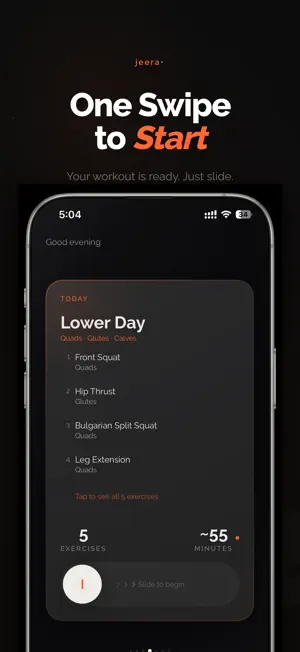
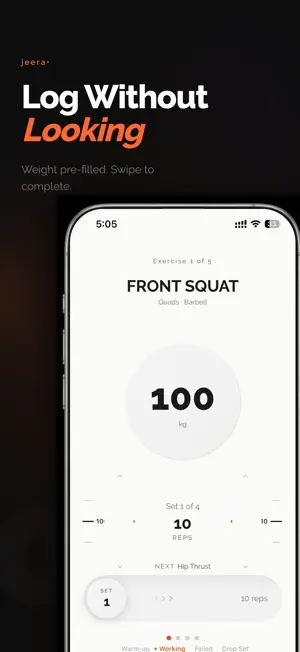
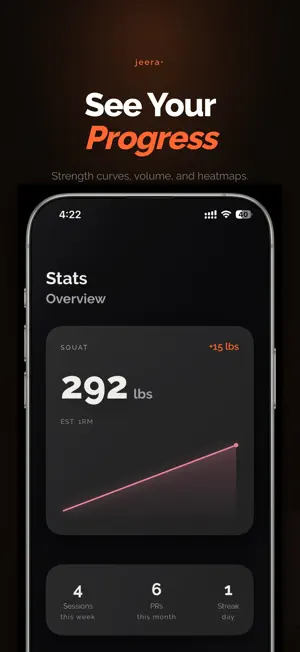
Stop tapping. Start training. Every workout tracker forces you out of your workout and into your phone. Logging a set takes 4-8 taps. Timers need manual starts. Finding last session's weight means scrolling through history. jeera cuts 83% of phone touches with one gesture: swipe right to log a set. That's it. ONE GESTURE, ONE SET Swipe the set card right to complete. Weight and reps are pre-filled from your last session. No typing, no tapping, no menus. Haptics confirm every action — you can log without looking at the screen. EVERYTHING IS AUTOMATIC Rest timer starts the moment you finish a set. Weights pre-fill with smart progression — if you hit all reps last time, jeera suggests going up. If you missed, it keeps you at the same weight. YOUR WORKOUT, YOUR JOURNAL Attach photos and videos to any workout. Build a visual timeline of your progress. Every image stays on your device — zero uploads, zero cloud storage, complete privacy. 16 SCIENCE-BACKED PROGRAMS From beginner full body to advanced push/pull/legs. Programs match your goals, equipment, and experience level. Or build your own with the program builder. ZERO-CHROME WORKOUT MODE Full-screen exercise cards. No navigation bars, no tabs, no clutter. Rest timer lives on your Lock Screen and Dynamic Island. Your phone stays in your pocket. BUILT FOR YOUR BODY - Strength curves and volume tracking per muscle group - Personal records celebrated with haptic fanfare - Weekly frequency heatmaps - Body measurements and progress photos with side-by-side compare APPLE WATCH + LIVE ACTIVITIES Rest timer on your wrist. Live Activities on Lock Screen. Start and control workouts from either device. PRIVACY FIRST All data lives on your device. Workouts sync to Apple Health. Photos stay in your library. Nothing leaves your phone. jeera means cumin in Hindi — a small seed that transforms everything it touches. Minimal footprint, maximum impact. Terms of Use: https://www.apple.com/legal/internet-services/itunes/dev/stdeula/
What’s new
Version 1.1.0 · Updated September 24, 2026
Six languages, actually translated. Hundreds of screens were still showing English on German, Spanish, French, Japanese, Korean and Simplified Chinese devices. Now they are not. • VoiceOver reaches the whole app. Every icon-only button is named, and controls that used to need a drag — the weight and reps dials, onboarding, the splash — now answer to a tap. • Steppers on the weight and reps dials. The chevrons were decoration; they are buttons now, with proper 44pt targets. • Reduce Motion is respected across every looping animation. • Your streak counts scheduled sessions, not calendar days, so rest days no longer reset it. • Stats, the widget and Apple Health agree with each other after you edit a past workout. • The Move ring gets the calories a session actually burned.
App privacy
The developer, Pratik Bodakhe, reported these privacy practices to Apple.
Data Not Collected
The developer does not collect any data from this app.
Alternatives to Jeera: Workout Tracker
Looking for apps like Jeera: Workout Tracker? Here are 6 similar apps on the App Store. The highest rated is Yoked: Workout Tracker Gym Log (5.0/5), and all 6 are free to download.
-
 StreakReps: Gym Workout Log
-
 Yoked: Workout Tracker Gym Log
5.0
Yoked: Workout Tracker Gym Log
5.0
-
 Evident: Gym Workout Planner
5.0
Evident: Gym Workout Planner
5.0
-
 attr/act™ Workout Log App
-
 Gymbell - workout tracker
5.0
Gymbell - workout tracker
5.0
-
 Straight Set: Workout Tracker
1.0
Straight Set: Workout Tracker
1.0
| App | Rating | Price | Last updated | Compare |
|---|---|---|---|---|
| Jeera: Workout Tracker | – | Free | September 24, 2026 | |
| StreakReps: Gym Workout Log | – | Free | Oct 3, 2026 | Compare |
| Yoked: Workout Tracker Gym Log | 5.0 / 5 (2) | Free | Jan 21, 2026 | Compare |
| Evident: Gym Workout Planner | 5.0 / 5 (6) | Free | Oct 7, 2026 | Compare |
| attr/act™ Workout Log App | – | Free | Oct 9, 2026 | Compare |
| Gymbell - workout tracker | 5.0 / 5 (4) | Free | Oct 3, 2026 | Compare |
| Straight Set: Workout Tracker | 1.0 / 5 (1) | Free | Jul 12, 2026 | Compare |