

EVStudio
CHANG JUI SHU Utilities iPhoneiPadiPod touch
EVStudio is a free Utilities app for iPhone and iPad by CHANG JUI SHU. Requires iOS 17.0. Updated October 14, 2026.
- Price
- Free
- on the App Store
- Size
- 37 MB
- Age 4+
- Updated
- Oct 14
- 2026 · v2.6.2
Screenshots


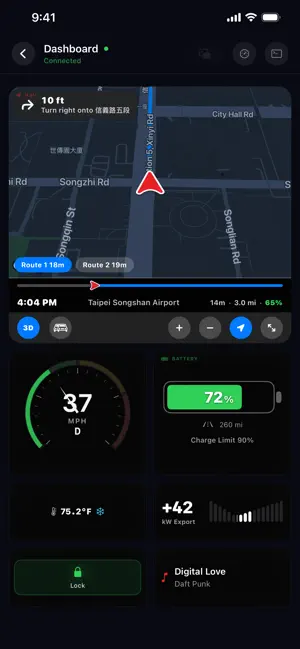
About EVStudio
Turn your iPhone into a second display for your car. The live dashboard talks to the vehicle directly over Bluetooth, so it keeps working in an underground garage or anywhere with no signal. Live traffic, cloud charging records, subscription validation and iCloud sync need a network connection. [Bluetooth Live Dashboard] Free - Connects straight to the car over Bluetooth and keeps reading supported live data with no network - Speed, gear, battery and range, all four tire pressures, door and window status - Drag and drop your own dashboard layout; portrait and landscape both supported - Lock Screen and Dynamic Island updates (Live Activity; some cloud updates need a network) - Floating window (Picture in Picture): tap the Floating Window button on the dashboard to keep speed, gear, regen and speed-camera alerts visible over other apps such as Google Maps or Apple Maps. It opens only when you tap it. - Supported models: Model 3, Model Y and Cybertruck, plus Model S and Model X from the 2021 refresh onward. 2015-2020 Model S and Model X use a key fob, have no phone key, and cannot pair with the Bluetooth dashboard. [Navigation] Free (live traffic is Premium) - Speed camera alerts cover Taiwan only. There is no camera data for other countries. - Alert distance scales with your speed, plus reroute suggestions - Switch between Google and Apple routing engines; traffic-aware routing is a Premium feature and needs a network [Charging Butler] Premium - Connect your Tesla account and finish Fleet Telemetry setup to detect and log charging sessions automatically - Time-of-use electricity plans for Taiwan, with cost per kWh - Charging curves, battery health (SOH) trends and a charging map - iCloud sync across your devices - Also unlocks Google traffic-aware routing in navigation [Sentry Viewer] Free - Import the Sentry and dashcam clips you choose, then play six cameras in sync - Event timeline and map overview; export a single camera or the six-camera grid, with an optional plate watermark - Clips are processed on your device and are never uploaded to EVStudio servers automatically [Light Show Studio] One-time purchase - Upload a track, generate a base light show and fine-tune each channel - Export to a USB drive, plug it into the car and play; single car or a full formation - The built-in editor works offline - Subscription details: EVStudio Pro is an auto-renewing subscription, offered monthly or yearly. The exact price for your region is shown in the App Store and in the app before you confirm. Eligible new customers get a 7-day free trial on the monthly plan or a 1-month free trial on the yearly plan. Subscriptions renew automatically unless cancelled at least 24 hours before the end of the current period, and can be managed or cancelled at any time in your App Store account settings. Privacy Policy: https://evstudio.netlify.app/privacy-en Terms of Use (EULA): https://www.apple.com/legal/internet-services/itunes/dev/stdeula/ EVStudio is an independent third-party app. It is not affiliated with, sponsored by or endorsed by Tesla, Inc. Tesla is a registered trademark of Tesla, Inc.
What’s new
Version 2.6.2 · Updated October 14, 2026
• Charging Butler: charging types are now Home, Fast and Slow. Fast = DC (Tesla Superchargers and third-party fast chargers); Slow = AC charging away from home. The provider (e.g. Tesla) is now optional. Existing DC records are moved to Fast automatically. • Heads-up: the former "Third-Party Rate" is now used for Slow charging. Please check your Fast and Slow charging rates in Settings › Electricity Plan Settings. • Automatic charging log: fast charges are no longer logged as third-party, home charges are no longer misjudged because of an outdated location, and "Import from Tesla" works again. • Sentry Video Manager: decrypt all events in one tap; exported videos now show speed correctly, play at the right speed and keep the camera layout in order. • Live Dashboard: the car now shows as locked after it auto-locks while driving; Sentry and Valet Mode status display correctly. • Navigation: more accurate arrival times after traffic updates. • Pairing: when picking a nearby car manually, you're asked to confirm if its name and VIN don't match. • Bug fixes and stability improvements.
App privacy
The developer, CHANG JUI SHU, reported these privacy practices to Apple.
Data Linked to You
The following data, which may be collected and linked to your identity, may be used for the following purposes:
- Purchases: Purchase History
- Location: Precise Location
- Contact Info: Email Address
- User Content: Audio Data, Customer Support, Other User Content
- Identifiers: User ID, Device ID
- Diagnostics: Other Diagnostic Data
- Other Data: Other Data Types
Used for: App Functionality
Data Not Linked to You
The following data, which may be collected but is not linked to your identity, may be used for the following purposes:
- Search History: Search History
Used for: App Functionality
Alternatives to EVStudio
Looking for apps like EVStudio? Here are 6 similar apps on the App Store. The highest rated is Camzy: Smart Dashcam for Tesla (3.0/5), and all 6 are free to download.
-
 Kwhit: EV Charging Log
-
 Camzy: Smart Dashcam for Tesla
3.0
Camzy: Smart Dashcam for Tesla
3.0
-
 Always22 - For your Tesla
-
 電程|電動車充電紀錄神器
-
 雲樁科技
雲樁科技
-
 i56集運
i56集運
| App | Rating | Price | Last updated | Compare |
|---|---|---|---|---|
| EVStudio | – | Free | October 14, 2026 | |
| Kwhit: EV Charging Log | – | Free | Oct 16, 2026 | Compare |
| Camzy: Smart Dashcam for Tesla | 3.0 / 5 (2) | Free | Sep 23, 2026 | Compare |
| Always22 - For your Tesla | – | Free | Apr 10, 2026 | Compare |
| 電程|電動車充電紀錄神器 | – | Free | Oct 12, 2026 | Compare |
| 雲樁科技 | – | Free | Aug 31, 2026 | Compare |
| i56集運 | – | Free | Oct 9, 2026 | Compare |
Compare EVStudio with the top alternatives: ratings, updates, ASO score and keyword gaps →