

BoardStrategist for Basketball
Yusaku Miki Sports iPhoneiPadiPod touch
BoardStrategist for Basketball is a paid Sports app for iPhone and iPad by Yusaku Miki. Requires iOS 16.0. Updated October 20, 2026.
- Price
- 5.99 USD
- on the App Store
- Size
- 166 MB
- Age 4+
- Updated
- Oct 20
- 2026 · v4.6.0
Screenshots
About BoardStrategist for Basketball
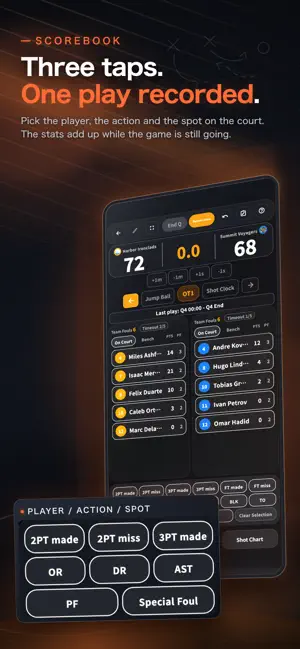
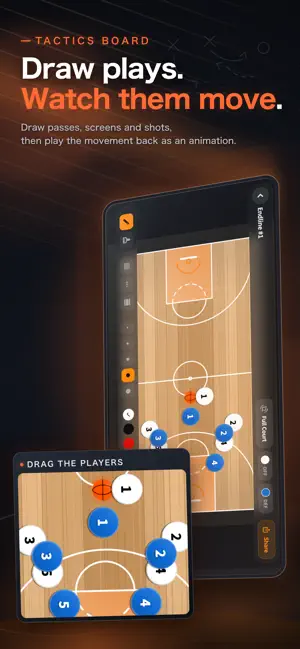
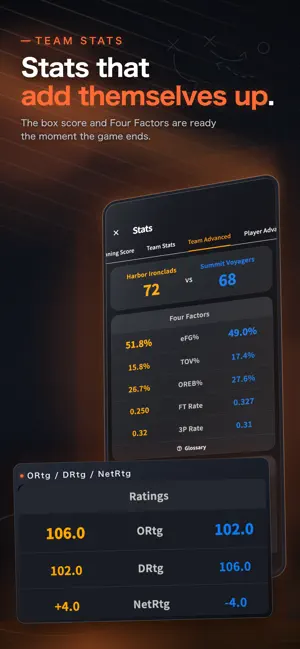
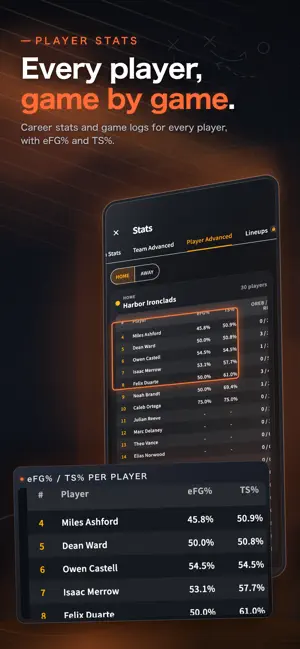
Pick the player, the action and the spot on the court. Three taps record a play, and your stats add up while the game is still going. Record your games, review them, and take what you learn into the next practice. Works on iPad and iPhone; for live games, we recommend iPad for its larger screen. ■ Scorebook: three taps per play - Choose the player, choose the action, tap the spot on the court. That's one play recorded - Record made and missed 2P/3P/FT, rebounds, assists, steals, blocks, turnovers and fouls - Game clock with quarters (5 to 12 minutes), substitutions and timeouts - Play-by-play, undo, and resume a paused game ■ Stats that add themselves up Everything is totaled as you record, so the box score is ready the moment the game ends. - Box score (FGM/FGA/FG%/3PM/3PA/3P%/FTM/REB/AST/STL/BLK/PF/PTS) - Career stats and game logs for every player, plus an all-player leaderboard - Four Factors (eFG%, TOV%, OREB%, FT Rate) and other advanced numbers ■ Review the game, plan the next practice - The shot chart shows where your team shot from and where the shots fell. Switch to a heat map by zone - The running score shows where the lead changed hands - Once you see what to work on, walk through it on the tactics board and put the practice on the calendar ■ Spectator mode: share the game with the bench and the stands A screen made to be watched, with the score, the clock and the stats shown large. - Put the device you're recording on into full screen during a timeout or a break - Connect a monitor or projector at the venue (cable or AirPlay) and only the spectator view goes to the big screen. Your device stays on the scorebook, so recording never stops ■ Scoresheets and sharing - Export an official-format scoresheet as a PDF straight from your recorded game. Excel export is also available - Turn the game result into a summary card, as an image or an MP4 video, and send it to your team and families ■ Tactics board: draw plays, then watch them move - Draw passes, dribbles, screens and shots with your finger or a stylus - Play back player and ball movement as an animation, and export it as a video ■ Team management - Register teams and players (name and number) and load them straight into a game - Keep games, practices and attendance on the calendar. Recorded games open right from the calendar ■ Pricing The app is a one-time purchase. Everything above is included, with no monthly fee. For deeper analysis, the optional BoardStrategist Pro subscription is available, with a 14-day free trial for first-time subscribers. - Opponent scouting: record, tendencies and per-player stats for each opponent, plus a pre-game briefing PDF - Player growth reports: each player's trends, strengths and areas to work on - Lineup analysis: points scored and allowed by every five-player combination - Tag plays on your game video, then export and share the clips - Season report PDFs and bench alerts - The full tactics library and unlimited My Team registrations ■ Who it's for - Coaches of youth, school and club teams - Parents and team managers asked to keep the score ■ Built for courts everywhere The whole app is localized. Stat abbreviations (PTS / REB / AST and so on) stay in the international English form. ■ Subscription details BoardStrategist Pro is an auto-renewable subscription. Payment is charged to your Apple ID at confirmation and renews automatically unless canceled at least 24 hours before the end of the current period. Manage or cancel anytime in Apple account settings. Terms of Use (EULA): https://www.apple.com/legal/internet-services/itunes/dev/stdeula/ Privacy Policy: https://boardstrategist.net/privacy/
What’s new
Version 4.6.0 · Updated October 20, 2026
This update greatly expands the Coach Pro analysis tools (player reports, scouting, season reports and video clips) and fixes issues on the recording screen. ■ Recording screen fixes • Fixed an issue where starting a game without the first roster player in the starting lineup put every registered player On Court and left the bench empty • Bulk substitution now lists registered players who are not on the game roster as bench candidates, so you can sub them straight in • The Scoresheet button on the game screen is now called Export result. PDFs, share images and Excel files are all exported from here ■ Player reports (Pro) • Shot charts now plot the actual shot locations • See success rates by shot type, offensive and defensive rebounds, and fouls per game, foul types and foul-outs • Who they play best with: playing time and point differential for each pair and trio a player shared the court with show which combinations work and which need attention • Rankings of the teammates a player assisted and was assisted by • Filter by game type, such as league or cup games. The filter is shown in the PDF ■ Scouting (Pro) • The opponent analysis screen now shows a Scouting Read. Tap an opponent player to see their hot zones • Added Shot tendencies (shot types and drive directions with success rates), Scoring runs (which quarters runs come in) and Most-used lineups (minutes and +/-) • Overtime points are now included in the per-quarter averages as OT • Fixed an issue where an opponent player you faced several times appeared as a separate row for each game. Players with the same number and name are now combined • Zone charts and shot tendencies of key players also appear in the handout PDF ■ Season reports (Pro) • Fixed an issue where the PDF covered all seasons instead of This year when no period was selected • Filter by game type or tournament before creating the report, then share it directly • Added shot success rates by court zone (color-coded chart and table) • The full player table now lists minutes and fouls per game (minutes are averaged only over games that used the game clock) ■ Video clips (Pro) • Adjust how many seconds before and after each marker are included in its clip. Check the start and end on the spot; changes apply when you export Thank you for using BoardStrategist. Send us your feedback from Settings.
App privacy
The developer, Yusaku Miki, reported these privacy practices to Apple.
Data Not Collected
The developer does not collect any data from this app.
Alternatives to BoardStrategist for Basketball
Looking for apps like BoardStrategist for Basketball? Here are 6 similar apps on the App Store. The highest rated is Preciser SnapStats (5.0/5), and 5 of the 6 are free to download.
-
 Preciser SnapStats
5.0
Preciser SnapStats
5.0
-
 Basketball - All My Tactics
-
 Racket
-
 stoBBuhr
-
 B.Stats Lab
-
 Basketball Stats PRO
4.8
Basketball Stats PRO
4.8
| App | Rating | Price | Last updated | Compare |
|---|---|---|---|---|
| BoardStrategist for Basketball | – | 5.99 USD | October 20, 2026 | |
| Preciser SnapStats | 5.0 / 5 (1) | Free | Oct 22, 2026 | Compare |
| Basketball - All My Tactics | – | Free | Aug 20, 2026 | Compare |
| Racket | – | Free | Oct 22, 2026 | Compare |
| stoBBuhr | – | Free | Feb 19, 2024 | Compare |
| B.Stats Lab | – | Free | Oct 4, 2026 | Compare |
| Basketball Stats PRO | 4.8 / 5 (797) | 19.99 USD | Sep 17, 2026 | Compare |