

Kip - Just Swipe
Nathan Victorin Utilities iPhoneiPadiPod touch
Kip - Just Swipe is a free Utilities app for iPhone and iPad by Nathan Victorin. Requires iOS 15.1. Updated April 28, 2026.
- Price
- Free
- on the App Store
- Size
- 69 MB
- Age 4+
- Updated
- Apr 28
- 2026 · v1.1.0
Screenshots

About Kip - Just Swipe
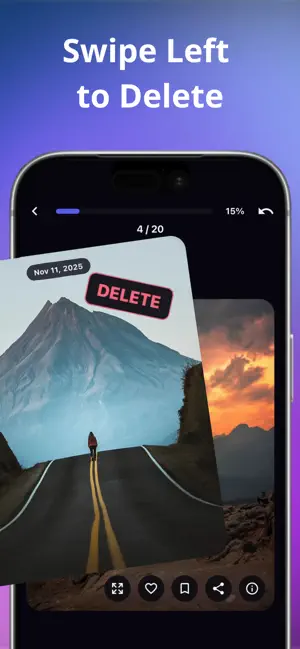
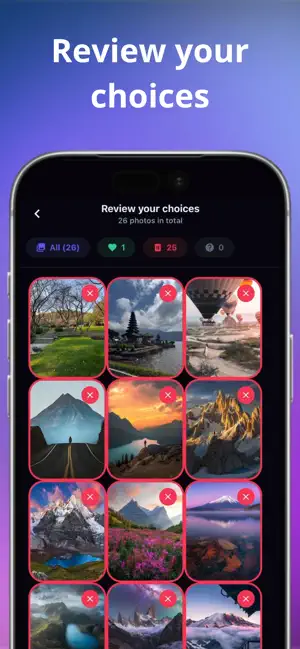
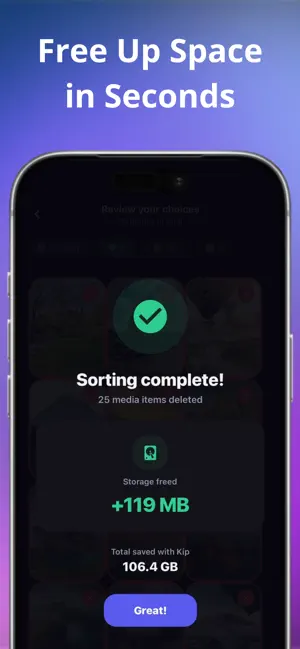
Cleaning your gallery shouldn't feel like a chore. Make it a game with Kip! We all take thousands of photos, videos, and screenshots, only to let them sit there eating up storage. Kip turns the boring task of cleaning your camera roll into a fast, fun, and addictive experience. How it works: - Swipe Right to keep a memory. - Swipe Left to trash it. It's that simple. Smart Filters: Don't scroll endlessly. Kip lets you sort your media exactly the way you want: - By Date: Tackle a specific month or year (Day and Week granularity available with Kip+). - Duplicates: Automatically detect duplicate photos and pick the best one to keep. - On This Day: Rediscover memories from this date in past years. - Random: Feeling adventurous? Get a random batch and start swiping. - By Type (Kip+): Focus on just your Photos, Videos, Screenshots, or Motion Photos. - By Album (Kip+): Clean up one album at a time. - By Place (Kip+): Revisit and sort memories by location. Stay Motivated: - Daily Streaks: Swipe 20 photos a day to build your streak. Don't break the chain! - Streak Freezes: Life happens. Earn freezes to protect your streak when you miss a day. - Leveling System: Earn XP with every swipe and climb the ranks from Neophyte to Legend. - Track Your Progress: See your stats, total space freed, and how far you've come. Key Features: - All Media Supported: Works seamlessly with Photos, Videos, Live Photos, and Screenshots. - Lightning Fast: Review your memories in minutes. You'll be surprised how fast you can declutter. - Save Massive Space: Instantly see how much storage you're freeing up before you confirm deletion. - Review Before You Delete: Changed your mind? Review all your choices, switch any photo from keep to delete, and only confirm when you're ready. - Mistake-Proof: Swiped left by accident? Undo anytime before final deletion. - Bookmark & Favorites: Mark your best memories as favorites or bookmark them into a dedicated album for safekeeping. - Speaks Your Language: Available in a lot of languages so you can declutter comfortably in your native tongue. - 100% Private: Everything happens directly on your device. We don't see, upload, or store your media. Your privacy is non-negotiable. Kip+ (In-App Purchase / Subscription Required): Kip is free to use with a daily limit of up to 150 swipes and basic filters. To unlock the ultimate cleaning experience, upgrade to Kip+ and enjoy: - Unlimited daily swipes: Clean your entire gallery without any limits. - Ad-free experience: Sort your photos with zero interruptions. - Advanced Filters: Unlock sorting by Day, Week, Album, Place, and Media Type. - Custom App Icons: Personalize your home screen with extra icon designs. - Subscriber Rank: Track your loyalty grade, stats, and earn exclusive badges. Download Kip today, declutter your digital life, and give your phone's storage the breathing room it deserves. Just swipe! Privacy Policy: http://mellow-editor-2d3.notion.site/Kip-Privacy-Policy-333b74462b3b801d99f5cf25a336afd5?pvs=73 Terms of Use (EULA): http://mellow-editor-2d3.notion.site/Kip-Terms-of-Service-333b74462b3b80238938f8e634935304?pvs=73
What’s new
Version 1.1.0 · Updated April 28, 2026
New Features & Settings - Global Notifications: Added a master toggle to easily enable or disable all app notifications. - Animation Control: You can now customize your visual experience by enabling or disabling all or specific app animations. - Onboarding Management: Added the ability to toggle onboarding screens on/off, or reset them if you want to view the tutorials again. Bug Fixes & Improvements - Stability: Fixed a critical bug that caused the app to crash when handling a massive volume of duplicate items. - Performance: Resolved an issue with media refreshing after finishing a sorting session for a much smoother return to the home screen. - UI Update: Refreshed the visual design of the Premium lock overlay on the statistics screen.
App privacy
The developer, Nathan Victorin, reported these privacy practices to Apple.
Data Not Linked to You
The following data, which may be collected but is not linked to your identity, may be used for the following purposes:
- Purchases: Purchase History
- Identifiers: User ID
- Usage Data: Product Interaction
- Diagnostics: Other Diagnostic Data
Used for: Analytics, App Functionality
Alternatives to Kip - Just Swipe
Looking for apps like Kip - Just Swipe? Here are 6 similar apps on the App Store. The highest rated is JustSwipe! (5.0/5), and all 6 are free to download.
-
 Phone Storage Cleaner - Swipr
1.0
Phone Storage Cleaner - Swipr
1.0
-
 Photo Cleaner: Pixapals
-
 C Vision
-
 Sweepr: Swiper Photo Cleaner
-
 JustSwipe!
5.0
JustSwipe!
5.0
-
 Photo Swipe To Delete Cleaner.
4.3
Photo Swipe To Delete Cleaner.
4.3
| App | Rating | Price | Last updated | Compare |
|---|---|---|---|---|
| Kip - Just Swipe | – | Free | April 28, 2026 | |
| Phone Storage Cleaner - Swipr | 1.0 / 5 (1) | Free | Jan 23, 2026 | Compare |
| Photo Cleaner: Pixapals | – | Free | Sep 11, 2025 | Compare |
| C Vision | – | Free | Sep 28, 2025 | Compare |
| Sweepr: Swiper Photo Cleaner | – | Free | Oct 9, 2026 | Compare |
| JustSwipe! | 5.0 / 5 (1) | Free | Jun 15, 2026 | Compare |
| Photo Swipe To Delete Cleaner. | 4.3 / 5 (6) | Free | Sep 16, 2026 | Compare |
Compare Kip - Just Swipe with the top alternatives: ratings, updates, ASO score and keyword gaps →