

GetGameSnap
Co Digit Games iPhoneiPadiPod touch
GetGameSnap is a free Games app for iPhone and iPad by Co Digit. Requires iOS 17.0. Updated August 28, 2026.
- Price
- Free
- on the App Store
- Size
- 1 MB
- Age 12+
- Updated
- Aug 28
- 2026 · v2.0.3
Screenshots

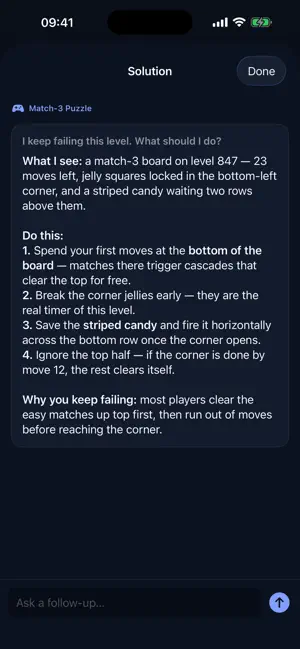

About GetGameSnap
Stuck on a level? Just snap a photo and get instant help. GameSnap analyzes your screenshot and gives you exactly what you need — whether it's a subtle hint, a full step-by-step walkthrough, or a clear explanation of what's happening on screen. How it works: Take a photo or screenshot of the level you're stuck on Choose your help mode — Hint, Step by step, or Explain Get instant, detailed help tailored to what's on your screen Features: Works with any game — console, mobile, PC Three help modes: quick hints, full walkthroughs, or screen explanations Ask follow-up questions for more detail Clean, simple interface designed for gamers Fast results, no waiting Whether you're stuck on a puzzle, can't beat a boss, or just don't know what to do next — GameSnap has you covered. 5 free searches included. Subscribe for unlimited help. Terms of Use (EULA): https://getgamesnap.com/terms Privacy Policy: https://getgamesnap.com/privacy
What’s new
Version 2.0.3 · Updated August 28, 2026
Your free searches now refill every 30 days instead of running out for good, so you can come back to GameSnap the next time a level stops you. Also in this update: internal improvements to sign-in reliability and reporting.
Play today's Inkspill puzzle
Spread your ink until the whole board is one color, within the move limit. A free daily puzzle from Fiplay, same board for everyone. It plays right here, no download.
App privacy
The developer, Co Digit, reported these privacy practices to Apple.
Data Linked to You
The following data, which may be collected and linked to your identity, may be used for the following purposes:
- Identifiers: User ID
- Usage Data: Product Interaction
- Contact Info: Email Address
Used for: Analytics, App Functionality