

MoVision - Scanner & AI Tools
Welove Games Co., Ltd. Productivity iPhoneiPadiPod touch
MoVision - Scanner & AI Tools is a free Productivity app for iPhone and iPad by Welove Games Co., Ltd. Requires iOS 17.6. Updated April 13, 2026.
- Price
- Free
- on the App Store
- Size
- 12 MB
- Age 4+
- Updated
- Apr 13
- 2026 · v1.0.1
Screenshots
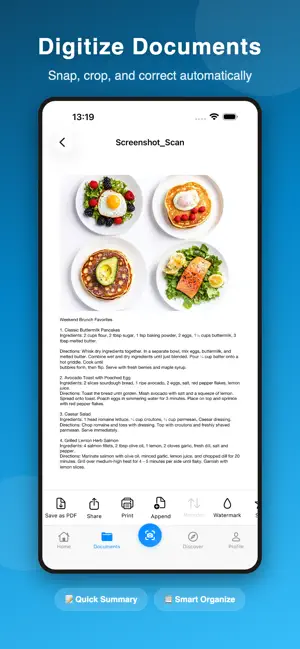


About MoVision - Scanner & AI Tools
MoVision is your phone's scanner and AI assistant. Snap a photo to scan documents, make ID photos, grade homework, or translate foreign text — 20+ tools in one app. 1. SMART SCANNING Turn paper into digital documents. Your phone is your scanner. · Smart Scan — auto edge detection, crop, and perspective correction · Document Scan — ID cards, driver's licenses, passports in standard format · Whiteboard Scan — capture meeting boards with glare removed automatically · Shadow / Handwriting / Watermark Removal — clean up your scans in one tap · Export as PDF or Word — ready to email, print, or archive 2. ID PHOTOS Skip the photo studio. Make them right on your phone. · Global Sizes — passport, visa, and standard ID sizes for countries worldwide · One-tap Background — switch between white, blue, red instantly · AI Cutout + Beauty — auto background removal and skin smoothing · Print Layout — generate print-ready layouts for any photo shop 3. TEXT RECOGNITION & TRANSLATION Extract text from photos. Translate what you can't read. · OCR — snap a photo, get editable text you can copy and share · Photo to Word — convert documents to Word files, tables included · Photo Translate — point at foreign text, get instant translation. Great for menus, signs, and labels when traveling 4. EDUCATION A real helper for parents and students. · Math Grading — snap a worksheet, get it graded instantly with accuracy stats · Homework Review — AI checks each problem, marks errors, shows correct answers · Exam Helper — snap a tough question, get step-by-step solutions · Homework Tutor — guides your child through the thinking, not just the answer 5. AI TOOL MARKET 19 AI tools that work with just a photo — for life, work, and learning. · Identify Anything — flowers, buildings, products, just snap it · Food Analysis — snap your meal to see calories and nutrition · Recipe Ideas — snap ingredients, get recipe suggestions · Photo Caption — snap a photo, AI writes the social post for you · Quick Summary / Smart Organize / Deep Analysis — snap work docs to extract key info · AI Ghostwriter / Smart Planning — draft proposals and plan your schedule · Memory Cards / Reading Notes / Language Learning — study smarter · Drawing Critique / Picture Writing / Poetry Analysis — learning tools for kids 6. CLOUD SYNC & SECURITY Switch phones without losing data. Keep important files protected. · Cloud Sync — automatic sync across iPhone and iPad · Document Lock — password-protect sensitive files · Folders & Tags — organize and find documents quickly · Recently Deleted — recover files you accidentally removed More utilities: Business Card Scanner, Receipt Scanner, Bank Card Recognition, License Plate Recognition, QR Scanner, Color Picker, Watermark Camera, Plant ID, Counter, AR Measure. — Subscription — Basic scanning is free. Subscribe to Premium for all tools and cloud sync. · Pricing shown in the app · Payment charged to your iTunes account · Auto-renews 24 hours before expiration; cancel anytime in Settings Privacy Policy: https://app.wuiyou.com/about/privacy.html Terms of Service: https://app.wuiyou.com/about/terms.html
What’s new
Version 1.0.1 · Updated April 13, 2026
Improved user experience and app stability.
App privacy
The developer, Welove Games Co., Ltd., reported these privacy practices to Apple.
Data Used to Track You
The following data may be used to track you across apps and websites owned by other companies:
- Identifiers: User ID
Data Linked to You
The following data, which may be collected and linked to your identity, may be used for the following purposes:
- Usage Data: Product Interaction
- Purchases: Purchase History
- Contact Info: Email Address, Name, Phone Number
- User Content: Photos or Videos, Other User Content
- Identifiers: User ID
Used for: Analytics, App Functionality
Data Not Linked to You
The following data, which may be collected but is not linked to your identity, may be used for the following purposes:
- Identifiers: User ID
Used for: Third-Party Advertising
Alternatives to MoVision - Scanner & AI Tools
Looking for apps like MoVision - Scanner & AI Tools? Here are 6 similar apps on the App Store. The highest rated is FastScanner: PDF&OCR (5.0/5), and 4 of the 6 are free to download.
-
 Machining Assistant
-
 闪词卡
闪词卡
-
 台灣房地網
台灣房地網
-
 Block Apps & Stay Focused
-
 SteelCorr Digital Paint Report
-
 FastScanner: PDF&OCR
5.0
FastScanner: PDF&OCR
5.0
| App | Rating | Price | Last updated | Compare |
|---|---|---|---|---|
| MoVision - Scanner & AI Tools | – | Free | April 13, 2026 | |
| Machining Assistant | – | 0.99 USD | Jun 12, 2026 | Compare |
| 闪词卡 | – | 0.99 USD | May 9, 2026 | Compare |
| 台灣房地網 | – | Free | Aug 12, 2025 | Compare |
| Block Apps & Stay Focused | – | Free | Jun 28, 2026 | Compare |
| SteelCorr Digital Paint Report | – | Free | Oct 6, 2026 | Compare |
| FastScanner: PDF&OCR | 5.0 / 5 (4) | Free | Oct 9, 2025 | Compare |