

FixPDF: PDF Editor & Converter
Denisha Vadukia Utilities iPhoneiPadiPod touch
FixPDF: PDF Editor & Converter is a free Utilities app for iPhone and iPad by Denisha Vadukia. Requires iOS 16.2. Updated October 15, 2026.
- Price
- Free
- on the App Store
- Size
- 107 MB
- Age 4+
- Updated
- Oct 15
- 2026 · v2.0.6
Screenshots


About FixPDF: PDF Editor & Converter
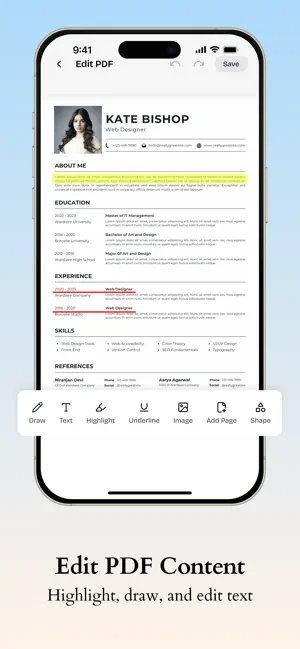
FixPDF is a PDF editor and converter for anyone who deals with documents on their phone: students turning in assignments, freelancers sending invoices, employees signing forms without a printer nearby. It edits, converts, merges, and signs PDFs in one app, so you're not stuck switching between five tools to finish one task. Why FixPDF PDFs are easy to receive and hard to change. A file lands in your inbox locked, scanned, or in the wrong format, and suddenly you're stuck figuring out which app can fix it. FixPDF handles it in one place, whatever the file needs. And now, open or download a PDF straight from any link, no browser detours, no separate downloader. Convert From PDF PDF to Word – turn a PDF into an editable DOCX file for revisions PDF to Excel – pull tables and data out of a PDF into a working spreadsheet PDF to Image, JPG, or PNG – export pages as high-quality images for sharing or reuse Convert To PDF Word to PDF, Excel to PDF – convert documents and spreadsheets into shareable, print-ready PDFs Image, JPG, or PNG to PDF – combine photos or scans into one organized PDF HTML to PDF – save a webpage as a PDF you can read offline Text to PDF – turn a plain text file into a formatted PDF Organize PDF Merge or combine PDFs – bring multiple files together into a single document Split PDF – break a large file into smaller, more manageable ones Crop, rotate, and reorder pages – clean up margins, fix orientation, and get pages in the right order Add page numbers – number pages automatically for reports and submissions Edit & Sign Edit PDF – change text and content directly, no need to recreate the file Annotate PDF – highlight, underline, or add notes for review Sign PDF – add an electronic or digital signature without printing and scanning Watermark PDF – mark documents with a custom watermark Redact PDF – remove or hide sensitive information before sharing Resume Maker Create a professional resume directly in FixPDF. Choose from resume templates, add and organise your personal and professional information, customise the design, and see your changes with a live preview. Save your resume as a draft, and download it as a PDF. View & Access Open PDFs from any link – view or download a PDF directly from a shared URL, without switching to a browser Extract images – pull embedded images out of a PDF file Secure PDF Protect and encrypt PDF – lock files with a password before sending them Unlock PDF – remove password restrictions when you have the right to access a file Built for real work Students use FixPDF to convert lecture notes and submit assignments in the right format. Freelancers and business owners use it to send polished invoices and contracts. HR teams and office workers rely on it to fill out and sign forms without a printer nearby. Teachers scan and organize handouts. Lawyers redact sensitive information before sharing case files. If it involves a PDF, there's a good chance FixPDF handles it. Why people stick with it One app for editing, converting, organizing, and signing, no jumping between tools Conversions that hold their formatting, not just their content A clean, straightforward interface with no learning curve Password protection and encryption for files that need to stay private Access PDFs from any link, in-app, without a browser Get started Whether it is a school assignment, a signed contract, or a document you need to send in the next five minutes, FixPDF is built to get it done without the extra steps. Install FixPDF and keep your PDF work in one place.
What’s new
Version 2.0.6 · Updated October 15, 2026
Resume Maker is now available! Choose a professional template, customise your resume with a live preview, and download it as a PDF.
App privacy
The developer, Denisha Vadukia, reported these privacy practices to Apple.
Data Used to Track You
The following data may be used to track you across apps and websites owned by other companies:
- Identifiers: Device ID
- Usage Data: Advertising Data
Data Linked to You
The following data, which may be collected and linked to your identity, may be used for the following purposes:
- Contact Info: Email Address
Used for: App Functionality
Data Not Linked to You
The following data, which may be collected but is not linked to your identity, may be used for the following purposes:
- Identifiers: Device ID
- Usage Data: Advertising Data
- User Content: Photos or Videos
Used for: Third-Party Advertising, App Functionality
Alternatives to FixPDF: PDF Editor & Converter
Looking for apps like FixPDF: PDF Editor & Converter? Here are 6 similar apps on the App Store. The highest rated is BIShare: File Transfer to PC (5.0/5), and all 6 are free to download.
-
 BIShare: File Transfer to PC
5.0
BIShare: File Transfer to PC
5.0
-
 OneTools: All-In-One Utility
-
 FlowCam: pausable video camera
4.6
FlowCam: pausable video camera
4.6
-
 Video To Audio - MP3 Extractor
5.0
Video To Audio - MP3 Extractor
5.0
-
 PixMarker: Draw & Highlight
4.0
PixMarker: Draw & Highlight
4.0
-
 FlowMount
4.0
FlowMount
4.0
| App | Rating | Price | Last updated | Compare |
|---|---|---|---|---|
| FixPDF: PDF Editor & Converter | – | Free | October 15, 2026 | |
| BIShare: File Transfer to PC | 5.0 / 5 (1) | Free | Oct 18, 2026 | Compare |
| OneTools: All-In-One Utility | – | Free | Apr 5, 2026 | Compare |
| FlowCam: pausable video camera | 4.6 / 5 (16) | Free | Oct 7, 2026 | Compare |
| Video To Audio - MP3 Extractor | 5.0 / 5 (5) | Free | Apr 1, 2026 | Compare |
| PixMarker: Draw & Highlight | 4.0 / 5 (3) | Free | May 30, 2026 | Compare |
| FlowMount | 4.0 / 5 (2) | Free | Mar 5, 2026 | Compare |