

MacroStack AI: Macro Tracker
Rexhep Rexhepi Health & Fitness iPhoneiPadiPod touchApple Watch
MacroStack AI: Macro Tracker is a free Health & Fitness app for iPhone and iPad by Rexhep Rexhepi. Rated 5.0/5 from 1 ratings. Requires iOS 17.0.
- Rating
- 5.0
- 1 ratings
- Price
- Free
- on the App Store
- Size
- 91 MB
- Age 4+
- Updated
- Nov 2
- 2026 · v2.21.0
Screenshots


About MacroStack AI: Macro Tracker
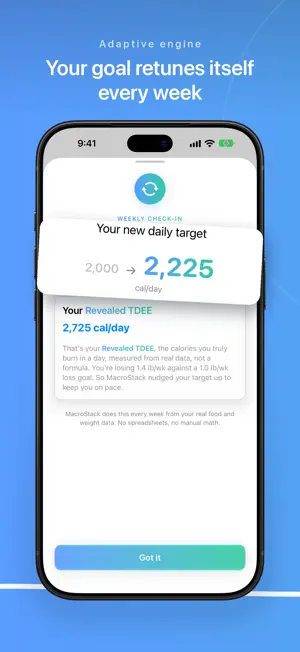
Most calorie apps hand you a goal from a formula and never check if it works. MacroStack checks every week. It compares what you logged against how your weight actually moved, reveals what your body really burns, and retunes your goal. THE ADAPTIVE ENGINE A textbook formula can only guess your metabolism, and your metabolism changes as you diet. A static goal quietly stops working. MacroStack treats your own results as the source of truth: - Revealed TDEE: the calories your body actually burns, computed from your logs and weigh-ins - Weekly recalibration that adjusts your goal and explains every change in plain language - A weight trend that smooths daily scale noise into a line you can trust - A forecast of where you are heading once enough data lands - Steady when the data says steady. No random goal churn. Cutting, bulking, or maintaining, it works the same way: your results drive your targets. TRACK FAST - 480,000+ foods, searchable offline - Barcode scanner - Popular restaurant items built in - Custom foods and recipes - Today at a glance: progress ring, remaining calories, and a bar for every macro - Home screen widgets and streaks AI FOOD SCANNER No label and no barcode? Point the camera at your plate and get calorie and macro estimates in seconds. AI NUTRITION COACH Ask what to eat. The coach answers with your numbers in front of it: remaining calories, protein gap, current goal. Meal ideas, weekly meal plans, and progress summaries grounded in your actual data. FASTING, IF YOU WANT IT An optional fasting timer with eating window reminders. PRIVATE BY DESIGN No account, no signup. Your log lives on your device and works offline. Export anytime, with encrypted backups when you want them. Set a goal, log your food, step on the scale. The engine does the rest. MEMBERSHIP Everyone starts with a 14-day free trial of the whole app: no payment and nothing renews. When it ends, full access requires a subscription or a one-time Lifetime purchase. There is no limited free version. - Monthly: $3.99 per month, includes a 14-day free trial - Annual: $34.99 per year, includes a 14-day free trial - Lifetime: $59.99, a one-time purchase The Monthly and Annual plans begin with a 14-day free trial. Payment is charged to your Apple Account when the trial ends unless you cancel at least 24 hours before it ends. These subscriptions renew automatically at the listed price unless auto-renew is turned off at least 24 hours before the end of the current period. The Lifetime option is a single payment charged at the time of purchase and does not renew. You can manage or cancel a subscription anytime in your Apple Account settings. Terms of Use (EULA): https://www.apple.com/legal/internet-services/itunes/dev/stdeula/ Privacy Policy: https://rrexhepi.github.io/macrostack-privacy/
What’s new
Version 2.21.0 · Updated November 2, 2026
Start with 14 days free, no card needed. The plans and the one-time Lifetime unlock sit under it, and Settings shows how many days are left. Settings is a short page now. Each section opens on its own, and your membership sits on top with a one-tap way to switch to Lifetime. Coach: "log 2 eggs and a banana" gives you a confirm card with real numbers. Chains Near Me measures a true distance. Ask for high protein, low fat, low carb or light and each gets its own list. Your coach cards survive closing the app. Scanner and recipes: Other opens the keyboard at once, and recipes read "1.5 of 3 servings". A late weekly check-in now counts from the missed weigh-in day. A first weigh-in that came from Apple Health or your watch asks whether to start from it, with its date. Links, buttons and pickers now wear the brand gradient instead of plain blue.
App privacy
The developer, Rexhep Rexhepi, reported these privacy practices to Apple.
Data Not Linked to You
The following data, which may be collected but is not linked to your identity, may be used for the following purposes:
- User Content: Photos or Videos, Other User Content
- Identifiers: Device ID
Used for: App Functionality
Alternatives to MacroStack AI: Macro Tracker
Looking for apps like MacroStack AI: Macro Tracker? Here are 6 similar apps on the App Store. The highest rated is MacroBar: AI Macro Tracker (5.0/5), and all 6 are free to download.
-
 MacroBar: AI Macro Tracker
5.0
-
 byte. Calorie & Macro Tracker
5.0
-
 Nectar – Glucose Tracker
-
 Brio - Calorie Tracker & Coach
5.0
-
 PocketMacro: Photo Calories
5.0
-
 Family health diary
4.5
| App | Rating | Price | Last updated | Compare |
|---|---|---|---|---|
| MacroStack AI: Macro Tracker | 5.0 / 5 (1 rating) | Free | November 2, 2026 | |
| MacroBar: AI Macro Tracker | 5.0 / 5 (2) | Free | Jun 28, 2026 | Compare |
| byte. Calorie & Macro Tracker | 5.0 / 5 (2) | Free | Oct 7, 2026 | Compare |
| Nectar – Glucose Tracker | – | Free | Jun 15, 2026 | Compare |
| Brio - Calorie Tracker & Coach | 5.0 / 5 (3) | Free | Oct 5, 2026 | Compare |
| PocketMacro: Photo Calories | 5.0 / 5 (1) | Free | Oct 25, 2026 | Compare |
| Family health diary | 4.5 / 5 (8) | Free | Apr 16, 2026 | Compare |