

SlideClean: Photo Cleaner
Mucahit Cucen Utilities iPhoneiPadiPod touch
SlideClean: Photo Cleaner is a free Utilities app for iPhone and iPad by Mucahit Cucen. Requires iOS 16.0. Updated August 4, 2026.
- Price
- Free
- on the App Store
- Size
- 7 MB
- Age 4+
- Updated
- Aug 4
- 2026 · v2.1.3
Screenshots

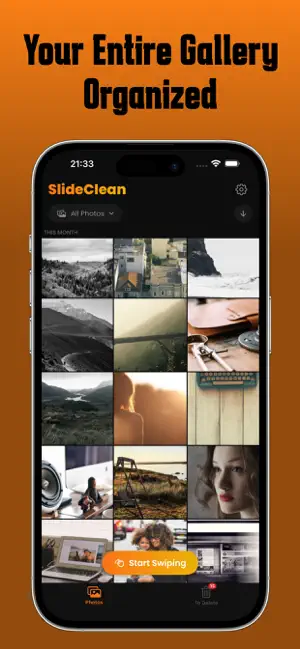

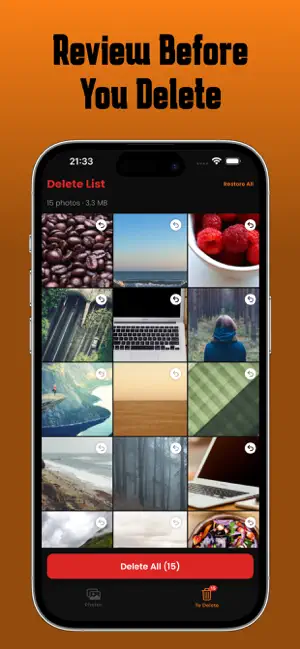
About SlideClean: Photo Cleaner
Your iPhone is full of photos you'll never look at again. Blurry shots, accidental screenshots, 47 nearly identical selfies from one night out. Sound familiar? SlideClean makes photo cleanup fast, fun, and satisfying. Just swipe right to keep, swipe left to delete. It's that simple. HOW IT WORKS Open SlideClean and start swiping through your entire camera roll. Every photo gets a quick decision: keep or delete. Photos you mark for deletion go to a review list where you can double-check before permanently removing them. Nothing is deleted without your confirmation. YOUR GALLERY, ORGANIZED Browse your photos in a beautiful grid view, organized by date. See today's photos, yesterday's, this week's, and beyond. Photos marked for deletion are moved to a separate list so your main gallery stays clean. SWIPE TO DECIDE The swipe screen shows your photos one at a time in a card stack. Swipe right to keep a photo, swipe left to mark it for deletion. Green means keep, red means delete. It's intuitive, fast, and even a little addictive. REVIEW BEFORE YOU DELETE Every photo you mark for deletion goes to the Delete List. You can restore any photo with a single tap. See exactly how much storage you'll free up before confirming deletion. You're always in control. FREE UP GIGABYTES Most users free up 2-10 GB of storage in their first session. That's room for hundreds of new photos, apps, or music. Stop getting the dreaded "Storage Almost Full" notification. PRIVACY FIRST SlideClean works entirely on your device. No cloud uploads, no servers, no account required. Your photos never leave your iPhone. PREMIUM Unlock unlimited photo cleanup with SlideClean Premium. Choose the plan that works for you: weekly, monthly, annual, or lifetime access. Download SlideClean and take back control of your photo library today. Terms of Use: https://www.apple.com/legal/internet-services/itunes/dev/stdeula/
What’s new
Version 2.1.3 · Updated August 4, 2026
We made Slide Clean ad-free forever.
App privacy
The developer, Mucahit Cucen, reported these privacy practices to Apple.
Data Used to Track You
The following data may be used to track you across apps and websites owned by other companies:
- Location: Coarse Location
- Identifiers: Device ID
Data Not Linked to You
The following data, which may be collected but is not linked to your identity, may be used for the following purposes:
- Location: Coarse Location
- Identifiers: Device ID
- Usage Data: Product Interaction
- Purchases: Purchase History
- Diagnostics: Crash Data, Performance Data
Used for: Third-Party Advertising, Analytics, App Functionality
Alternatives to SlideClean: Photo Cleaner
Looking for apps like SlideClean: Photo Cleaner? Here are 6 similar apps on the App Store.
-
 Sound Gauge: Decibel
-
 CleanMate-Smart Phone Cleaner
-
 SweepIt: Swipe Photo Cleaner
-
 Glide Clean
-
 Sift: Swipe Photo Cleaner
-
 CleanSwipe: Offline Cleaner
| App | Rating | Price | Last updated | Compare |
|---|---|---|---|---|
| SlideClean: Photo Cleaner | – | Free | August 4, 2026 | |
| Sound Gauge: Decibel | – | Free | Sep 26, 2026 | Compare |
| CleanMate-Smart Phone Cleaner | – | Free | Aug 24, 2026 | Compare |
| SweepIt: Swipe Photo Cleaner | – | Free | Apr 18, 2026 | Compare |
| Glide Clean | – | Free | Sep 12, 2026 | Compare |
| Sift: Swipe Photo Cleaner | – | Free | May 7, 2026 | Compare |
| CleanSwipe: Offline Cleaner | – | Free | Jan 13, 2026 | Compare |