

CopyCam - Photo Overlay Camera
Kin Chio Pang Photo & Video iPhoneiPadiPod touch
CopyCam - Photo Overlay Camera is a free Photo & Video app for iPhone and iPad by Kin Chio Pang. Requires iOS 17.5. Updated October 9, 2026.
- Price
- Free
- on the App Store
- Size
- 6 MB
- Age 4+
- Updated
- Oct 9
- 2026 · v5.6.1
Screenshots
Save to Pinterest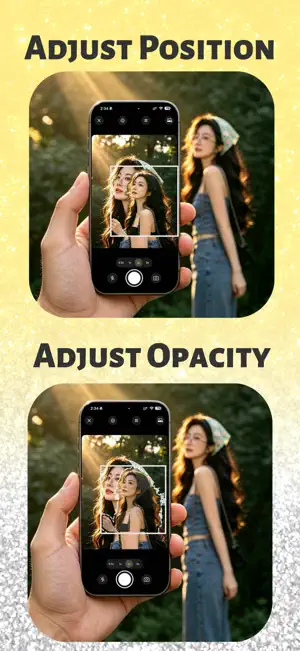

About CopyCam - Photo Overlay Camera
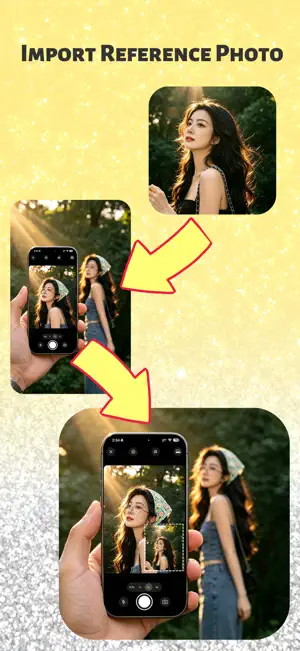
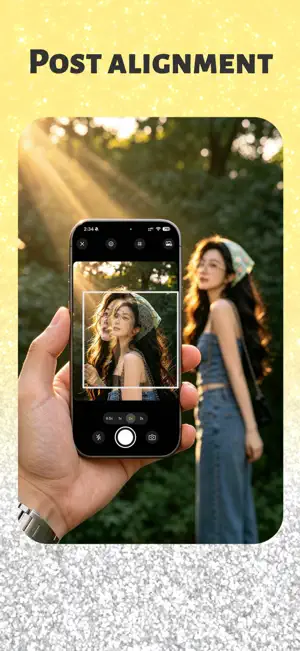
CopyCam overlays any photo on your camera screen, so you can match the pose, angle and framing before you shoot. Use it as a real-time camera guide or stencil to align your shot. See a photo you love? Recreate it, shot for shot. PERFECT FOR • Travel recreations: found a photo you love? Line up the same pose and angle on location. • The boyfriend perspective: load your partner's favorite reference photo and nail their framing every time. • Progress shots: align before and after photos for fitness, skincare or home projects. • Learning composition: use great photos as live guides and train your eye. FEATURES • Photo overlay on the live camera preview • Drag, scale and rotate the reference layer with simple gestures • Opacity slider for precise alignment • Outline mode for easy pose matching • Line / Outline mode for precise edge alignment and pose matching • The overlay never appears in your final photo • No account, no ads, works offline How It Works 1. Import a reference photo from your library. 2. Move, scale and adjust its opacity over the live camera view. 3. Align the scene with the overlay and take the shot. PRIVATE BY DESIGN Everything happens on your device. Your photos never leave your phone. Terms of Use: https://www.apple.com/legal/internet-services/itunes/dev/stdeula/ Privacy Policy: https://gist.github.com/Hantarksla/398e37f18db1f8c3f5fd8051e6ad5078
What’s new
Version 5.6.1 · Updated October 9, 2026
CopyCam 5.6.1 Update: Primarily fixes several issues and improves the stability of the following features. CHECK BEFORE YOU SAVE The shutter no longer writes straight to your library. Preview the photo first, save it if you like it, or close to discard it. DRAG TO COMPARE Turn on Drag to Compare and slide the divider. The left side stays your original reference. The right side is the live photo, or the overlay result when you switch to With Overlay. SAVE WHAT YOU WANT Choose No Overlay and confirm to keep only the live photo, without using a free save. Choose With Overlay to keep the finished overlay photo. Save All keeps both. MORE FREE CUTOUTS Free background-removal tries are now doubled. Using the original photo as a layer does not use one, so you can take your time choosing. NEW OUTLINE MODE (L) A rebuilt person outline that now traces facial features too. See the pose, angle and expression at a glance, then line up and recreate the shot. Tap L again to switch between Simple and Detailed lines. OPENS STRAIGHT TO THE CAMERA Launch the app and you're ready to shoot. No extra taps when inspiration hits. SHARE A BEFORE & AFTER After you save, CopyCam creates a side-by-side of the reference and your photo. Share it to Instagram, TikTok and more, and show everyone how close you got! A FAIRER FREE TRIAL Regular photos no longer use up your free saves. Only saves that use Outline, Mono or extra layers count, so take your time trying it out. EASIER TO GET STARTED New in-app tips show you how to import a photo, switch modes and change layers on your first try. TAP TO FOCUS WITH LAYERS Focus works even with a reference on screen. Tap the selected layer or an empty spot to focus, or tap another layer to select it. NOW IN TRADITIONAL CHINESE Now available in Traditional Chinese. Plus bug fixes and stability improvements. Enjoying CopyCam? A 5-star review helps us a lot!
App privacy
The developer, Kin Chio Pang, reported these privacy practices to Apple.
Data Not Linked to You
The following data, which may be collected but is not linked to your identity, may be used for the following purposes:
- Location: Coarse Location
- Identifiers: Device ID
- Usage Data: Product Interaction
- Diagnostics: Other Diagnostic Data
Used for: Analytics
Alternatives to CopyCam - Photo Overlay Camera
Looking for apps like CopyCam - Photo Overlay Camera? Here are 6 similar apps on the App Store. The highest rated is MatchFrame: Camera Overlay (4.3/5), and all 6 are free to download.
-
 OverCam - Overlay Camera
-
 TwinCam: Recreate Photo Pose
-
 Posey: Pose Reference Camera
-
 Framed: Pose Overlay Camera
-
 GhostFrame: Recreate Any Photo
1.0
-
 MatchFrame: Camera Overlay
4.2
| App | Rating | Price | Last updated | Compare |
|---|---|---|---|---|
| CopyCam - Photo Overlay Camera | – | Free | October 9, 2026 | |
| OverCam - Overlay Camera | – | Free | Oct 25, 2026 | Compare |
| TwinCam: Recreate Photo Pose | – | Free | Sep 17, 2026 | Compare |
| Posey: Pose Reference Camera | – | Free | Jul 20, 2026 | Compare |
| Framed: Pose Overlay Camera | – | Free | Oct 24, 2026 | Compare |
| GhostFrame: Recreate Any Photo | 1.0 / 5 (1) | Free | Sep 26, 2026 | Compare |
| MatchFrame: Camera Overlay | 4.3 / 5 (4) | Free | Sep 24, 2026 | Compare |