

Overlaid – Maps & Layers
Bhagya Silva Navigation iPhoneiPadiPod touch
Overlaid – Maps & Layers is a free Navigation app for iPhone and iPad by Bhagya Silva. Requires iOS 17.0. Updated August 17, 2026.
- Price
- Free
- on the App Store
- Size
- 69 MB
- Age 4+
- Updated
- Aug 17
- 2026 · v1.8
Screenshots


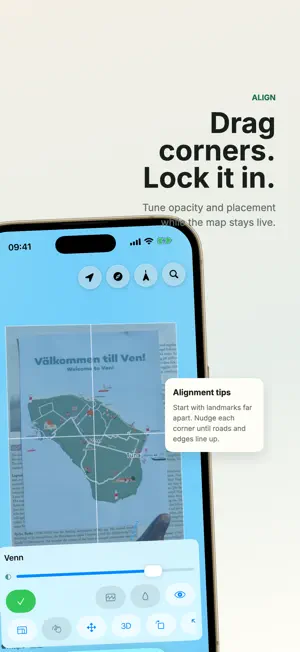

About Overlaid – Maps & Layers
Place any image on a live map so you can compare a park map, garden plan, historical map, site plan, trail route, festival ground, campus map, resort map, or reference photo with the real world. FEATURES - Overlay images on a live MapKit map with standard, satellite, and hybrid views. - Use Assisted Align to match a point on your image with the same point on the map. - Pin corners for precise placement when you need final control. - Tune opacity to compare the overlay with today's roads, paths, water, buildings, and terrain. - Hide, show, edit, export, and manage multiple overlays. - Keep overlays in sync on iPhone and iPad with private iCloud. HOW TO - Add a map image, scan, screenshot, site plan, trail guide, or venue layout. - Place it over the matching location on the live map. - Tap a landmark on the overlay, then tap the same landmark on the map to align it quickly. - Use corner pins and opacity when you want to fine tune the result. - Export an overlay package when you want to move or reuse a map setup. WORKS GREAT - In famous parks and gardens such as Keukenhof, Kew Gardens, Versailles, Central Park, Hyde Park, Butchart Gardens, Longwood Gardens, Tivoli Gardens, Gardens by the Bay, Yosemite, Yellowstone, Zion, Banff, Acadia, Grand Canyon, Plitvice, Kruger, and Serengeti. - For historical maps, park maps, botanical garden maps, estate maps, theme park maps, trail maps, campus maps, resort maps, golf course maps, island maps, fairgrounds, festival grounds, construction plans, field surveys, event layouts, and site inspections. - For comparing old maps with today's streets, checking plans in the field, and bringing any image into geographic context. Terms of Use: https://www.apple.com/legal/internet-services/itunes/dev/stdeula/
What’s new
Version 1.8 · Updated August 17, 2026
Adds Assisted Align: tap a landmark on your overlay, tap the matching spot on the map, and Overlaid will move, rotate, and scale the image into place. This release also keeps the existing corner-pin tools for final fine-tuning and fixes duplicate recovered-copy overlays during iCloud sync.
App privacy
The developer, Bhagya Silva, reported these privacy practices to Apple.
Data Not Collected
The developer does not collect any data from this app.
Alternatives to Overlaid – Maps & Layers
Looking for apps like Overlaid – Maps & Layers? Here are 6 similar apps on the App Store. The highest rated is Map Map - Your Map on a Map (5.0/5), and 5 of the 6 are free to download.
-
 Maply - Turn Images into Maps
-
 MapsON: maps are always there!
-
 YouAreHere - GPS on Map
-
 Map Map - Your Map on a Map
5.0
Map Map - Your Map on a Map
5.0
-
 Orienteering Companion
-
 CityGrid - First Responder Map
| App | Rating | Price | Last updated | Compare |
|---|---|---|---|---|
| Overlaid – Maps & Layers | – | Free | August 17, 2026 | |
| Maply - Turn Images into Maps | – | Free | Jun 7, 2026 | Compare |
| MapsON: maps are always there! | – | Free | Aug 14, 2026 | Compare |
| YouAreHere - GPS on Map | – | Free | Dec 30, 2025 | Compare |
| Map Map - Your Map on a Map | 5.0 / 5 (2) | Free | Apr 30, 2024 | Compare |
| Orienteering Companion | – | 1.99 USD | Jan 20, 2026 | Compare |
| CityGrid - First Responder Map | – | Free | Mar 2, 2026 | Compare |