

PulsePro Interval Timer
Toshihiro Nakao Health & Fitness iPhoneiPadiPod touch
PulsePro Interval Timer is a free Health & Fitness app for iPhone and iPad by Toshihiro Nakao. Requires iOS 18.0. Updated September 21, 2026.
- Price
- Free
- on the App Store
- Size
- 3 MB
- Age 4+
- Updated
- Sep 21
- 2026 · v2.0.0
Screenshots



About PulsePro Interval Timer
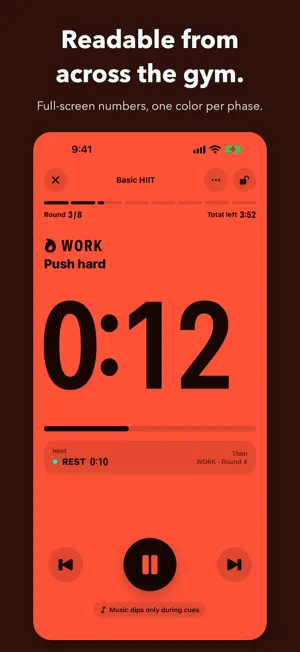
Leave your phone on the floor and still read the clock. PulsePro fills the screen with the number and paints the whole display a different color for work and rest. Tabata, HIIT, EMOM, AMRAP — build any of them to the second. A plain stopwatch never tells you whether you are meant to be moving or resting, or how many rounds are left. PulsePro changes the entire screen color per phase and puts the countdown in the largest type that fits. From across the room, mid-burpee, one glance is enough. [Readable from a distance] - The whole screen changes color per phase (warm up / work / rest / cool down) - Full-screen countdown, with the round shown as "3/8" at all times - "Next" and "Then" sit under the clock, so nothing catches you off guard - Turn the phone sideways for a stripped-back layout built for the gym - The countdown also runs on the Lock Screen and in the Dynamic Island [Built to the second] - Arrange warm up, work, rest and cool down in any order - Set a repeat count per group (20s work + 10s rest, eight rounds) - EMOM (start every minute) and AMRAP (as many rounds as you can) included - Templates for Tabata, HIIT 40/20 and a bodyweight circuit - Hit "try" while editing to run what you just built [Cues you can hear, or see] - Spoken cues (English or Japanese) or four sound effects - Separate halfway and last-ten-seconds cues - Music ducks only while a cue plays, then comes straight back - Screen flash and rear light cues for headphones and noisy gyms - Wave your hand over the phone to pause, for sweaty hands and gloves [Everything you finish adds up] - Log effort (RPE 1-10) and a note the moment you stop - Weekly, monthly and yearly totals, a twelve-week heat map, and an effort trend - Browse by calendar or list, and search by preset name or note - Set a weekly target and watch the streak build - Export the whole log to CSV for any spreadsheet [One tap from the Home Screen] - Start a favorite session from a widget or Control Center - Start it with Shortcuts or your voice assistant - Save finished sessions to Apple Health as HIIT workouts (optional) [About Pro] One purchase. No subscription. The core timer, Lock Screen countdown, history, insights and Health saving all stay available without it. Pro removes the preset and block limits and unlocks EMOM/AMRAP, iCloud sync, the flash and light cues, and hands-free pause. When you cannot hear and cannot get close, the clock still has to be right. PulsePro keeps time so you can keep moving.
What’s new
Version 2.0.0 · Updated September 21, 2026
- Added a short walkthrough for new users, with optional sample sessions so the insights and history screens make sense right away (removable in one tap later) - Rebuilt Insights: week / month / year, a twelve-week heat map, an effort (RPE) trend, and a per-preset breakdown - Rebuilt the Journal: pick a day from the calendar, search by preset name or note, and select several records to delete at once - Records now carry an effort score (RPE 1-10) and a note. Both are editable and save themselves - Set a weekly target and see how the streak is holding up in Insights - iCloud sync is now part of Pro. Without it your records still live on the device and still export to CSV - Reviewed every English and Japanese string across the app, the widget and system-facing text
App privacy
The developer, Toshihiro Nakao, reported these privacy practices to Apple.
Data Not Linked to You
The following data, which may be collected but is not linked to your identity, may be used for the following purposes:
- Usage Data: Product Interaction
- Diagnostics: Crash Data, Performance Data, Other Diagnostic Data
Used for: Analytics, App Functionality
Alternatives to PulsePro Interval Timer
Looking for apps like PulsePro Interval Timer? Here are 6 similar apps on the App Store. The highest rated is TheraNotes: AI Therapy Journal (5.0/5), and all 6 are free to download.
-
 JiaAn Care: Family Care
-
 TheraNotes: AI Therapy Journal
5.0
-
 HIGHER Movement
-
 SKILL Fitness Studio New
5.0
-
 Collegiate Fit Expo
-
 Wobbly: Sobriety Tracker
5.0
| App | Rating | Price | Last updated | Compare |
|---|---|---|---|---|
| PulsePro Interval Timer | – | Free | September 21, 2026 | |
| JiaAn Care: Family Care | – | Free | Oct 26, 2026 | Compare |
| TheraNotes: AI Therapy Journal | 5.0 / 5 (1) | Free | Aug 3, 2026 | Compare |
| HIGHER Movement | – | Free | Jan 4, 2026 | Compare |
| SKILL Fitness Studio New | 5.0 / 5 (24) | Free | Feb 1, 2024 | Compare |
| Collegiate Fit Expo | – | Free | Sep 5, 2026 | Compare |
| Wobbly: Sobriety Tracker | 5.0 / 5 (3) | Free | Oct 19, 2026 | Compare |