

Captions AI Video
Yaroslav Mykhailov Photo & Video iPhoneiPadiPod touchMac
Captions AI Video is a free Photo & Video app for iPhone and iPad by Yaroslav Mykhailov. Requires iOS 18.6. Updated October 5, 2026.
- Price
- Free
- on the App Store
- Size
- 19 MB
- Age 4+
- Updated
- Oct 5
- 2026 · v1.2
Screenshots
About Captions AI Video
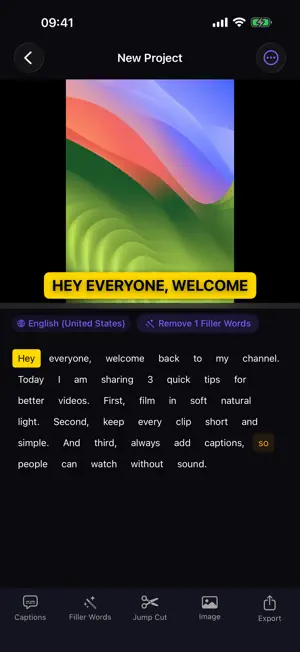
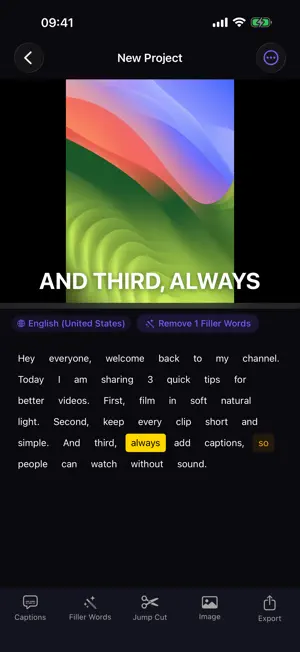
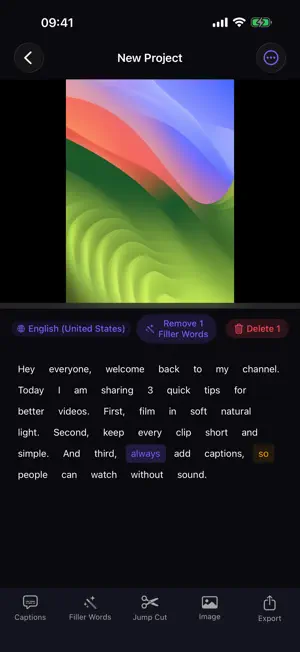
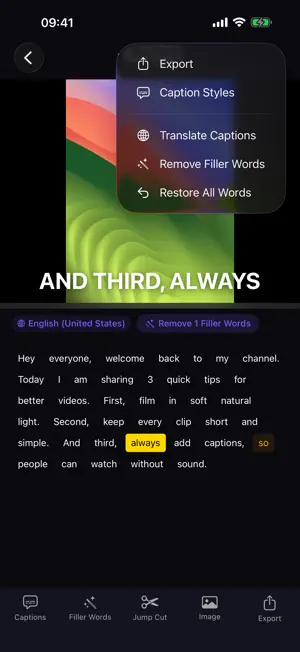
Turn talking videos into polished, captioned clips on iPhone, iPad, and Mac. Captions AI Video uses private, on-device AI: your video and transcript stay on your device. AUTO CAPTIONS, READY TO EDIT Import a video and create an editable, word-by-word transcript with precise timing. Choose the spoken language or let Whisper detect it automatically. EDIT VIDEO LIKE TEXT Delete words from the transcript to cut the matching moments from your video. Remove filler words, rewrite captions, and adjust timing without learning a complex timeline. CAPTIONS FOR EVERY FORMAT Choose from 22 animated caption styles, customize text and colors, and reframe your video for vertical, square, or landscape platforms. PRIVATE ON-DEVICE AI Speech recognition runs locally on your device. Your source video is not uploaded to a captioning service. The AI model downloads once and remains available offline. BUILT FOR CREATOR WORKFLOWS • Word-by-word captions • Text-based video cuts • Filler-word removal • Editable caption timing and styles • Vertical, square, and landscape resizing • TXT, SRT, and VTT subtitle export • Custom logo overlays with Pro • Scrolling teleprompter FREE TO START Import and transcribe videos at no cost. Your first 720p video export is free and includes a small Captions AI watermark. CAPTIONS AI VIDEO PRO Upgrade for: • Unlimited video exports • 1080p and 4K quality • All 22 animated caption styles • Watermark-free exports • Custom logo and brand overlays Subscriptions renew automatically unless cancelled at least 24 hours before the end of the current period. You can manage or cancel a subscription in your Apple ID account settings. Privacy Policy: https://docgpt.ai/privacy-captions-ai-video Terms of Service: https://docgpt.ai/terms-captions-ai-video
What’s new
Version 1.2 · Updated October 5, 2026
• Upgrading is easier: plans and the free trial button are now always visible on Mac, iPhone and iPad • Fixed premium caption styles not opening the Pro screen on iPhone and iPad • Quick access to Pro from the Projects screen on iPhone and iPad • Stability improvements
App privacy
The developer, Yaroslav Mykhailov, reported these privacy practices to Apple.
Data Not Collected
The developer does not collect any data from this app.
Alternatives to Captions AI Video
Looking for apps like Captions AI Video? Here are 6 similar apps on the App Store. The highest rated is Pinch Video & Photo Compressor (5.0/5), and all 6 are free to download.
-
 Viral Captions & Video Text
-
 Pinch Video & Photo Compressor
5.0
Pinch Video & Photo Compressor
5.0
-
 Caption Roulette
-
 Veditist Video Speed Reverse
-
 AI Captions: Subtitle Maker
4.0
AI Captions: Subtitle Maker
4.0
-
 Auto Captions for Video AI
3.5
Auto Captions for Video AI
3.5
| App | Rating | Price | Last updated | Compare |
|---|---|---|---|---|
| Captions AI Video | – | Free | October 5, 2026 | |
| Viral Captions & Video Text | – | Free | Aug 11, 2026 | Compare |
| Pinch Video & Photo Compressor | 5.0 / 5 (1) | Free | Oct 10, 2026 | Compare |
| Caption Roulette | – | Free | Feb 23, 2026 | Compare |
| Veditist Video Speed Reverse | – | Free | Aug 28, 2026 | Compare |
| AI Captions: Subtitle Maker | 4.0 / 5 (1) | Free | Jul 31, 2026 | Compare |
| Auto Captions for Video AI | 3.5 / 5 (2) | Free | May 24, 2026 | Compare |
Compare Captions AI Video with the top alternatives: ratings, updates, ASO score and keyword gaps →