

Family Calendar Planner-Toggly
Golinski Ventures Sp. z o.o. Productivity iPhoneiPadiPod touchApple Watch
Family Calendar Planner-Toggly is a free Productivity app for iPhone and iPad by Golinski Ventures Sp. z o.o. Rated 3.5/5 from 2 ratings. Requires iOS 18.0.
- Rating
- 3.5
- 2 ratings
- Price
- Free
- on the App Store
- Size
- 118 MB
- Age 4+
- Updated
- Oct 15
- 2026 · v1.4.0
Screenshots


About Family Calendar Planner-Toggly
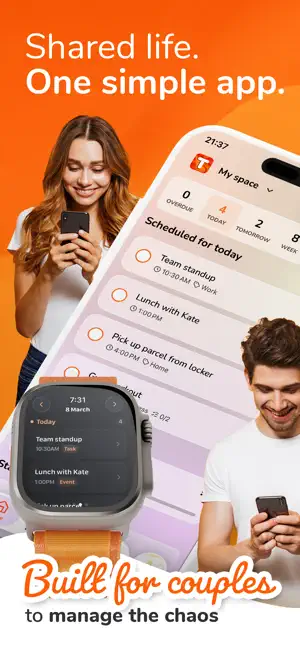
Plan less. Live more. Together. Toggly is the shared planner for couples, families and roommates. Calendar, to-do lists and expense tracking - finally in one app that everyone can use, on any device. No more "What are you doing Saturday?" texts. No more forgotten groceries. No more arguments about who paid for what. Toggly keeps everyone on the same page - automatically. ---------------------- SHARED CALENDAR Your calendar. Their calendar. One view. Day, week and month views with colour tags, priorities, notes and subtasks. Set reminders so nothing falls through the cracks. SHARED TO-DO LISTS Lists that update for both of you. Groceries, chores, weekend ideas - everything in one place. Create multiple lists, drag to reorder, check items off and watch progress together. EXPENSE TRACKING Split expenses without the awkward conversation. Add income and expenses, assign them to budgeted categories, and see where the money goes with clear charts. 35 currencies supported. FOCUS TIMER Stay focused. Built-in Pomodoro timer (25/5/15) with session stats, automatic cycles and a home screen widget. REAL COLLABORATION • Shared boards - one space for your household • Invite via link or QR code - takes seconds • Assign tasks to people • Live activity feed - see what changed and when • Guest mode - no sign-up needed to get started ALWAYS WITH YOU • 12 widgets: Home Screen, Lock Screen & Control Center • Siri Shortcuts and Spotlight search • Apple Watch companion app • Sync with Apple Calendar, Google Calendar & Outlook (Pro) • Export: JSON (free), CSV & ICS (Pro) • Dark, light and system modes • 11 themes and accent customisation • 28 languages ---------------------- FREE PLAN INCLUDES • 1 board for up to 2 people • 5 to-do lists with up to 20 items each • Calendar with all views • Expense tracking with charts and budgets • Focus timer with Live Activities • All widgets and themes • Siri, Spotlight and Apple Watch • No ads. TOGGLY PRO Need more? Pro unlocks: • Up to 10 boards with 20 people each • Unlimited lists, items, subtasks and tags • Recurring tasks and expenses • Calendar sync (Apple, Google, Outlook) • CSV & ICS export • Face ID lock • Realtime sync Start with a free 7-day trial. Plans include monthly, yearly and lifetime options. ---------------------- CROSS-PLATFORM Works on iOS and the web. Everyone can join - regardless of their device. Data syncs automatically across all platforms. PRIVACY & SECURITY Your data belongs to you. Each user can only access their own boards. We use encryption and database-level isolation. Sign in with Apple, Google or email. No ads, no data selling. ---------------------- Start in 30 seconds. Download free and invite someone you love. Questions? Feedback? We'd love to hear from you: [email protected] togglyapp.com Terms: togglyapp.com/terms Privacy: togglyapp.com/privacy
What’s new
Version 1.4.0 · Updated October 15, 2026
• Siri: add tasks and list items, or mark them done. With the new Siri, where available: create and move events, edit and delete items (shared boards ask before deleting for everyone), and act on what's on screen or in a notification. • Made for iPhone Duo: tabs on the outer screen and a two-pane planner when you unfold it. • A fresh look for iOS 27, plus Control Center controls and Apple Watch complications. • A new extra-large This Week widget with checkboxes, widgets that look right on tinted Home Screens, and the Today widget rising in the Smart Stack before your next task. • Accessibility: larger text support in more places, Reduce Transparency, and Increase Contrast. • More reliable offline mode - changes you make offline are kept until they sync - plus small fixes. New Siri features require iOS 27 and are available only in supported regions and languages.
App privacy
The developer, Golinski Ventures Sp. z o.o., reported these privacy practices to Apple.
Data Linked to You
The following data, which may be collected and linked to your identity, may be used for the following purposes:
- Identifiers: User ID
- Usage Data: Product Interaction
- Purchases: Purchase History
- Contact Info: Email Address, Name
Used for: Analytics, App Functionality
Data Not Linked to You
The following data, which may be collected but is not linked to your identity, may be used for the following purposes:
- Diagnostics: Crash Data, Performance Data
Used for: App Functionality