

PhotoDateStamp: Timestamp
路洋 邱 Photo & Video iPhoneiPadiPod touch
PhotoDateStamp: Timestamp is a free Photo & Video app for iPhone and iPad by 路洋 邱. Rated 5.0/5 from 1 ratings. Requires iOS 17.0. Updated November 4, 2026.
- Rating
- 5.0
- 1 ratings
- Price
- Free
- on the App Store
- Size
- 86 MB
- Age 4+
- Updated
- Nov 4
- 2026 · v3.2.0
Screenshots
Save to Pinterest
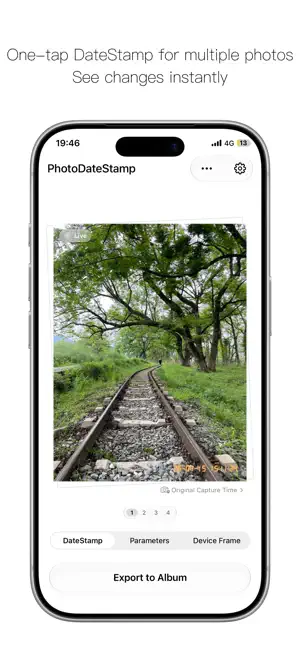


About PhotoDateStamp: Timestamp
Add the date a photo was taken, and keep the moments from your trips, everyday life and family memories easy to place in time. PhotoDateStamp adds retro timestamps and camera settings to photos and Live Photos. You can also put screenshots inside iPhone device frames. CHOOSE HOW THE DATE APPEARS • Use an available capture date, the current time or a custom date. • Show just the date, the date with hours and minutes, or the date with seconds. STAMP PHOTOS AND LIVE PHOTOS • Add timestamps or camera-parameter watermarks to Live Photos and preview their motion. • Select up to 9 photos at a time. • If Live Photo processing times out or fails, the app notifies you and switches to a still photo so you can continue. SHOW YOUR CAMERA SETTINGS • Display available EXIF data, including device model, focal length, aperture, shutter speed and ISO. • Show camera settings, the date and time, or both. • Choose a strip layout or a Liquid Glass style. Available details depend on the original photo's metadata. FRAME YOUR SCREENSHOTS • Add an iPhone device frame and choose a model and color. • Use portrait or landscape layouts to share your screen. USE SIRI AND SHORTCUTS • Ask Siri to add a timestamp to your latest photo and save it, without opening the app. • Start your workflow from Shortcuts, widgets or Photos extensions. • Find processed photos in a dedicated album. ON-DEVICE PROCESSING, NO ADS Watermark processing takes place on your device. Your photos are not uploaded. Purchases, restoring purchases and downloading photos from the system's cloud library may require a connection. Try the app for 7 days. After the trial, choose an annual subscription or a lifetime purchase to continue. See the in-app purchase screen for pricing and terms. Terms of Service & Privacy Policy: https://yi-cheng.feishu.cn/docx/BaKMdcFsEoZ1m8xmw8ZcjzUMnhc
What’s new
Version 3.2.0 · Updated November 4, 2026
This update • Customize timestamp watermark colors. • Add frames for iPhone 18 Pro, 18 Pro Max, and iPhone Duo screenshots. • Refined iPhone Duo support and interactions. Recent updates • Live Photos that time out switch to stills, so you can keep watermarking and exporting. • Ask Siri to timestamp your latest photo without opening the app. • Choose date-only or date-and-time formats; add camera details with Liquid Glass. • Use system transparency settings, find watermarked photos in a dedicated album, and enjoy a refined guide and Settings.
App privacy
The developer, 路洋 邱, reported these privacy practices to Apple.
Data Not Collected
The developer does not collect any data from this app.
Alternatives to PhotoDateStamp: Timestamp
Looking for apps like PhotoDateStamp: Timestamp? Here are 6 similar apps on the App Store. The highest rated is PicPure - Smart Photo Cleaner (5.0/5), and all 6 are free to download.
-
 SplitCam: Dual Recorder
4.6
-
 PicPure - Smart Photo Cleaner
5.0
-
 MiroMiro: Wear the Magic
4.0
-
 Exiv - EXIF Viewer & Editor
5.0
-
 Swipe Photo Cleaner : piclean
4.5
-
 Video Editor - ClipFlow
4.9
| App | Rating | Price | Last updated | Compare |
|---|---|---|---|---|
| PhotoDateStamp: Timestamp | 5.0 / 5 (1 rating) | Free | November 4, 2026 | |
| SplitCam: Dual Recorder | 4.6 / 5 (5) | Free | Sep 13, 2026 | Compare |
| PicPure - Smart Photo Cleaner | 5.0 / 5 (1) | Free | May 18, 2026 | Compare |
| MiroMiro: Wear the Magic | 4.0 / 5 (4) | Free | Aug 10, 2026 | Compare |
| Exiv - EXIF Viewer & Editor | 5.0 / 5 (4) | Free | Aug 24, 2026 | Compare |
| Swipe Photo Cleaner : piclean | 4.5 / 5 (4) | Free | Oct 21, 2026 | Compare |
| Video Editor - ClipFlow | 4.9 / 5 (20) | Free | Nov 11, 2026 | Compare |