

Map Maker - City Guide & Maps
BULPARA TEKNOLOJI LIMITED SIRKETI Travel iPhoneiPadiPod touch
Map Maker - City Guide & Maps is a free Travel app for iPhone and iPad by BULPARA TEKNOLOJI LIMITED SIRKETI. Requires iOS 17.0. Updated March 12, 2026.
- Price
- Free
- on the App Store
- Size
- 6 MB
- Age 4+
- Updated
- Mar 12
- 2026 · v1.0
Screenshots

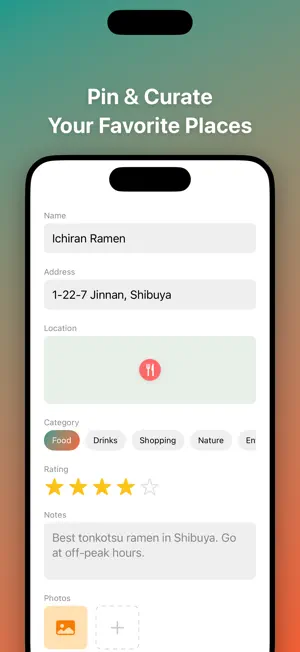


About Map Maker - City Guide & Maps
Create beautiful custom maps of your favorite places. Map Maker lets you build curated local guides with pins, photos, ratings, and notes — then share them as stunning images. Whether it's your favorite coffee spots, a weekend travel itinerary, or hidden gems only locals know, your maps tell the story. ▸ BUILD YOUR PERFECT MAP Create unlimited themed maps for any occasion. • Drop pins — search places, use your location, or browse the Discover tab • Add rich details — notes, photos, star ratings, and categories • Choose your style — Standard, Satellite, Dark, Muted, Vibrant, or Terrain • Organize by category — Food, Drinks, Shopping, Nature, Entertainment, and Custom ▸ DISCOVER PLACES NEARBY Find and save great spots without leaving the app. • Browse 8 categories — restaurants, coffee, bars, shopping, parks, museums, gyms, hotels • Search by city — explore destinations before you visit • One-tap save — add any place directly to your maps • Distance sorting — see what's closest to you right now ▸ SHARE YOUR GUIDES Turn your maps into beautiful shareable images. • Export as image — share on Instagram, WhatsApp, or Messages • Full-quality export — no watermark with Premium • Link sharing — send your map to anyone • No app required — recipients see your guide instantly ▸ PRICING FREE: • 3 maps with up to 25 pins each • 1 photo per pin • Standard map style • Share with watermark PREMIUM SUBSCRIPTION Map Maker Premium is available with the following subscription options: Premium Monthly: $3.99/month Premium Annual: $19.99/year (Save 58%) — includes 7-day free trial Unlimited maps & pins. 5 premium map styles. 4 photos per pin. Full-quality image export. Zero ads. Payment will be charged to your Apple ID account at confirmation of purchase. Subscription automatically renews unless canceled at least 24 hours before the end of the current period. Your account will be charged for renewal within 24 hours prior to the end of the current period. You can manage and cancel your subscriptions by going to your App Store account settings after purchase. Terms of Service: https://mapmaker.bulpara.com/terms Privacy Policy: https://mapmaker.bulpara.com/privacy
App privacy
The developer, BULPARA TEKNOLOJI LIMITED SIRKETI, reported these privacy practices to Apple.
Data Used to Track You
The following data may be used to track you across apps and websites owned by other companies:
- Identifiers: Device ID
- Usage Data: Advertising Data
Data Not Linked to You
The following data, which may be collected but is not linked to your identity, may be used for the following purposes:
- Identifiers: Device ID
- Usage Data: Advertising Data
- Location: Precise Location
Used for: Third-Party Advertising, App Functionality
Alternatives to Map Maker - City Guide & Maps
Looking for apps like Map Maker - City Guide & Maps? Here are 6 similar apps on the App Store. The highest rated is My Traveler Map (5.0/5), and all 6 are free to download.


| App | Rating | Price | Last updated | Compare |
|---|---|---|---|---|
| Map Maker - City Guide & Maps | – | Free | March 12, 2026 | |
| localthings: Map Maker | – | Free | Sep 8, 2026 | Compare |
| Livlymaps | – | Free | Oct 12, 2026 | Compare |
| My Traveler Map | 5.0 / 5 (1) | Free | Jun 19, 2026 | Compare |
| mapMySheet | – | Free | Apr 8, 2024 | Compare |
| Yoon Maps | – | Free | Oct 18, 2026 | Compare |
| Travel Plan Maker | – | Free | Apr 12, 2026 | Compare |