

Helio. Energy & Habit Tracker
Oleksandr Slobodianiuk Health & Fitness iPhoneiPadiPod touchMacApple Watch
Helio. Energy & Habit Tracker is a free Health & Fitness app for iPhone and iPad by Oleksandr Slobodianiuk. Requires iOS 26.0. Updated October 14, 2026.
- Price
- Free
- on the App Store
- Size
- 71 MB
- Age 4+
- Updated
- Oct 14
- 2026 · v3.4
Screenshots
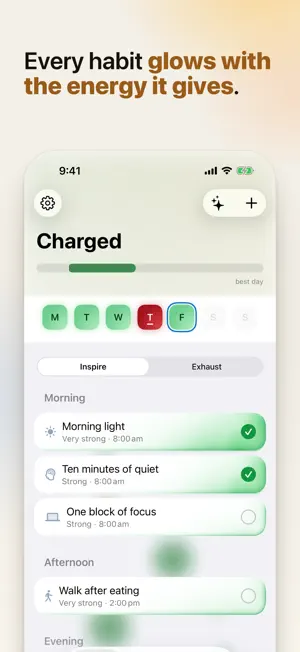
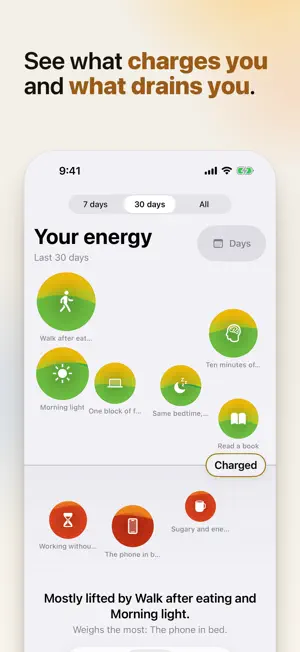


About Helio. Energy & Habit Tracker
Helio shows which habits give you energy and which take it away. Log each one with a tap, see your week in charts, and ask Helio’s AI why a day went the way it did. Every habit is either an Inspire, which charges you, or an Exhaust, which drains you, at one of five strengths. Tap it when you do it and its row lights up: the more energy it gives, the further its glow reaches, and drains glow deep red. One word sums up how the day is going, the balance shows where it sits between your worst possible day and your best, and the week strip colors each day by how it went. Prefer numbers? They are one switch away in Settings. No streak guilt, no scoring you against strangers. Just your own day, honestly counted. INSIGHTS AND CHAT • Insights open on “Your week” with your days in charts, then cards that each lead with their own chart, all built only from your own logs • Chat answers questions about your habits from your real history, with figures and small charts right inside the reply • Keep several chats, pin one to the top, or start a New chat any time • Dictate instead of typing, or talk it through in a live voice call you can interrupt; the call is saved to your chats as text • Snap a photo of your lunch, or pick one from your library, and ask about it • The AI reads your history but never logs or changes anything for you ONE TAP, EVERYWHERE • Small and medium Home Screen widgets, the medium one logging a habit without opening the app, plus Lock Screen widgets • An Apple Watch app with the day’s word, its balance and your habit list, plus watch-face complications in all four styles • Helio for Mac in the menu bar: how today is going and your habits, one click to log (sign in on your iPhone first) • Everything stays in sync, and taps made offline arrive when you reconnect BUILT FOR REAL DAYS • Habits grouped into Morning, Afternoon, Evening and Any time, with reminders on the days you choose • Carry-over energy for habits that keep paying off tomorrow • Past days stay editable, so a forgotten log is not lost • “Happened Today” for one-off things that will never be a habit • Notes on any habit, on any day, and one note for the whole day MADE TO LOOK AT • An ambient particle background that reflects the shape of your day • Haptics that feel different for an Inspire, an Exhaust and a day fully logged • Light and dark mode, and the particle background can be switched off YOURS, AND PRIVATE • Works with no account at all; nothing forces you to sign in • Sign in with Apple or Google only if you want your habits on more than one device • No ads, no third-party tracking, nothing sold to anyone New here? A short introduction walks you through it on first launch, and you can replay it any time from Settings. Available in Czech, Danish, Dutch, English, Estonian, Finnish, French, German, Icelandic, Irish, Italian, Latvian, Lithuanian, Norwegian Bokmål, Polish, Portuguese, Russian, Swedish and Ukrainian. Helio Pro and Helio Max are optional auto-renewing subscriptions. Terms of Use: https://skylabmain-dot.github.io/privacy-page-energy-tracker/terms.html
What’s new
Version 3.4 · Updated October 14, 2026
Helio 3.4 gives Today a new look. YOUR HABITS GLOW Habits now show their energy as light instead of numbers. The more a habit gives you, the further its glow reaches, and drains glow deep red. One word sums up the day: Charged, Steady or Running low. YOUR WEEK AT A GLANCE The week strip on Today colors each day by how it went. The month calendar now lives in Your energy, under Days. A NOTE FOR EVERY DAY “How was today?” on Today keeps one note for the whole day, and you can write one for any past day too. ADD AND EDIT, REDESIGNED A new sheet for adding and editing habits: choose whether a habit charges or drains you, pick one of five strengths and see the row exactly as it will look on Today. Hold any habit on Today to edit it, add a note for today or delete it. PREFER NUMBERS? They are one switch away: Settings > Energy display. If you used Helio before this update, a card on Today offers that switch once. WIDGETS, APPLE WATCH AND MAC New Lock Screen widgets. The Home Screen widgets, the Apple Watch app and the Mac menu bar app now show the day’s word and follow your choice of Glow or Numbers. Plus a round of fixes across the app.
App privacy
The developer, Oleksandr Slobodianiuk, reported these privacy practices to Apple.
Data Linked to You
The following data, which may be collected and linked to your identity, may be used for the following purposes:
- Purchases: Purchase History
- Identifiers: User ID, Device ID
- Usage Data: Product Interaction, Advertising Data
- Contact Info: Email Address, Name
- User Content: Photos or Videos, Audio Data, Customer Support, Other User Content
- Diagnostics: Crash Data, Other Diagnostic Data
Used for: Analytics, App Functionality
Data Not Linked to You
The following data, which may be collected but is not linked to your identity, may be used for the following purposes:
- Location: Coarse Location
- Usage Data: Other Usage Data
- Diagnostics: Performance Data
Used for: Analytics, App Functionality
Alternatives to Helio. Energy & Habit Tracker
Looking for apps like Helio. Energy & Habit Tracker? Here are 6 similar apps on the App Store.
-
 Tide: Energy Tracker
-
 My Energy Tracker
-
 Cairn: Habit & Mood Journal
-
 Lune Dream - AI Sleep Coach
-
 Cairn: Gentle Habit Tracker
-
 Peakly: Energy Tracker
| App | Rating | Price | Last updated | Compare |
|---|---|---|---|---|
| Helio. Energy & Habit Tracker | – | Free | October 14, 2026 | |
| Tide: Energy Tracker | – | Free | Jul 9, 2026 | Compare |
| My Energy Tracker | – | Free | Dec 30, 2025 | Compare |
| Cairn: Habit & Mood Journal | – | Free | Jul 31, 2026 | Compare |
| Lune Dream - AI Sleep Coach | – | Free | Mar 30, 2026 | Compare |
| Cairn: Gentle Habit Tracker | – | Free | Jul 24, 2026 | Compare |
| Peakly: Energy Tracker | – | Free | Mar 30, 2026 | Compare |