

FocusFrog
DazzleAppz Productivity iPhoneiPadiPod touch
FocusFrog is a free Productivity app for iPhone and iPad by DazzleAppz. Requires iOS 13.0. Updated September 22, 2026.
- Price
- Free
- on the App Store
- Size
- 28 MB
- Age 4+
- Updated
- Sep 22
- 2026 · v1.1
Screenshots
About FocusFrog
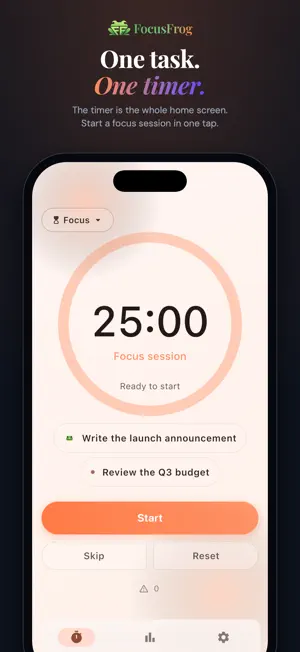
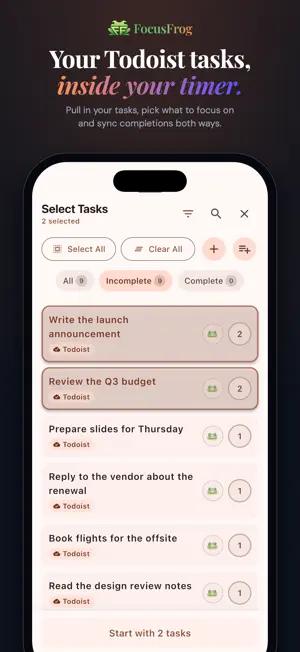
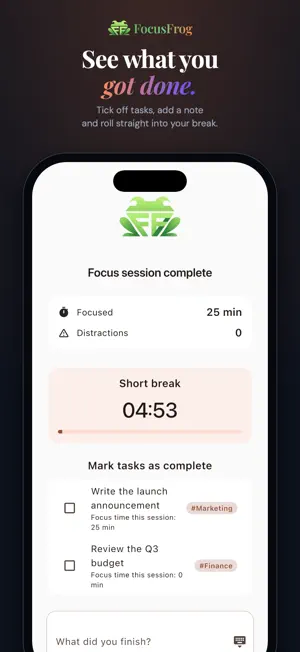
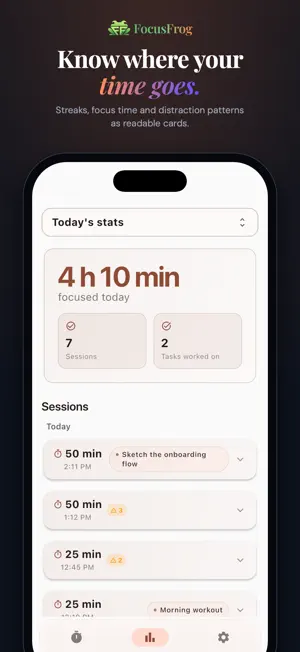
FocusFrog is a Pomodoro timer that puts the timer first. No signup walls, no twelve-step setup - just open it and start focusing. Start a focus session in one tap from a cold launch. When the bell rings, take a break. FocusFrog handles the Focus → Break → Focus cycle automatically, or you can control it manually. Terms of Use: https://www.apple.com/legal/internet-services/itunes/dev/stdeula/ What makes FocusFrog different: Timer-first design: the timer isn't buried behind a task list or settings screen Todoist sync: pull in your tasks and sync completions both ways Daily Frog: mark your most important task so you can't ignore it - eat that frog first Distraction Logger: tap a button to log interruptions without breaking flow Auto-Pilot Mode: auto-start breaks and focus sessions so you just keep working 10 handcrafted themes that transform the entire app, not just an accent color Stats that tell a story: streaks, best focus window, distraction patterns, productivity rate Session notes, pomodoro goals, and multiple tasks per session Lock screen timer, DND auto-mode, and background running Backup & Restore: your data stays yours The core timer and every essential feature are free forever. FocusFrog Pro unlocks premium themes (Ocean, Forest, Sunset, Midnight, Aurora, Cherry Blossom), advanced analytics with weekly and monthly trend charts, achievements & badges, and full session history. No account required. No ads. Just focus.
What’s new
Version 1.1 · Updated September 22, 2026
Your timer, outside the app FocusFrog now runs as a Live Activity. The countdown stays on your lock screen and in the Dynamic Island, and you can pause, resume, skip or end a session from there without opening the app. The time you see there matches the app to the second. Keep screen on, your way A new setting lets you choose when the screen stays awake: all the time while FocusFrog is open, only while a timer is running, or never. A calmer finish The end of a session is gentler: a soft hand-off from focus to break, a light haptic, and a quiet pulse of the ring. The session summary now works in landscape too. Polish • Lighter, easier-to-read timer digits • Longer task names fit on the Stats screen • Clearer, more consistent wording throughout Settings and notifications Fixes • A completed session could occasionally be counted twice. It no longer is. • The timer restores reliably when you come back to the app after a long break. Thanks for focusing with FocusFrog. If something isn't right, reply from Settings or leave a review. We read everything!
App privacy
The developer, DazzleAppz, reported these privacy practices to Apple.
Data Not Collected
The developer does not collect any data from this app.
Alternatives to FocusFrog
Looking for apps like FocusFrog? Here are 6 similar apps on the App Store. The highest rated is Session Pomodoro Focus Timer (4.8/5), and all 6 are free to download.
-
 Flowmo: Flowmodoro Timer
4.0
Flowmo: Flowmodoro Timer
4.0
-
 ADHD Organizer: Llama Life
4.5
ADHD Organizer: Llama Life
4.5
-
 Session Pomodoro Focus Timer
4.8
Session Pomodoro Focus Timer
4.8
-
 Morgen Calendar & Planner
4.4
Morgen Calendar & Planner
4.4
-
 Capacities – Notes & PKM
4.3
Capacities – Notes & PKM
4.3
-
 Superlist: To Do List & Team
4.5
Superlist: To Do List & Team
4.5
| App | Rating | Price | Last updated | Compare |
|---|---|---|---|---|
| FocusFrog | – | Free | September 22, 2026 | |
| Flowmo: Flowmodoro Timer | 4.0 / 5 (7) | Free | Feb 14, 2026 | Compare |
| ADHD Organizer: Llama Life | 4.5 / 5 (117) | Free | Jun 13, 2026 | Compare |
| Session Pomodoro Focus Timer | 4.8 / 5 (364) | Free | Jul 16, 2026 | Compare |
| Morgen Calendar & Planner | 4.4 / 5 (213) | Free | May 20, 2026 | Compare |
| Capacities – Notes & PKM | 4.3 / 5 (114) | Free | Sep 22, 2026 | Compare |
| Superlist: To Do List & Team | 4.5 / 5 (454) | Free | Sep 23, 2026 | Compare |
Compare FocusFrog with the top alternatives: ratings, updates, ASO score and keyword gaps →