

StockScan – Inventory & Stock
Sascha Bommels Utilities iPhoneiPadiPod touchApple Watch
StockScan – Inventory & Stock is a free Utilities app for iPhone and iPad by Sascha Bommels. Requires iOS 18.0. Updated September 14, 2026.
- Price
- Free
- on the App Store
- Size
- 10 MB
- Age 4+
- Updated
- Sep 14
- 2026 · v1.4.0
Screenshots


About StockScan – Inventory & Stock
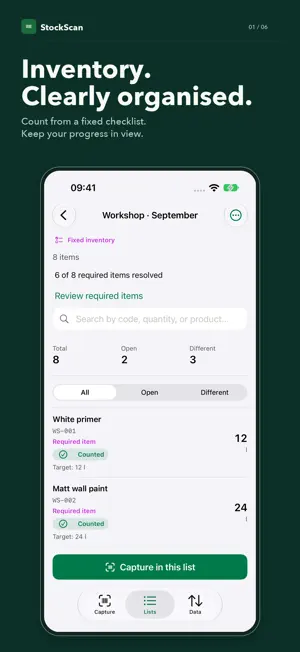
Inventory with a clear view – from the first scan to the finished report. Count items in your warehouse, workshop or service van. Scan barcodes, EANs and QR codes, or enter item numbers. Calculate quantities right in the app. The core inventory workflow works offline. COUNT FREELY OR FOLLOW A CHECKLIST Start a free inventory and capture the items you find. Or import a fixed checklist from Excel, CSV or TSV. Scan in any order; additional items are clearly labelled. Before completion, StockScan reminds you of required items still open. Count them or explicitly skip them. PUT YOUR PRODUCT DATA TO WORK Import product details and manufacturer or supplier mappings from Excel. Fixed checklists are matched against your existing product master data: missing EANs, names and units are filled when the match is unique. Reset counts and reuse the same checklist. CAPTURE. LISTS. DATA. Three focused areas connect scanning, quantity calculations, search and data transfer. Keep your active capture list in view. Units, comments and item details are within easy reach. Live Activities show progress on the Lock Screen and in the Dynamic Island on supported iPhones. REPORTS AND HISTORY Export CSV for free or enriched Excel files with Pro. Complete inventories and preserve the counted state in history. Fixed inventory reports distinguish counted, open and skipped items. COUNT FROM YOUR WRIST Count one item on Apple Watch for free. Pro sends entire inventory lists to browse and count. When the connection drops, changes are queued until iPhone confirms them. FREE & PRO Free includes one active inventory with up to 100 distinct items, completion, history and unlimited CSV export. Pro adds unlimited active inventories and items, Fast Scan, XLSX reports, templates, target/actual review, history comparisons, difference reports and Watch list mode. Optional private iCloud sync between your own Apple devices is available with Pro. German and English. Supports VoiceOver, larger text and Reduce Motion. Intelligent column mapping uses Apple Intelligence on supported devices when available; standard detection remains available. StockScan Pro is available as an auto-renewable monthly or yearly subscription with Apple Family Sharing. The price, term, and any available trial are shown in the App Store before purchase and may vary by country or region. Payment is charged to your Apple ID. The subscription renews automatically unless canceled at least 24 hours before the end of the current period. You can manage or cancel it in your App Store account settings after purchase. Customers who previously purchased the paid app keep permanent Pro access. Existing inventory data remains visible without an active Pro subscription. Terms of Use (EULA): https://www.apple.com/legal/internet-services/itunes/dev/stdeula/
What’s new
Version 1.4.0 · Updated September 14, 2026
New in 1.4.0 – all changes since App Store version 1.2.2: FREE AND FIXED INVENTORIES • Keep counting freely, or import a fixed checklist from Excel, CSV or TSV. Your inventory mode stays visible in capture, lists, item details and history. • Scan required items in any order. Additional items are allowed and clearly labelled. • Before completion, review every required item that has not been counted. Count it now or explicitly skip it. Completion is available only after all required items are resolved. Counted zero and skipped remain distinct. • Imports match the checklist against your existing product master data and fill missing EANs, names and units when the match is unique. Imported values and leading zeros are preserved. • Reset counts and reuse a fixed checklist without importing it again. Deleting an individual required position reopens it for counting. • Fixed checklists remain available in history and templates. Reports include inventory mode, item type and review status; open or skipped quantities remain blank. A CLEARER WORKSPACE • Capture, Lists and Data bring daily tasks together. Settings and searchable help have a clearer structure. • Your active capture list stays selected while you browse or export other lists. Switch intentionally with “Capture in this list”. • Consistent item details, quantity calculations, units and comments. Drafts survive opening and dismissing Pro. • Search, sorting, open and different items, progress, completion, target quantities and Watch actions are within easy reach. • Updated onboarding, German and English labels, and improved layouts for larger text and Dark Mode. IMPORT, EXPORT AND LIVE PROGRESS • Live Activities display inventory progress on the Lock Screen and in the Dynamic Island on supported iPhones. • Intelligent import can map unfamiliar Excel/CSV columns using Apple Intelligence on supported devices. Standard column detection remains available as a fallback. • Numbers files receive clear export guidance. Import dialogs can be cancelled reliably. • Improved CSV sharing and Excel export. Export source, filters and filenames follow the selected inventory. • The camera pauses outside Capture and behind dialogs; tabs stay reachable after manual entry. • Optional private iCloud sync with Pro supports fixed checklists, including counts, skipped items, resets, history and templates. Existing inventories remain free inventories. Use 1.4.0 or later on every participating device when syncing fixed inventories.
App privacy
The developer, Sascha Bommels, reported these privacy practices to Apple.
Data Not Collected
The developer does not collect any data from this app.
Alternatives to StockScan – Inventory & Stock
Looking for apps like StockScan – Inventory & Stock? Here are 6 similar apps on the App Store. The highest rated is Converter (5.0/5), and 3 of the 6 are free to download.
-
 Counter Smart | Tally Counter
-
 QuickAlarm - Widget
-
 Decibel Meter - Sound Test
-
 CameraAddress
-
 AirShout
-
 Converter
5.0
Converter
5.0
| App | Rating | Price | Last updated | Compare |
|---|---|---|---|---|
| StockScan – Inventory & Stock | – | Free | September 14, 2026 | |
| Counter Smart | Tally Counter | – | Free | Feb 28, 2026 | Compare |
| QuickAlarm - Widget | – | Free | Jul 16, 2026 | Compare |
| Decibel Meter - Sound Test | – | 0.99 USD | Sep 29, 2026 | Compare |
| CameraAddress | – | 0.49 USD | May 14, 2026 | Compare |
| AirShout | – | 0.99 USD | Apr 23, 2026 | Compare |
| Converter | 5.0 / 5 (2) | Free | Sep 14, 2026 | Compare |