

Mooneem: Personal Finance
Akash Agrahari Finance iPhoneiPadiPod touch
Mooneem: Personal Finance is a free Finance app for iPhone and iPad by Akash Agrahari. Requires iOS 15.1. Updated June 28, 2026.
- Price
- Free
- on the App Store
- Size
- 34 MB
- Age 4+
- Updated
- Jun 28
- 2026 · v1.3
Screenshots


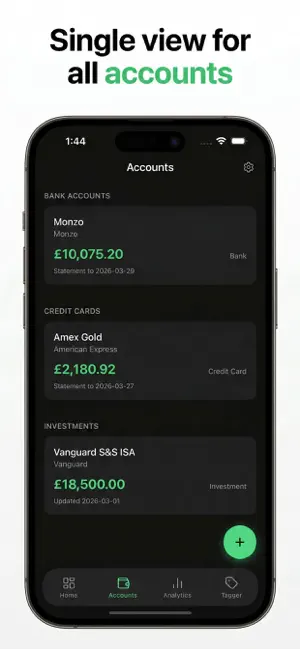
About Mooneem: Personal Finance
Most personal finance apps get in the way. They want you to create an account. Connect your bank. Pay a monthly fee. Agree to terms about how your financial data might be "used to improve your experience." And after all that — they still don't work the way you think. Mooneem is different. It was built out of frustration with exactly that. No account. No subscription. No cloud. Your data never leaves your phone. You import your bank statements as CSV files — the kind every bank already lets you export — and Mooneem does the rest. Tag merchants once, and every future transaction from that merchant is categorised automatically. Check your net worth across all accounts. See where your money actually goes each month. That's it. No social features. No budgeting "challenges". No AI suggestions about your coffee spending. Just a clean, fast, opinionated app that shows you the truth about your finances. What Mooneem does: * Import statements from Amex, Monzo, Chase and more * Auto-categorise spending by merchant * Net worth tracking across current accounts, savings, investments and pensions * Monthly and yearly spending trends by category * Multi-currency support with live exchange rates * Expense overrides for irregular periods (holidays, big purchases) * Works entirely offline What Mooneem doesn't do: * Ask for your bank login * Store anything outside your phone * Charge you anything Built for people who want to understand their money — without handing it over to someone else first.
What’s new
Version 1.3 · Updated June 28, 2026
Chase UK Credit Card support You can now import Chase UK credit card PDF statements directly. Open a statement PDF from Files, Mail, or any app and choose "Open with Mooneem" — your transactions will be imported automatically, including multi-currency purchases. Improved "Open with Mooneem" Mooneem now appears higher in the share sheet when opening CSV, Excel, and PDF files from other apps. Account owner shown when importing The "Open with" file picker now shows the account owner name alongside the institution, making it easier to pick the right account when you have multiple owners.
App privacy
The developer, Akash Agrahari, reported these privacy practices to Apple.
Data Not Collected
The developer does not collect any data from this app.
Alternatives to Mooneem: Personal Finance
Looking for apps like Mooneem: Personal Finance? Here are 6 similar apps on the App Store. The highest rated is Budget Planner - Quanta AI (5.0/5), and all 6 are free to download.
-
 Ledge Finance Tracker
-
 Settle - Split Expenses
-
 Chippy Split
-
 Rothschild & Co CardAssist
-
 Budget Planner - Quanta AI
5.0
-
 PL Capital: Stocks, MF, IPO
| App | Rating | Price | Last updated | Compare |
|---|---|---|---|---|
| Mooneem: Personal Finance | – | Free | June 28, 2026 | |
| Ledge Finance Tracker | – | Free | May 27, 2026 | Compare |
| Settle - Split Expenses | – | Free | Oct 10, 2026 | Compare |
| Chippy Split | – | Free | Nov 2, 2026 | Compare |
| Rothschild & Co CardAssist | – | Free | Aug 24, 2026 | Compare |
| Budget Planner - Quanta AI | 5.0 / 5 (9) | Free | Oct 27, 2026 | Compare |
| PL Capital: Stocks, MF, IPO | – | Free | Aug 20, 2026 | Compare |