

burner notes
Arden Knablein-Greene Productivity iPhoneiPadiPod touch
burner notes is a free Productivity app for iPhone and iPad by Arden Knablein-Greene. Rated 5.0/5 from 2 ratings. Requires iOS 17.0. Updated April 28, 2026.
- Rating
- 5.0
- 2 ratings
- Price
- Free
- on the App Store
- Size
- 5 MB
- Age 4+
- Updated
- Apr 28
- 2026 · v1.1
Screenshots
About burner notes
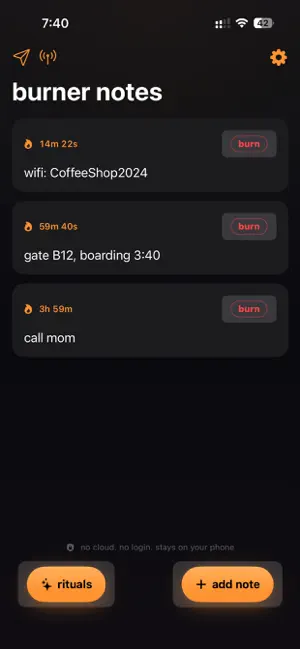
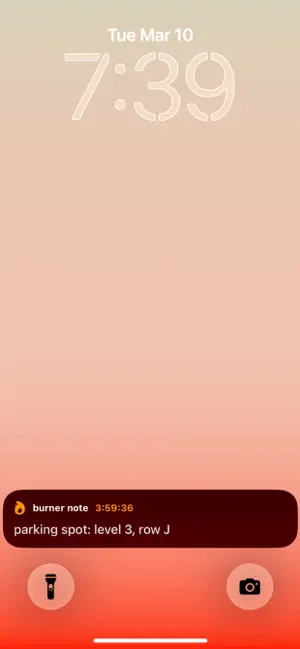
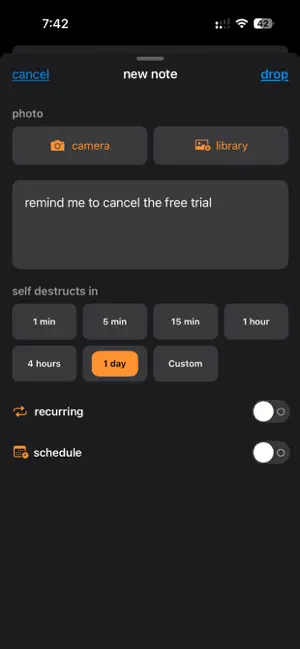
stop deleting notes you write a quick thought in notes. a password. a flight number. a grocery list. a vent. then it sits there forever because you never go back to delete it. burner notes fixes that. write it, set a timer, and it's gone when you're done with it every note has a self-destruct countdown. when time runs out, it's permanently deleted from your device. no cloud. no account. no way to get it back. that's the point how it works write a note. pick a timer: 1 minute, 5 minutes, 15 minutes, 1 hour, 4 hours, 1 day, or set a custom duration down to the minute. a live countdown appears on your lock screen and dynamic island. when the timer hits zero, it's gone. or burn it early no drafts. no archive. no undo destruction rituals when a note burns, it doesn't just disappear. it's destroyed with a full visual and haptic experience. each ritual is designed for a different feeling • classic burn - fire rises from below, words char to glowing embers, ash scatters • shredder - words split into strips and fall like paper scraps • deep sea - letters fade to ocean blue and drift upward as bubbles • black hole - text shrinks into a singularity. the void doesn't give things back • dissolve - acid eats through your words, letters corrode and drip away • avalanche - boulders fall. text crushes flat. dust settles whisper: device-to-device notes send a self-destructing note to someone nearby. no server. no cloud. no login. just encrypted peer-to-peer over bluetooth and wi-fi. they read it, it burns live everywhere • live activity countdown on your lock screen and dynamic island • home screen widget shows your soonest-expiring note make it yours • 5 extra destruction rituals with unique animations • 5 burn sounds: none, fire, whoosh, crumple, glitch • 4 vibration styles: standard, strong, double tap, pulse • 6 color themes: orange, white, red, cyan, green, purple • attach photos that burn with the note • recurring notes that auto-recreate on the same timer • scheduled notes with a future start time privacy is the architecture • zero data leaves your phone. ever • no account. no email. no sign-up • no analytics. no tracking. no telemetry • notes are permanently deleted when burned • app switcher shows a privacy screen • lock screen content is redacted when locked burner pro $2.99/month or $14.99 once forever unlocks 5 premium destruction rituals, premium sounds, vibration styles, 6 color themes, whisper, photo notes, recurring notes, scheduled notes, custom timers, and export the free version includes unlimited notes, classic burn ritual, fire sound, standard vibration, all preset timers, live activities, widgets, and full privacy requires iphone with ios 17 or later Terms of Use (EULA): https://www.apple.com/legal/internet-services/itunes/dev/stdeula/ Privacy Policy: https://gist.githubusercontent.com/ardenkg/517883cd1e4f814ce926d0d61f7bacb8/raw/gistfile1.txt
What’s new
Version 1.1 · Updated April 28, 2026
updated to new swift version, added redeem codes, fixed dynamic island persistence issue
App privacy
The developer, Arden Knablein-Greene, reported these privacy practices to Apple.
Data Not Collected
The developer does not collect any data from this app.
Alternatives to burner notes
Looking for apps like burner notes? Here are 6 similar apps on the App Store. The highest rated is Preferred Hands (5.0/5), and all 6 are free to download.
-
 SnapLines
-
 Dayfly
-
 UmtilNote - Fleeting Thoughts
-
 Bubble Note: Notes That Fade
3.0
Bubble Note: Notes That Fade
3.0
-
 Blink Notes
-
 Preferred Hands
5.0
Preferred Hands
5.0
| App | Rating | Price | Last updated | Compare |
|---|---|---|---|---|
| burner notes | 5.0 / 5 (2 ratings) | Free | April 28, 2026 | |
| SnapLines | – | Free | Jan 28, 2026 | Compare |
| Dayfly | – | Free | Sep 25, 2026 | Compare |
| UmtilNote - Fleeting Thoughts | – | Free | Apr 17, 2026 | Compare |
| Bubble Note: Notes That Fade | 3.0 / 5 (1) | Free | Jul 9, 2026 | Compare |
| Blink Notes | – | Free | Jan 6, 2025 | Compare |
| Preferred Hands | 5.0 / 5 (2) | Free | Oct 1, 2026 | Compare |
Compare burner notes with the top alternatives: ratings, updates, ASO score and keyword gaps →