

Myware: Save Videos to a Map
JORDI REINA I GARCIA Lifestyle iPhoneiPadiPod touch
Myware: Save Videos to a Map is a free Lifestyle app for iPhone and iPad by JORDI REINA I GARCIA. Requires iOS 17.0. Updated October 22, 2026.
- Price
- Free
- on the App Store
- Size
- 80 MB
- Age 4+
- Updated
- Oct 22
- 2026 · v1.11.5
Screenshots
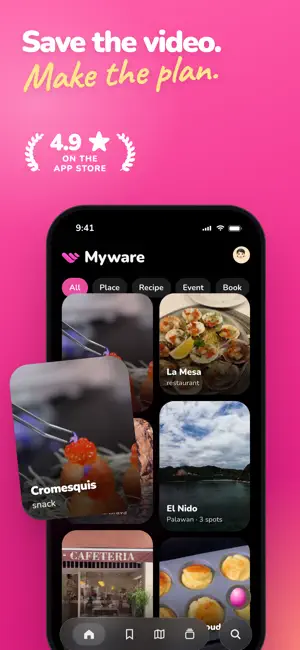


About Myware: Save Videos to a Map
Ever watch a video you love on TikTok, Reels or Shorts and then never find it again? Myware is the app for saving your favorite videos and actually coming back to them. Share a link in seconds and the app organizes it for you: places, recipes, tutorials, products, plans, outfits and routines. 4.9 stars on the App Store. HOW IT WORKS 1. Share any video from TikTok, Instagram or YouTube 2. Tap Myware in the Share menu 3. Myware saves it, summarizes it and organizes it for you SAVE EVERYTHING THAT INSPIRES YOU - Restaurants and cafes you want to try - Places to visit on your next trip - Plans and activities for the weekend - Recipes to cook later - Step-by-step tutorials and guides - Products you want to buy or try - Workout routines - Outfits and looks you want to remember SEARCH BY WHAT YOU WANT, NOT WHERE YOU SAVED IT One search for everything you save: places, recipes, products, books, movies, videos and plans. Type the way you think: - "restaurants in New York" / "things to do in Austin" / "places to visit in Rome" / "glute workout" / "quick recipes" Myware even finds what the title doesn't say — search an ingredient and the recipe shows up. And places come sorted by distance, nearest first. YOUR PLACES ON A MAP Every place you save shows up on a map. Perfect for trips and seeing what's nearby. ALERTS WHEN IT'S READY Share and close the app. Myware takes a few minutes to read the video and organize it, then tells you the moment it's done — one tap and you're there. SHARE YOUR PLANS Send a plan with a link and they'll see it exactly as you made it. Got one shared with you? Save it and it's yours — its places on your map, its recipes in your collection. And when sharing a video you can send it straight into a plan — pick one or create it right from the share sheet. DISCOVER WHAT YOU ALREADY HAD Open any place and see which other saved videos mention it. MORE TO DISCOVER When you reach the end of your saves, Home keeps going with what the community saves: places, recipes, events and more, nearest first if you like. Like something? Save it with one tap. FROM "I SAW IT AND LIKED IT" TO "I FOUND IT AND DID IT." PRIVATE BY DEFAULT You only save what you choose. The community only ever shows the post, never who saved it, and a plan is only shared if you send it. Download Myware free and stop losing the videos that inspire you.
What’s new
Version 1.11.5 · Updated October 22, 2026
Myware no longer ends when your saves do. • When you reach the end of what you saved, Home keeps going with "More to discover": what the community saves, inside each category too. • Like something from the community? Save it with one tap on the icon. • Sort Home by Recent or Nearby with the two icons on the right. In Nearby every card shows how far away it is, and community picks also go from nearest to farthest. • Lumi looks in the community when your own saves have no answer, and tells you when a recommendation comes from there. • A place's details now show the community posts that include it. • "Select all" in Home and Saved. • The Saved calendar shows the number of each day. And also: • A place's dishes no longer show up twice in its details. • Long videos are processed more reliably. The community never shows who saved what. Thanks for using Myware!