

Anchor App Blocker
Ryan Tinklepaugh Productivity iPhoneiPadiPod touch
Anchor App Blocker is a free Productivity app for iPhone and iPad by Ryan Tinklepaugh. Requires iOS 18.0. Updated October 3, 2026.
- Price
- Free
- on the App Store
- Size
- 22 MB
- Age 4+
- Updated
- Oct 3
- 2026 · v1.0.8
Screenshots


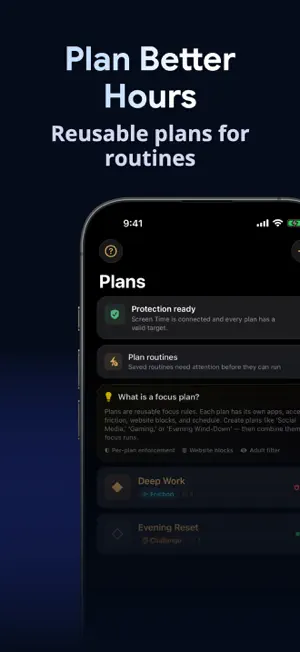

About Anchor App Blocker
Make focus automatic with reusable Focus Plans that block selected apps and websites through Apple's Screen Time controls. Start a Focus Run now or let a schedule protect the hours that matter. BUILD RULES THAT HOLD - Choose the apps, categories, and websites each Focus Plan protects. - Preview a plan before it starts and see whether enforcement is healthy. - Pick the right level of friction: Nudge, Friction, Challenge, Timed Lock, Hard Lock, or Combo Lock. - Resolve schedule conflicts and use safe recovery when Screen Time needs attention. - Review blocked attempts, turn-back rate, focused time, and recent patterns. - Check status from widgets and start eligible plans with Shortcuts. FREE - One Focus Plan. - Nudge, Friction, and Challenge enforcement. - One accountability partner. - Seven days of activity history. ANCHOR PRO - Unlimited Focus Plans and accountability partners. - Repeating schedules and automatic routines. - Timed Lock, Hard Lock, and Combo Lock. - Custom unlock challenges and 30-day patterns. PRIVACY AND CONTROL Anchor uses Apple's Family Controls, Managed Settings, and Device Activity frameworks. Your plan data and focus history stay on your device. Anchor cannot see the content inside blocked apps. Screen Time authorization is requested only when you set up protection. Subscriptions renew automatically unless canceled in your Apple ID settings. Restore an existing purchase from Settings > Restore Purchases. Features shown as Pro require an active Anchor entitlement; previously purchased lifetime access remains honored. Anchor is a focus aid, not a parental-control guarantee or emergency service. TERMS OF USE Product Terms of Use: https://www.uncommonweather.com/legal/apps/anchor-terms.html Apple Standard Terms of Use (EULA): https://www.apple.com/legal/internet-services/itunes/dev/stdeula/
What’s new
Version 1.0.8 · Updated October 3, 2026
Improved safety around saved Focus Plans and protection recovery. Anchor detects conflicting saved records, preserves existing data, and makes recovery controls available before loading subscription options. More reliable handling of recorded declines and agreement withdrawal when local legal storage is temporarily unavailable. Clearer Pro benefits and trial information, plus improved readability on iPhone and iPad.
App privacy
The developer, Ryan Tinklepaugh, reported these privacy practices to Apple.
Data Linked to You
The following data, which may be collected and linked to your identity, may be used for the following purposes:
- Purchases: Purchase History
- Location: Coarse Location
- Identifiers: User ID, Device ID
- Usage Data: Product Interaction
- Diagnostics: Performance Data, Other Diagnostic Data
- Other Data: Other Data Types
Used for: Analytics, App Functionality, Other Purposes
Alternatives to Anchor App Blocker
Looking for apps like Anchor App Blocker? Here are 6 similar apps on the App Store. The highest rated is BarBlock: Barcode App Blocker (4.9/5), and all 6 are free to download.
-
 Goal Lock: App Blocker & Focus
-
 Anchor: Focus Timer
-
 Clocker Manager
-
 TaskGate: Focus & App Blocker
-
 BarBlock: Barcode App Blocker
4.9
BarBlock: Barcode App Blocker
4.9
-
 Nudge: Focus & App Blocker
4.8
Nudge: Focus & App Blocker
4.8
| App | Rating | Price | Last updated | Compare |
|---|---|---|---|---|
| Anchor App Blocker | – | Free | October 3, 2026 | |
| Goal Lock: App Blocker & Focus | – | Free | Sep 16, 2026 | Compare |
| Anchor: Focus Timer | – | Free | Dec 9, 2025 | Compare |
| Clocker Manager | – | Free | Nov 17, 2023 | Compare |
| TaskGate: Focus & App Blocker | – | Free | Jul 6, 2026 | Compare |
| BarBlock: Barcode App Blocker | 4.9 / 5 (15) | Free | Sep 29, 2026 | Compare |
| Nudge: Focus & App Blocker | 4.8 / 5 (52) | Free | Oct 22, 2026 | Compare |
Compare Anchor App Blocker with the top alternatives: ratings, updates, ASO score and keyword gaps →