

SnapInk - Sign PDF Documents
华清 沈 Productivity iPhoneiPadiPod touch
SnapInk - Sign PDF Documents is a free Productivity app for iPhone and iPad by 华清 沈. Requires iOS 16.6. Updated July 7, 2026.
- Price
- Free
- on the App Store
- Size
- 11 MB
- Age 4+
- Updated
- Jul 7
- 2026 · v1.1.0
Screenshots


About SnapInk - Sign PDF Documents
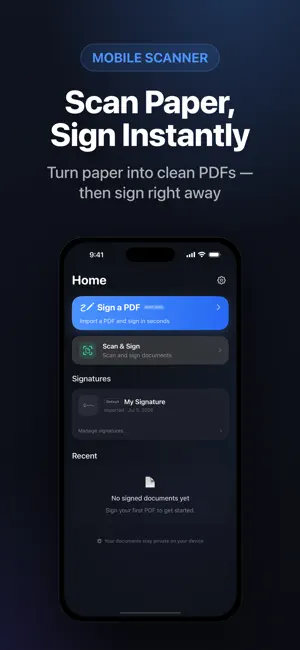
The All-in-One PDF Tool for Effortless Signing, Filling & Scanning SnapInk is your go-to mobile companion for handling all your PDF needs on iPhone and iPad. Whether you need to sign a contract, fill out a form, or scan a receipt, SnapInk provides a fast, professional, and private solution—without ever needing to upload your sensitive documents to the cloud. FAST & SECURE PDF SIGNING - Easy E-Signatures: Draw your signature, scan your hand-written one, or import digital stamps. - Reusable Signature Vault: Save your signatures and initials for one-tap signing on future documents. - Professional Stamp Editor: Add dates, text, and checkmarks with precision. Move, resize, and rotate elements for the perfect fit. - Flattened Exports: Export high-quality, flattened PDFs that are ready for professional sharing and legally binding workflows. POWERFUL MOBILE SCANNER - Digitize Anything: Quickly scan contracts, invoices, notes, or IDs into clear, high-quality PDFs. - Crystal Clear Quality: Built-in image enhancement ensures your documents look professional. - Import with Ease: Bring in PDFs from Files, iCloud, or directly from your email via the share sheet. - Sign Scanned Docs: Scan and sign in one seamless workflow. PRIVACY-FIRST APPROACH - 100% On-Device: We believe your documents belong to you. SnapInk processes everything locally. - No Cloud Uploads: Your PDFs never leave your device for signing or scanning. - No Account Needed: Start working immediately without the hassle of creating an account or logging in. - Secure Sharing: You have full control over when and where you share your processed files. GO PRO FOR UNLIMITED PRODUCTIVITY - Unlimited Exports: Remove all limits on signed PDF exports. - Advanced Signature Management: Save multiple signatures for different business or personal needs. - Signature Scan: Capture a signature from paper and save it to your reusable vault. - Premium Ink & Stamps: Unlock premium ink colors and import your own custom stamps. WHO IS SNAPINK FOR? - Business Professionals: Sign contracts and agreements from anywhere. - Students: Scan and organize notes and assignments. - Remote Workers: Fill out HR forms and send reports without a printer. - Everyone: Manage daily document tasks with speed and privacy. PURCHASES SnapInk offers a selection of free features with optional Pro upgrades. Available subscriptions include weekly, yearly, and lifetime plans. Prices and terms are displayed clearly in-app before purchase. Privacy Policy: https://aipromptant.com/snapink/privacy-policy Terms of Service: https://aipromptant.com/snapink/terms-of-service
What’s new
Version 1.1.0 · Updated July 7, 2026
Thanks for using SnapInk! This update makes signing faster and smoother: • Multi-page signing: a new thumbnail strip lets you jump between pages instantly • In-editor signature picker — switch signatures without leaving the page • New checkmark stamp for quick approvals • More ink colors to match any document • Swipe back for more natural navigation • Sharper signature scanning and a cleaner first-run experience • Performance improvements and bug fixes Everything stays 100% on your device — no account, no cloud.
App privacy
The developer, 华清 沈, reported these privacy practices to Apple.
Data Not Linked to You
The following data, which may be collected but is not linked to your identity, may be used for the following purposes:
- Purchases: Purchase History
- Identifiers: Device ID
- Usage Data: Product Interaction
- Diagnostics: Crash Data, Performance Data
Used for: App Functionality
Alternatives to SnapInk - Sign PDF Documents
Looking for apps like SnapInk - Sign PDF Documents? Here are 6 similar apps on the App Store. The highest rated is Quick Read - RSVP (5.0/5), and 5 of the 6 are free to download.
-
 Sign PDF: Document Signer
-
 Ember PDF: Scan, Edit, Sign
-
 Compress PDF & Merge - Quire
-
 PDF Master: PDF Tools
-
 Agenda: Day Planner
-
 Quick Read - RSVP
5.0
Quick Read - RSVP
5.0
| App | Rating | Price | Last updated | Compare |
|---|---|---|---|---|
| SnapInk - Sign PDF Documents | – | Free | July 7, 2026 | |
| Sign PDF: Document Signer | – | Free | Sep 11, 2026 | Compare |
| Ember PDF: Scan, Edit, Sign | – | Free | Mar 30, 2026 | Compare |
| Compress PDF & Merge - Quire | – | Free | Jun 16, 2026 | Compare |
| PDF Master: PDF Tools | – | Free | Mar 31, 2026 | Compare |
| Agenda: Day Planner | – | Free | Oct 5, 2026 | Compare |
| Quick Read - RSVP | 5.0 / 5 (2) | 3.99 USD | Apr 20, 2026 | Compare |