

Math Basics: Practice & Learn
Tiny Bits Education iPhoneiPadiPod touch
Math Basics: Practice & Learn is a free Education app for iPhone and iPad by Tiny Bits. Requires iOS 16. Updated October 15, 2026.
- Price
- Free
- on the App Store
- Size
- 9 MB
- Age 4+
- Updated
- Oct 15
- 2026 · v2.1.2
Screenshots



About Math Basics: Practice & Learn
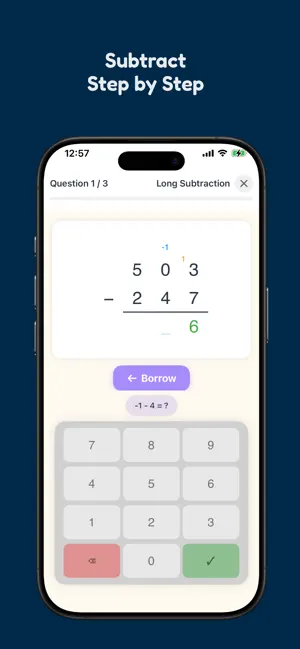
MAKE MATH PRACTICE A FUN DAILY HABIT FOR CHILDREN AGED 5 TO 12 From simple sums to full written methods, children can practice addition, subtraction, multiplication, and division step by step, explore fractions visually, and learn about factors, primes and geometry too. PRIVACY FIRST No ads. No tracking. No accounts. No internet required. All data stays on your device. START SIMPLE AND BUILD CONFIDENCE Practice everything from basic calculations to long addition, long subtraction, long multiplication, and long division. A step by step grid view shows carries, borrows, and partial products so children can understand the method, not just the answer. FACTORS, PRIMES AND MULTIPLES Learn the divisibility rules from 2 to 13, find the prime factors of a number, build numbers from prime tiles, and split them with factor trees and factor ladders. Then work out the greatest common factor and least common multiple of two numbers, with step-by-step help for the final multiplication. When an answer is wrong, the explanation uses the very number the child was working on. SHAPES, SOLIDS AND ANGLES Name flat shapes and solids, tell regular polygons from irregular ones, count sides, corners, faces and edges, and recognize acute, right and obtuse angles. A wrong answer is explained, not just marked: the parts are counted one at a time, a solid comes apart on screen to show the faces hidden at the back, and an incorrectly identified angle is compared with a right angle. UNDERSTAND FRACTIONS Introduce fractions in a hands on, visual way. Children shade parts of a whole and compare fractions side by side, building a real understanding of what fractions mean. TIMES TABLES AND FLASHCARDS Practice multiplication and division facts from 2 to 10. Flip card flashcards help children review what they know and focus on what still needs work. A color coded mastery view makes progress easy to see. DAILY GOALS AND STREAKS Set goals based on questions answered, correct answers, accuracy, or practice time. Progress bars and streaks encourage children to keep practicing every day. PARENT DASHBOARD A PIN protected parent area helps you follow each child’s progress. View accuracy, time spent, strengths, weaknesses, and streaks, then export PDF or CSV reports. DESIGNED FOR FAMILIES Choose from four visual themes. Parents can assign different themes to each child. Family Sharing is supported, so one purchase can be used by the whole family. TRY IT FREE FOR 7 DAYS, THEN KEEP PRACTICING EVERY DAY Unlock everything with a single one time purchase. No subscriptions. When the trial ends, every child still gets 15 minutes of free practice a day.
What’s new
Version 2.1.2 · Updated October 15, 2026
Two new games bring decimals to long multiplication and long division. Decimal Multiplication, on the Multiplication menu, multiplies the digits as if they were whole numbers, then your child taps the gap in the product where the decimal point goes. A wrong tap is explained, not just marked: the digits after the point in both numbers are counted, the same number of digits is counted from the right of the product, and the point moves there. When a short product needs extra zeros, as in 0.3 × 0.2 = 0.06, they appear in orange. Decimal Division, on the Division menu, works in all four long division layouts. A session includes three kinds of question: a decimal divided by a whole number, a whole-number division that carries on past the point by bringing down zeros, and a decimal divided by a decimal, where the points are moved first. The keypad has a decimal point key, and the app never prompts for it: your child presses it on their own when they bring down the first digit after the point. A point that is missed, pressed too early or moved to the wrong place is explained with a short animation. The app writes a decimal point or a decimal comma, whichever your phone's region uses. In the long division layout with the answer on top, each digit of the answer now sits above the last digit of the dividend used to work it out. Rounds are now sized by time. In the parent area, one Exercise Length slider, from 30 seconds to 5 minutes, replaces the question count for every game, and each game works out how many questions fit at your child's own pace. Statistics is now in three levels. The main page shows practice time and daily activity and leads to Numbers and Shapes & Space, which list their operations. Each operation has its own page, with charts of improvement over time and the questions your child got wrong most often in the past week. For addition, subtraction, multiplication and division, it also lists the questions that took longest to answer. The PDF report follows the same layout. Plus bug fixes and improvements.
App privacy
The developer, Tiny Bits, reported these privacy practices to Apple.
Data Not Collected
The developer does not collect any data from this app.
Alternatives to Math Basics: Practice & Learn
Looking for apps like Math Basics: Practice & Learn? Here are 6 similar apps on the App Store. The highest rated is Multiplication Table Master (5.0/5), and all 6 are free to download.
-
 Arithmetic - Mental Math
-
 Multiplication Table Master
5.0
Multiplication Table Master
5.0
-
 ASVABIFY
5.0
ASVABIFY
5.0
-
 DivisionSense – 商を見つけましょう
-
 Inkgrad: Printed Math Practice
-
 Pixel Math Quest
| App | Rating | Price | Last updated | Compare |
|---|---|---|---|---|
| Math Basics: Practice & Learn | – | Free | October 15, 2026 | |
| Arithmetic - Mental Math | – | Free | Aug 4, 2026 | Compare |
| Multiplication Table Master | 5.0 / 5 (1) | Free | Sep 5, 2024 | Compare |
| ASVABIFY | 5.0 / 5 (2) | Free | Oct 19, 2026 | Compare |
| DivisionSense – 商を見つけましょう | – | Free | Oct 12, 2026 | Compare |
| Inkgrad: Printed Math Practice | – | Free | Aug 4, 2026 | Compare |
| Pixel Math Quest | – | Free | Jul 11, 2026 | Compare |