

CueTask: Focus Audio Player
KHALID BELMOUDEN Productivity iPhoneiPadiPod touch
CueTask: Focus Audio Player is a free Productivity app for iPhone and iPad by KHALID BELMOUDEN. Requires iOS 16.6. Updated April 29, 2026.
- Price
- Free
- on the App Store
- Size
- 26 MB
- Age 4+
- Updated
- Apr 29
- 2026 · v1.0.4
Screenshots


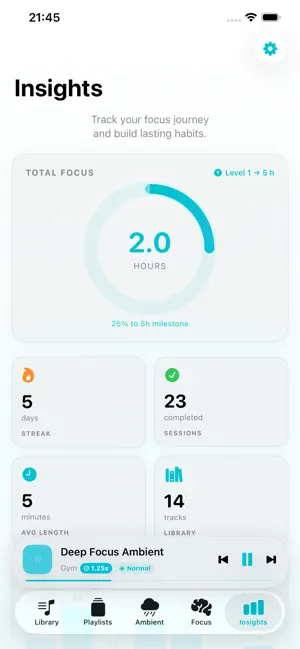
About CueTask: Focus Audio Player
Welcome to CueTask, your ultimate offline audio player and daily focus companion. Designed for deep work, active workouts, and restful sleep, CueTask combines a powerful local audio manager with a productivity timer to keep you on track. Whether you are listening to audiobooks, studying with lofi beats, or relaxing with an ambient mix, CueTask works entirely offline to keep you in the zone. Key Features: • ADHD & Neurodivergent Friendly: Designed to minimize distractions and reduce cognitive overload. The structured timer and offline environment make it a perfect tool for managing ADHD and maintaining hyper-focus. • Smart Playlists for Every Activity: Create custom offline playlists tailored to your daily routine. Build a "Deep Work" playlist for the office, a "Gym & Run" mix, or a "Sleep" list with ambient sounds. • Activity-Linked Focus Timer: Set your session duration (from 1 to 60 minutes) and tie it directly to your audio. Going for a 30-minute run? Set the timer, and when the audio stops, you know your session is complete! • Ambient Mixes & Audio: Load your favorite ambient soundscapes to block out distractions and enhance your concentration wherever you are. • 100% Offline Audio Player: Play your own local MP3s and audio files without needing an internet connection. No buffering, no subscriptions, and no accounts required. • Background Playback: Your playlists continue playing even when your device is locked, fully integrated with the iOS Control Center. • Seamless Import: Open your supported audio files directly into CueTask from the iOS Share Sheet or the Apple Files app. • Minimalist Interface: A distraction-free, premium dark-mode inspired design that helps you concentrate on the task at hand. • Privacy First: Your files, playlists, and focus tasks stay strictly on your device. We do not track your listening habits. Take control of your daily workflow. Import your favorite tracks, organize your daily playlists, set the timer, and get things done with CueTask.
What’s new
Version 1.0.4 · Updated April 29, 2026
Welcome to the latest update! We are thrilled to announce full Arabic language support in CueTask. Our distraction-free, offline audio experience is now fully localized for our Arabic-speaking users. We've also introduced a brand-new welcome storyboard (onboarding experience) to help you set up your focus sessions faster than ever. Plus, we've made under-the-hood performance improvements and bug fixes to keep your workflow running smoothly. Update now and get into the zone!
App privacy
The developer, KHALID BELMOUDEN, reported these privacy practices to Apple.
Data Used to Track You
The following data may be used to track you across apps and websites owned by other companies:
- Identifiers: Device ID
- Usage Data: Product Interaction
Data Linked to You
The following data, which may be collected and linked to your identity, may be used for the following purposes:
- Identifiers: Device ID
- Usage Data: Product Interaction
Used for: Third-Party Advertising
Alternatives to CueTask: Focus Audio Player
Looking for apps like CueTask: Focus Audio Player? Here are 6 similar apps on the App Store. The highest rated is YapRun (5.0/5), and all 6 are free to download.
-
 Paperly - Read with ease
4.8
Paperly - Read with ease
4.8
-
 VoiceStream: AI Voice Notes
-
 YapRun
5.0
YapRun
5.0
-
 Voice Notes - Speech to Text
4.0
Voice Notes - Speech to Text
4.0
-
 SafeThink - Private AI
-
 Luya Ai
| App | Rating | Price | Last updated | Compare |
|---|---|---|---|---|
| CueTask: Focus Audio Player | – | Free | April 29, 2026 | |
| Paperly - Read with ease | 4.8 / 5 (4) | Free | May 11, 2026 | Compare |
| VoiceStream: AI Voice Notes | – | Free | Oct 8, 2026 | Compare |
| YapRun | 5.0 / 5 (1) | Free | Feb 27, 2026 | Compare |
| Voice Notes - Speech to Text | 4.0 / 5 (1) | Free | Mar 15, 2026 | Compare |
| SafeThink - Private AI | – | Free | Mar 17, 2026 | Compare |
| Luya Ai | – | Free | Aug 19, 2026 | Compare |