

YapText - Tap to Voice Text
ZPresso LLC Productivity iPhoneiPadiPod touch
YapText - Tap to Voice Text is a free Productivity app for iPhone and iPad by ZPresso LLC. Requires iOS 17.6. Updated October 22, 2026.
- Price
- Free
- on the App Store
- Size
- 7 MB
- Age 4+
- Updated
- Oct 22
- 2026 · v2.4.6
Screenshots

About YapText - Tap to Voice Text
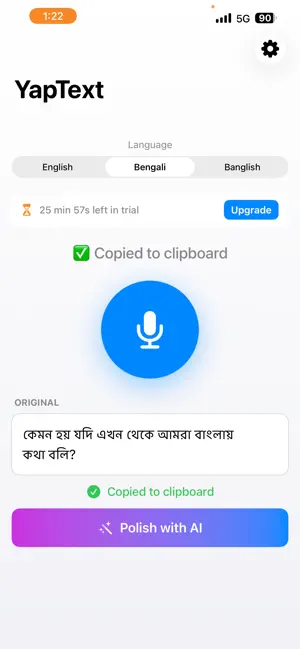
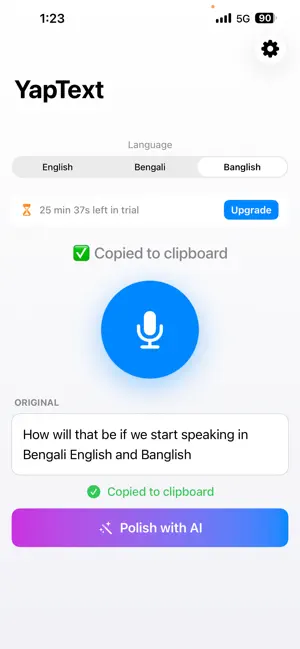
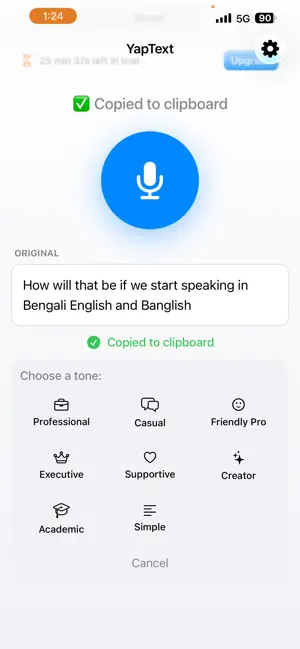
Speak naturally. Get polished text instantly. YapText turns your voice into clean, professional text in seconds. One tap, you talk, and AI does the rest — perfect for replies, notes, social posts, and ideas you don't have time to type out. WHY YAPTEXT Typing is slow. Voice notes get ignored. YapText gives you the speed of voice with the clarity of clean writing — so you save hours every week and sound sharp every time. HOW IT WORKS 1. Tap the mic and speak naturally 2. Your voice becomes accurate, punctuated text 3. Tap a tone to polish it — Professional, Casual, or any of 8 styles 4. Text is auto-copied to your clipboard, ready to paste anywhere WORKS IN 3 LANGUAGES Switch instantly between: - English - Bengali (বাংলা) - Banglish (Bengali in Roman script) Each language is tuned for accuracy with the right speech engine — no fiddling required. 8 AI POLISH TONES Don't just transcribe — transform. Pick the tone that fits your message: - Professional — clean, business-appropriate - Casual — relaxed, friendly, everyday - Friendly Pro — warm but professional - Executive — direct and decisive - Supportive — empathetic and helpful - Creator — fun, engaging, social-media ready - Academic — structured and precise - Simple — easy words, very clear BUILT FOR REAL LIFE - Custom keyboard — dictate inside any app, paste into anything - Home Screen and Lock Screen widgets for one-tap recording - Auto-copy to clipboard — no extra steps - 5th-grade reading level by default — clean, never overcomplicated - Preserves your voice — fixes mistakes without rewriting who you are PRIVATE BY DESIGN - Your voice is processed in memory and immediately discarded - Transcripts are never logged or stored on our servers - No accounts required, no tracking, no ads - No data sold to third parties YAPTEXT PRO Subscribe for unlimited use across all features: - 3-day free trial - Monthly: $7.99 - Yearly: $69.99 (save 27%) Cancel anytime in Settings → Apple ID → Subscriptions. Subscription auto-renews unless cancelled at least 24 hours before each period ends. Privacy Policy: https://yaptext.com/privacy Terms of Service: https://yaptext.com/terms Have feedback? Email [email protected] — we read every message.
What’s new
Version 2.4.6 · Updated October 22, 2026
• iPad notes: a big eraser now sits between the pens and the colours in every pen set. It never scrolls away, and no pen hides under it. • Touch anywhere on the eraser box with your finger or Apple Pencil to start erasing. Touch it again to go back to the pen you were using.
App privacy
The developer, ZPresso LLC, reported these privacy practices to Apple.
Data Not Linked to You
The following data, which may be collected but is not linked to your identity, may be used for the following purposes:
- User Content: Audio Data
Used for: App Functionality
Alternatives to YapText - Tap to Voice Text
Looking for apps like YapText - Tap to Voice Text? Here are 6 similar apps on the App Store. The highest rated is Echo: Semantic Voice Keyboard (5.0/5), and all 6 are free to download.
-
 Echo: Semantic Voice Keyboard
5.0
Echo: Semantic Voice Keyboard
5.0
-
 Phonic Dictation
5.0
Phonic Dictation
5.0
-
 Dictando: Voice to Text
-
 KeyVoice - AI Voice Keyboard
5.0
KeyVoice - AI Voice Keyboard
5.0
-
 Speak - Voice Keyboard
-
 TypeVoice: AI Voice Keyboard
5.0
TypeVoice: AI Voice Keyboard
5.0
| App | Rating | Price | Last updated | Compare |
|---|---|---|---|---|
| YapText - Tap to Voice Text | – | Free | October 22, 2026 | |
| Echo: Semantic Voice Keyboard | 5.0 / 5 (7) | Free | May 27, 2026 | Compare |
| Phonic Dictation | 5.0 / 5 (1) | Free | Aug 15, 2026 | Compare |
| Dictando: Voice to Text | – | Free | Oct 22, 2026 | Compare |
| KeyVoice - AI Voice Keyboard | 5.0 / 5 (1) | Free | May 13, 2026 | Compare |
| Speak - Voice Keyboard | – | Free | Apr 21, 2026 | Compare |
| TypeVoice: AI Voice Keyboard | 5.0 / 5 (1) | Free | Jun 4, 2026 | Compare |