

Cleio: AI Meeting Notes
Kidae Lee Productivity iPhoneiPadiPod touchMac
Cleio: AI Meeting Notes is a free Productivity app for iPhone and iPad by Kidae Lee. Requires iOS 26.1. Updated October 3, 2026.
- Price
- Free
- on the App Store
- Size
- 36 MB
- Age 17+
- Updated
- Oct 3
- 2026 · v1.5.1
Screenshots


About Cleio: AI Meeting Notes
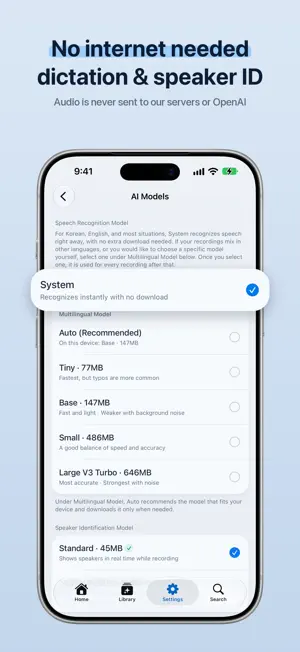
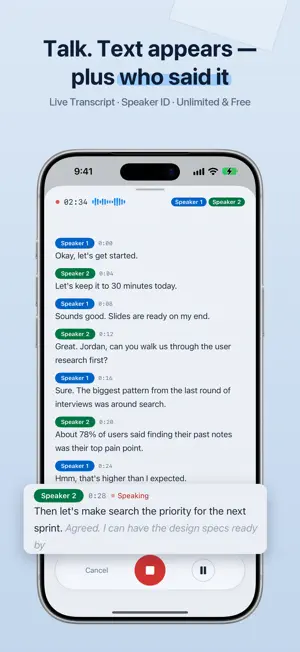
Cleio turns your meetings, lectures, interviews, memos, and ideas into transcripts and AI summaries — automatically. Start recording with a single tap and Cleio writes the transcript on the spot, identifying who said what with speaker identification. ■ Features · One-tap recording with a distraction-free interface · On-device transcripts — faster and more accurate · Speaker identification to see who said what at a glance · On-device AI summaries — auto-categorized for meetings, lectures, interviews, memos, and more · Library tab — every recording and summary in one place, organized by folder, topic, or date · Calendar — link recordings to events and browse them by month · Transcript editing — split and merge sections, undo, and find & replace · Edit summaries in place, in Markdown — the original stays untouched · Import audio files you already have · Export summary to-dos to the Reminders app · Transcript playback synced with the recording waveform · Share summaries as Markdown or plain text — line breaks, tables, and lists stay intact · Full dark mode support ■ Free to use Recording, transcripts, speaker identification, on-device AI summaries, and calendar linking are free and unlimited. These run entirely on your device, without sending anything to a server. ■ Do more with Pro · Email summaries to attendees — Send the meeting summary to all attendees at once · Optimize Device Storage — Keep originals on iCloud while your device stays light · High-quality AI summaries powered by Cloud AI · Multilingual meeting translation — Translate recordings with mixed languages into the language you choose, shown alongside the transcript · Transcript text correction · iCloud sync to pick up where you left off across devices · Markdown and PDF export ■ Who it's for · Professionals who want to capture every detail of a meeting · Anyone who needs to review 1:1s or consultations · Journalists and researchers who run interviews regularly · Students who record lectures to review them later · People who want to jot down ideas without losing a thought ■ Privacy and security Cleio is built with privacy at its core. · All free features run entirely on your device (transcripts, speaker identification, on-device AI summaries) · Text processed through Pro Cloud AI is not used for model training · No account sign-up required ■ A note on recording Follow the recording laws where you live. If other people's voices are included, it's safer to get their consent beforehand. See our Terms of Service for more details. ■ Subscription info · Pro Monthly and Pro Annual plans available · Pricing varies by region. See the App Store for your local price. · Subscriptions renew automatically. You can cancel anytime up to 24 hours before the next billing date. · Manage subscription: Settings > Apple ID > Subscriptions Terms of Service: https://cleioapp.github.io/terms-of-service-en/ Privacy Policy: https://cleioapp.github.io/privacy-policy-en/ Contact: [email protected]
What’s new
Version 1.5.1 · Updated October 3, 2026
Cleio v1.5.1 — Using Cleio on iPad and finding things are both easier now. ■ iPad · A redesigned iPad layout — pick a place on the left, and browse the list and details side by side · Press ⌘F to search right away. The layout adjusts itself in either orientation ■ Search · Results are grouped by recording, so you can see at a glance whether a match was found in the title, summary, or transcript · Expand a match right where it appears, then jump straight to the transcript ■ Recording Status · See when Cleio is recording on the Lock Screen and in the Dynamic Island — paused and waiting-to-resume states are shown with different shapes · Open a recording straight from Shortcuts and Siri. Spotlight results open in the app, too ■ Listen & Organize · The playback bar is now a floating capsule, with a new playback speed button · Folders appear in a grid on Home. "All" and "Uncategorized" stay pinned at the top ■ Fixes · Cleio now tells you why a summary or text correction stopped · Fixed summaries that showed the same content twice, and notifications that showed the wrong title Send your feedback to [email protected].
App privacy
The developer, Kidae Lee, reported these privacy practices to Apple.
Data Not Linked to You
The following data, which may be collected but is not linked to your identity, may be used for the following purposes:
- Purchases: Purchase History
- Usage Data: Product Interaction
- Diagnostics: Crash Data, Performance Data, Other Diagnostic Data
Used for: Analytics, App Functionality
Alternatives to Cleio: AI Meeting Notes
Looking for apps like Cleio: AI Meeting Notes? Here are 6 similar apps on the App Store.
-
 PhotoDiet - Compress Photos
-
 회의록(Hoirock) - 실시간 AI 회의 비서
-
 swift文字起こし
-
 VoiceMemoAI: AI Note Taker
-
 StudyTime - Study Timer
-
 ヨミ表
| App | Rating | Price | Last updated | Compare |
|---|---|---|---|---|
| Cleio: AI Meeting Notes | – | Free | October 3, 2026 | |
| PhotoDiet - Compress Photos | – | Free | Mar 28, 2026 | Compare |
| 회의록(Hoirock) - 실시간 AI 회의 비서 | – | Free | Jul 24, 2026 | Compare |
| swift文字起こし | – | Free | May 12, 2025 | Compare |
| VoiceMemoAI: AI Note Taker | – | Free | Oct 16, 2026 | Compare |
| StudyTime - Study Timer | – | Free | Jul 5, 2026 | Compare |
| ヨミ表 | – | Free | Jun 16, 2024 | Compare |