

FlowBudget: Expense Tracker
Riccardo Nestola Finance iPhoneiPadiPod touch
FlowBudget: Expense Tracker is a free Finance app for iPhone and iPad by Riccardo Nestola. Rated 5.0/5 from 1 ratings. Requires iOS 26.0.
- Rating
- 5.0
- 1 ratings
- Price
- Free
- on the App Store
- Size
- 27 MB
- Age 4+
- Updated
- Oct 20
- 2026 · v2.1
Screenshots


About FlowBudget: Expense Tracker
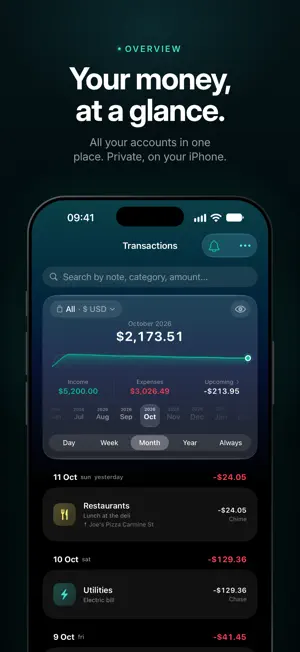
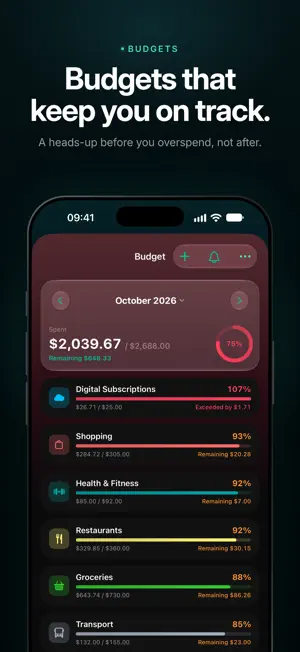
FlowBudget is the simple, intuitive app to track expenses, manage budgets, and take control of your personal finances. Add income and expenses in seconds, organize every transaction by category, and monitor your accounts in real time. Your Monthly Report tells the story of your money, month after month where it went, how much you saved, and what mattered most. KEY FEATURES • Dashboard with total balance and recent transactions • Multiple accounts (checking, cash, cards, savings) • Custom categories with icons and colors • Recurring transactions: subscriptions, rent, salary • Budget management with spending limits per category • Monthly financial report: income, expenses and balance • Detailed statistics and charts by category and period • Upcoming expenses: keep an eye on what's coming • Attach PDF receipts and invoices to transactions • Trash with restore option • Home screen widget FLOWBUDGET PRO • Unlimited accounts, categories and budgets • Unlimited recurring transactions • Full statistics history, including Year and All-time views • In-depth Monthly Report: savings rate, top categories, month-over-month comparison • Push notifications for budget alerts and recurring transactions • iCloud sync across iPhone, iPad and Mac • Backup and CSV export Try FlowBudget Pro free for 7 days. Available as a monthly subscription, annual subscription, or one-time purchase. Terms of Use: https://getflowbudget.com/terms
What’s new
Version 2.1 · Updated October 20, 2026
FlowBudget 2.1: your money like you've never seen it Constellation: a whole new way to see your spending Categories become planets and places become their moons, all animated. Tap a moon to see its transactions instantly. It's the most beautiful chart we've ever made. (Pro) Statistics, redesigned from scratch • Every chart is new, hand-drawn and animated: sharper, smoother, easier to read • Meet Treemap: your spending as tiles that settle into place one by one • Flows (Sankey) now on iPad too, full screen with zoom (pinch and double-tap) and PDF export • Category trends, plus a summary of goals and transfers for the period Eight new color palettes Make the app yours with Ocean, Amethyst, Aurora, Neon, Sunset, Nebula, Nocturne and Graphite. The gradient still tells you at a glance whether you're in the green or in the red. (Pro) Goals with photos Give every goal a cover photo, synced across all your devices. Cards arrange in a grid and you can reorder them however you like. You can also complete a goal before reaching the target. Contributions stay linked to their goal everywhere: details, widgets, reports, map, calendar and Spotlight. Transactions, with a new period strip Swipe through days, weeks and months on an elegant strip, and see what's incoming at a glance. More powerful recurring transactions • Transfers between accounts can now repeat too • When you delete an occurrence, you choose: just this one, this and all future ones, or the whole series • The new “Upcoming” card shows what's ahead at a glance A faster, smarter map Amount bubbles that merge as you zoom out. Search for a city and find every transaction made there. Clearer budgets A compact summary with a ring, and the budgets about to overspend right at the top. And more… • Camera icon to scan a receipt while adding an expense • Clear iCloud status: you always know if everything is synced • Haptic feedback, larger tap targets, improved VoiceOver and full support for Reduce Motion Tons of fixes • No more duplicate notifications across iPhone, iPad and Mac • Fixed a crash after deleting a recurring transaction • Swipe to Delete no longer removes the row before you confirm • “Last 7/30/90 days” now count real calendar days • A goal due today no longer shows as overdue • Duplicate categories across languages now merge automatically • CSV import links contributions back to your goals • iPad: correct layouts with the sidebar open and when resizing windows Enjoying FlowBudget? A review helps us a lot
App privacy
The developer, Riccardo Nestola, reported these privacy practices to Apple.
Data Not Linked to You
The following data, which may be collected but is not linked to your identity, may be used for the following purposes:
- Identifiers: Device ID
- Usage Data: Product Interaction
Used for: Analytics
Alternatives to FlowBudget: Expense Tracker
Looking for apps like FlowBudget: Expense Tracker? Here are 6 similar apps on the App Store.
-
 Brixa: AI Expense Tracker
-
 Kaku - Kakebo
-
 Family Budget: Spend & Save
-
 Money Envelope: Budget Tracker
-
 KashIQ - Expense Tracker
-
 FlowBudget
| App | Rating | Price | Last updated | Compare |
|---|---|---|---|---|
| FlowBudget: Expense Tracker | 5.0 / 5 (1 rating) | Free | October 20, 2026 | |
| Brixa: AI Expense Tracker | – | Free | Oct 6, 2026 | Compare |
| Kaku - Kakebo | – | Free | Jul 17, 2026 | Compare |
| Family Budget: Spend & Save | – | Free | Sep 2, 2026 | Compare |
| Money Envelope: Budget Tracker | – | Free | Sep 4, 2026 | Compare |
| KashIQ - Expense Tracker | – | Free | Sep 10, 2026 | Compare |
| FlowBudget | – | Free | Oct 18, 2026 | Compare |