

Smart Printer App & PDF Scan
THI MY HAO TRAN Business iPhoneiPadiPod touch
Smart Printer App & PDF Scan is a free Business app for iPhone and iPad by THI MY HAO TRAN. Rated 4.6/5 from 31 ratings. Requires iOS 15.5.
- Rating
- 4.6
- 31 ratings
- Price
- Free
- on the App Store
- Size
- 153 MB
- Age 4+
- Updated
- Oct 2
- 2026 · v0.0.6
Screenshots

About Smart Printer App & PDF Scan
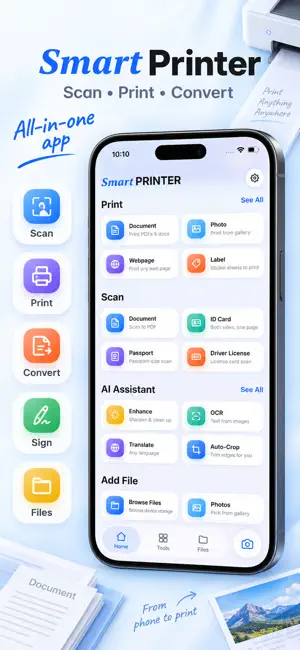
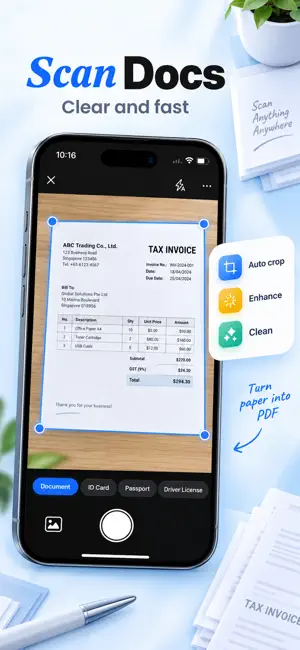
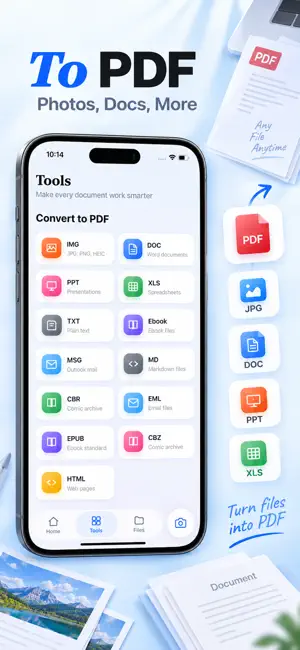
Transform your phone into a powerful wireless printer, portable scanner, fax machine, and PDF editor! Print photos, documents, emails, and web pages directly from your smartphone to ANY Wi-Fi, Bluetooth, or USB printer. No complex setup, no drivers required—just tap and print instantly. Whether you are working from home, in the office, or on the go, our app ensures your documents look professional and are ready in seconds. KEY FEATURES: 1. EXTENSIVE PRINTER COMPATIBILITY Compatible with 10,000+ printer models including: • HP (OfficeJet, LaserJet, Envy, DeskJet, DesignJet...) • Canon (PIXMA, LBP, MF, MP, MX, MG, SELPHY...) • Epson (Artisan, WorkForce, Stylus, EcoTank...) • Brother (MFC, DCP, HL, MW, PJ...) • Samsung, Xerox, Dell, Konica Minolta, Kyocera, Lexmark, Ricoh, Sharp, Toshiba, OKI, and more. • Supports all AirPrint enabled devices. 2. UNIVERSAL SMART PRINTING • Print Anything: PDF files, Office docs (Word, Excel, PowerPoint), Text files, and more. • Photos & Images: Print memories of high quality. Supports JPG, PNG, HEIC. • Web Printing: Print full web pages or articles directly from the browser. • Clipboard Printing: Copy text from any app and print it instantly. • Email Attachments: Print files directly from Gmail, Outlook, Yahoo, and more. 3. ADVANCED PDF SCANNER • High-Quality Scans: Turn your camera into a pocket scanner. Scan receipts, contracts, notes, and whiteboards. • Smart Detection: Automatically detects document edges and corrects perspectives. • Filters & Enhancement: Remove shadows and enhance readability with Black & White, Grayscale, or Color filters. • ID Card & Passport Mode: Special layout to scan both sides of an ID onto one page. 4. PDF TOOLS & EDITOR SUITE • Merge & Split PDFs: Combine multiple PDFs or photos into a single document or split a large file into separate pages. • Smart E-Signature: Create your signature and sign contracts/forms digitally right on the screen. • Add Text & Markups: Insert Notes, Labels, and highlight key points on your documents. • Stickers & Stamps: Add professional stamps (e.g., "Approved") or fun stickers to your files. • Layout Control: Print multiple photos on one page (Collage), adjust margins, and select paper size (A4, Letter, Legal, 4x6, A3, etc.). 5. COMPREHENSIVE PDF CONVERTER Convert almost any file format into a high-quality PDF instantly. Supported conversions include: • Office Documents: Convert DOC, PPT, and XLS to PDF. • Images & Text: Convert JPG, PNG, and TXT to PDF. • Ebooks & Comics: Convert Ebook, EPUB, CBR, and CBZ formats to PDF. • Web & Emails: Convert HTML, MD, MSG, and EML to PDF. 6. GLOBAL FAX SERVICE • Send Faxes Anywhere: Easily fax your documents, PDFs, or scanned files directly from your phone to fax machines worldwide. No physical fax machine needed! 7. CLOUD & FILE MANAGEMENT • Seamless Integration: Access files directly from Google Drive, Dropbox, OneDrive, iCloud, and Box. • File Organization: Easy-to-use file manager to sort, rename, and delete documents. WHY CHOOSE US? • Zero Configuration: Auto-detects printers on your Wi-Fi network. • Secure & Private: Your documents are processed locally and securely. • High Resolution: Maintains the original quality of your photos and text. • Eco-Friendly Option: Preview helps you avoid printing mistakes and wasting paper. • All-in-One Solution: Print, scan, fax, convert, and edit PDFs all in one single app. Download Smart Printer App & PDF Scan now and experience the future of mobile printing! Disclaimer: This app is a third-party tool designed to facilitate mobile printing. We are not affiliated with, endorsed by, or associated with any printer manufacturers such as HP, Canon, Epson, Brother, Samsung, Xerox, or others mentioned. All trademarks and brand names are the property of their respective owners. Privacy Policy: https://xhao.app/privacy-policy Terms of Service: https://xhao.app/terms-of-service
Ratings & reviews
4.6
31 ratings
What’s new
Version 0.0.6 · Updated October 2, 2026
- Bug fixes and improvements.
App privacy
The developer, THI MY HAO TRAN, reported these privacy practices to Apple.
Data Used to Track You
The following data may be used to track you across apps and websites owned by other companies:
- Identifiers: Device ID
Data Not Linked to You
The following data, which may be collected but is not linked to your identity, may be used for the following purposes:
- Identifiers: Device ID
- Usage Data: Product Interaction
- Diagnostics: Crash Data, Performance Data, Other Diagnostic Data
Used for: Developer’s Advertising or Marketing, Analytics
Alternatives to Smart Printer App & PDF Scan
Looking for apps like Smart Printer App & PDF Scan? Here are 6 similar apps on the App Store. The highest rated is Scanner App - PDF & OCR (5.0/5), and all 6 are free to download.
-
 Scanner App - PDF & OCR
5.0
-
 Notiz: AI Note Taker & Summary
4.7
-
 Scanovo: QR & PDF Scanner
5.0
-
 HP Smart Printer: Air Print
3.6
-
 Printer App: AI Scanner & PDF
4.4
-
 Wisp AI Note Taker
4.5
| App | Rating | Price | Last updated | Compare |
|---|---|---|---|---|
| Smart Printer App & PDF Scan | 4.6 / 5 (31 ratings) | Free | October 2, 2026 | |
| Scanner App - PDF & OCR | 5.0 / 5 (1) | Free | Aug 26, 2026 | Compare |
| Notiz: AI Note Taker & Summary | 4.7 / 5 (16) | Free | May 27, 2026 | Compare |
| Scanovo: QR & PDF Scanner | 5.0 / 5 (1) | Free | Aug 18, 2026 | Compare |
| HP Smart Printer: Air Print | 3.6 / 5 (7) | Free | Oct 21, 2026 | Compare |
| Printer App: AI Scanner & PDF | 4.4 / 5 (42) | Free | Sep 30, 2026 | Compare |
| Wisp AI Note Taker | 4.5 / 5 (530) | Free | Apr 28, 2026 | Compare |