

Said Right: Better Texts
Solvyn Drift LLC Productivity iPhoneiPadiPod touch
Said Right: Better Texts is a free Productivity app for iPhone and iPad by Solvyn Drift LLC. Rated 5.0/5 from 5 ratings. Requires iOS 13.0.
- Rating
- 5.0
- 5 ratings
- Price
- Free
- on the App Store
- Size
- 78 MB
- Age 4+
- Updated
- Aug 2
- 2026 · v1.0.16
Screenshots


About Said Right: Better Texts
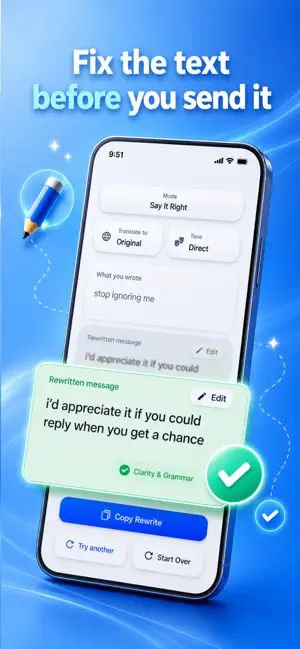
Said Right helps you turn what you mean into a clear, natural, ready-to-send message. Whether you are rewriting a text, replying to someone, sending a work message, apologizing, setting a boundary, flirting, asking a question, starting a conversation, or trying not to sound rude, Said Right helps you say it in a way that fits the moment. Start with your own words, choose a tone, and get a message that keeps your meaning while improving how it sounds. Choose from tones like Gentle, Playful, Direct, Formal, and Flirty. Each tone is designed for a different communication style. Gentle helps soften your message without making it weak. Direct keeps things clear and simple. Formal helps with polished writing for work, school, and professional messages. Playful adds lightness when the moment is casual. Flirty helps your message feel more charming when the context fits. Said Right can also help with dating app messages, dating profile replies, first messages, conversation starters, compliments, and flirty texts when you want to sound natural instead of awkward or forced. Not sure what to say? Describe the situation and Said Right can help create a sendable reply. Instead of giving long advice or generic coaching, it focuses on giving you a message you can actually use. Have a screenshot? Use Screenshot mode with a user-selected image. Said Right uses visible text from the screenshot to help create a reply based on the conversation context. Screenshot mode is designed for user-selected screenshots and visible text. It does not automatically read your messages or scan private conversations in the background. Need another language? Translate your rewritten message while keeping the tone and meaning as close as possible. Translation is designed for everyday communication and should always be reviewed before sending. You can also use Said Right from the keyboard extension when you want help rewriting without switching back and forth. Keyboard rewriting is user-triggered, so your text is only sent when you choose to rewrite. Said Right can help with: * Text messages * Dating app messages * Dating profile replies * First messages * Conversation starters * Flirty texts * Compliments * Apologies * Boundaries * Work messages * School writing * Emails * Formal requests * Screenshot replies * Translations * Keyboard rewrites * Messages when you do not know what to say Premium unlocks expanded access to Said Right features, including unlimited normal use of rewrites, replies, tones, translations, screenshot replies, and keyboard rewrites. Premium use remains subject to safety protections, abuse prevention, service availability, and platform limits. Free users receive limited usage, including starter rewrites and limited daily access afterward. Said Right is not a chatbot for endless conversation. It is a communication tool built to help you write messages faster, clearer, and closer to how you actually want to sound. Privacy-conscious by design: your text is used to generate the rewrite, reply, or translation you request. Screenshot mode uses text from user-selected screenshots. Support workflows do not require private conversations, screenshots, prompts, rewrite outputs, receipts, tokens, or secrets by default. Your words, said right. Terms of Use: https://www.apple.com/legal/internet-services/itunes/dev/stdeula/ Privacy Policy: https://saidright-legal.pages.dev/privacy.html Support: https://saidright-legal.pages.dev/support.html
Ratings & reviews
5.0
5 ratings
What’s new
Version 1.0.16 · Updated August 2, 2026
We polished the rough edges, squashed some bugs, and made Said Right even better.
App privacy
The developer, Solvyn Drift LLC, reported these privacy practices to Apple.
Data Not Linked to You
The following data, which may be collected but is not linked to your identity, may be used for the following purposes:
- User Content: Emails or Text Messages, Photos or Videos
Used for: App Functionality
Alternatives to Said Right: Better Texts
Looking for apps like Said Right: Better Texts? Here are 6 similar apps on the App Store. The highest rated is ConnectBetter Chat (5.0/5), and 5 of the 6 are free to download.
-
 Repitch: Tone Rewriter
-
 TextBetter AI
-
 Tone Translator: AI Translate
-
 repli.ai
-
 ConnectBetter Chat
5.0
ConnectBetter Chat
5.0
-
 Swaytype AI Translate Keyboard
5.0
Swaytype AI Translate Keyboard
5.0
| App | Rating | Price | Last updated | Compare |
|---|---|---|---|---|
| Said Right: Better Texts | 5.0 / 5 (5 ratings) | Free | August 2, 2026 | |
| Repitch: Tone Rewriter | – | 0.99 USD | Jun 20, 2026 | Compare |
| TextBetter AI | – | Free | May 11, 2026 | Compare |
| Tone Translator: AI Translate | – | Free | Aug 4, 2026 | Compare |
| repli.ai | – | Free | Oct 2, 2026 | Compare |
| ConnectBetter Chat | 5.0 / 5 (1) | Free | Jun 12, 2026 | Compare |
| Swaytype AI Translate Keyboard | 5.0 / 5 (1) | Free | Oct 21, 2026 | Compare |