

Pickr - Warehouse Picking
Backroom Studio Ltd Business iPhoneiPadiPod touch
Pickr - Warehouse Picking is a free Business app for iPhone and iPad by Backroom Studio Ltd. Requires iOS 17.0. Updated October 24, 2026.
- Price
- Free
- on the App Store
- Size
- 7 MB
- Age 4+
- Updated
- Oct 24
- 2026 · v2.4.0
Screenshots



About Pickr - Warehouse Picking
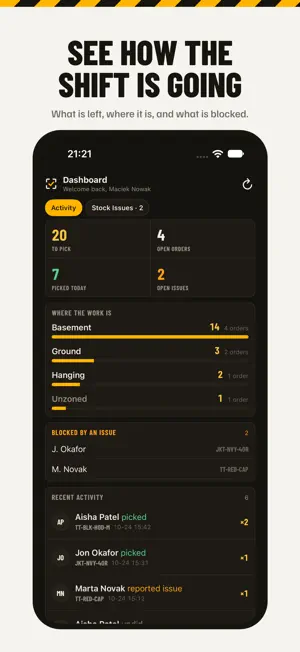
Pickr turns your Linnworks orders into fast, clear pick lists on any phone or tablet. Stop printing paper pick sheets. Every picker gets a live list sorted by bin, so they walk each aisle once and the whole team stays in step. HOW IT WORKS - Connect to Linnworks from your Pickr account; open orders flow in automatically - Orders are merged and sorted into bin-walk order, grouped by warehouse zone - Tap to pick, scan to confirm; progress syncs to every device in seconds - Completed orders are tagged back in Linnworks with who picked them and when THE PICK LIST - The current bin stays at the top, with the next bin beside it - Zone, tag, courier and component filters, switched on by your admin - Barcode scanning with the camera or a hardware scanner - Hold an item to undo, report it missing or damaged, or see its photo - Multi-quantity picks, composite items shown as their parts - A short practice run on first sign-in teaches the gestures STOCK TOOLS - Count stock on the shelf and update Linnworks in one step - Grid counts for sized products, with drafts that survive a restart - Move items between bins, singly or in bulk - Stock issue reports that land on the admin dashboard for a recount FOR ADMINS - Live dashboard: what is left, where it is, and what is blocked - Analytics per picker and per day - Warehouse zones, team roles and per-picker zone assignment - Admin and picker roles with separate permissions Works on iPhone, iPad, Android and the web, in English, German, French, Spanish, Italian, Dutch, Polish, Portuguese and Romanian. Pickr requires a Linnworks account and a Pickr account. Questions? [email protected]
What’s new
Version 2.4.0 · Updated October 24, 2026
A new look for Pickr. • The pick list is denser and clearer: the current bin stays at the top with the next one beside it, and more items fit on screen. • Scanning is one tap away, and hardware scanners just work. • Tag, courier and component filters appear when your admin turns them on. • A short practice run on first sign-in teaches the gestures. Replay it any time from Settings. • Settings grouped by role, every delete asks first, follows your light or dark mode. • Stock counts are saved as drafts and survive a restart, with history and CSV import/export. • Hardware barcode scanners now work on iPhone.
App privacy
The developer, Backroom Studio Ltd, reported these privacy practices to Apple.
Data Linked to You
The following data, which may be collected and linked to your identity, may be used for the following purposes:
- Contact Info: Email Address, Name
- Usage Data: Product Interaction
Used for: App Functionality
Alternatives to Pickr - Warehouse Picking
Looking for apps like Pickr - Warehouse Picking? Here are 6 similar apps on the App Store.
-
 SimpleSJob
-
 Scan And Ship - BigCommerce
-
 MYE Companion App
-
 Hire Me-UK Jobs
-
 Corrodere Academy
-
 TTP Log Book App
| App | Rating | Price | Last updated | Compare |
|---|---|---|---|---|
| Pickr - Warehouse Picking | – | Free | October 24, 2026 | |
| SimpleSJob | – | Free | Jun 7, 2026 | Compare |
| Scan And Ship - BigCommerce | – | Free | Apr 14, 2026 | Compare |
| MYE Companion App | – | Free | Oct 12, 2025 | Compare |
| Hire Me-UK Jobs | – | Free | Jul 1, 2026 | Compare |
| Corrodere Academy | – | Free | Jan 8, 2026 | Compare |
| TTP Log Book App | – | Free | Aug 15, 2024 | Compare |