

Audio Editor: Mp3 Cutter
Bayram Utku Uzunlar Entertainment iPhoneiPadiPod touch
Audio Editor: Mp3 Cutter is a free Entertainment app for iPhone and iPad by Bayram Utku Uzunlar. Rated 5.0/5 from 1 ratings. Requires iOS 26.2.
- Rating
- 5.0
- 1 ratings
- Price
- Free
- on the App Store
- Size
- 27 MB
- Age 4+
- Updated
- Jun 17
- 2026 · v1.0
Screenshots


About Audio Editor: Mp3 Cutter
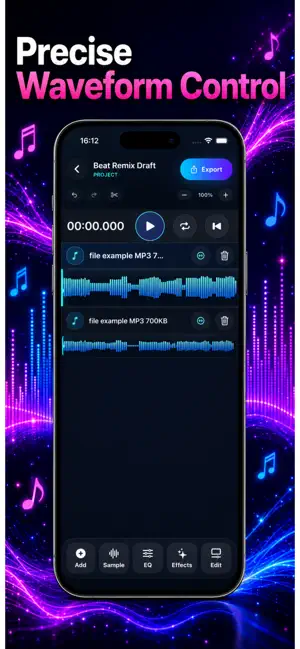
Audio Editor is a simple, powerful audio editing app built for creators who want to edit, convert, polish, and share audio quickly. Import your audio, work directly on the waveform, trim clips with precision, arrange tracks, apply effects, adjust EQ, and export your final result in the format you need. Whether you are editing music, voice recordings, podcasts, video audio, or quick social media sound clips, Audio Editor helps you move from raw file to finished audio without a complicated workflow. Key Features Edit Audio With Precision Trim, split, arrange, and fine-tune audio clips directly on the waveform. Build clean edits faster with a visual timeline made for quick decisions. Convert Audio Files Convert between popular audio formats including MP3, M4A, and WAV. You can also extract audio from video files and prepare it for editing or sharing. Multi-Track Projects Create layered audio projects and combine multiple tracks in one timeline. Perfect for mixing music, voiceovers, effects, intros, outros, and more. Effects & EQ Polish your sound with audio effects and equalizer controls. Shape your track before exporting so it sounds ready to share. Export & Share Export your finished audio and share it wherever you need. Create clean audio files for content, music projects, podcasts, videos, or personal use. Built for Speed Audio Editor keeps the workflow simple: import, edit, polish, export. No clutter, no complicated setup, just the tools you need to finish your audio. Use Audio Editor to: - Trim music and recordings - Convert MP3, M4A, and WAV files - Extract audio from video - Edit voice recordings - Prepare podcast clips - Create clean social media audio - Build multi-track audio projects - Add effects and EQ before export Pro Features Some advanced features may require an Audio Editor Pro subscription or lifetime purchase. Pro features can include multi-track editing, advanced effects, EQ controls, unlimited exports, and other premium editing tools. Subscription and Purchase Information Audio Editor may offer monthly subscription and lifetime purchase options. Payment will be charged to your Apple ID account at confirmation of purchase. Subscriptions automatically renew unless canceled at least 24 hours before the end of the current period. You can manage or cancel subscriptions in your App Store account settings. Audio Editor is designed for anyone who wants a fast, modern, and easy way to work with audio on iPhone. Terms of Use (EULA): https://www.apple.com/legal/internet-services/itunes/dev/stdeula/ Privacy Policy: https://app.notion.com/p/Audio-Editor-Mp3-Cutter-Privacy-Policy-38172a5e889b80f7b367f0e3ef450901
App privacy
The developer, Bayram Utku Uzunlar, reported these privacy practices to Apple.
Data Not Collected
The developer does not collect any data from this app.
Alternatives to Audio Editor: Mp3 Cutter
Looking for apps like Audio Editor: Mp3 Cutter? Here are 6 similar apps on the App Store. The highest rated is Friendlee Radio (5.0/5), and all 6 are free to download.
-
 Thats Jokes
-
 Friendlee Radio
5.0
Friendlee Radio
5.0
-
 Hot Giggity Live
-
 Photo Carbon Copy
-
 Texting Story Chat Master
4.8
Texting Story Chat Master
4.8
-
 SonicHue Sync
5.0
SonicHue Sync
5.0
| App | Rating | Price | Last updated | Compare |
|---|---|---|---|---|
| Audio Editor: Mp3 Cutter | 5.0 / 5 (1 rating) | Free | June 17, 2026 | |
| Thats Jokes | – | Free | Nov 25, 2024 | Compare |
| Friendlee Radio | 5.0 / 5 (2) | Free | Sep 11, 2026 | Compare |
| Hot Giggity Live | – | Free | Mar 25, 2026 | Compare |
| Photo Carbon Copy | – | Free | Dec 31, 2024 | Compare |
| Texting Story Chat Master | 4.8 / 5 (4) | Free | Dec 15, 2025 | Compare |
| SonicHue Sync | 5.0 / 5 (6) | Free | Sep 15, 2026 | Compare |