

Video Transcriber: Scribehz
Vikram Singh Productivity iPhoneiPadiPod touch
Video Transcriber: Scribehz is a free Productivity app for iPhone and iPad by Vikram Singh. Requires iOS 17.6. Updated April 29, 2026.
- Price
- Free
- on the App Store
- Size
- 9 MB
- Age 4+
- Updated
- Apr 29
- 2026 · v1.5
Screenshots

About Video Transcriber: Scribehz
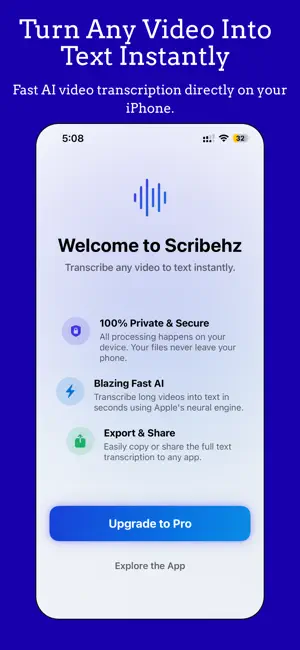
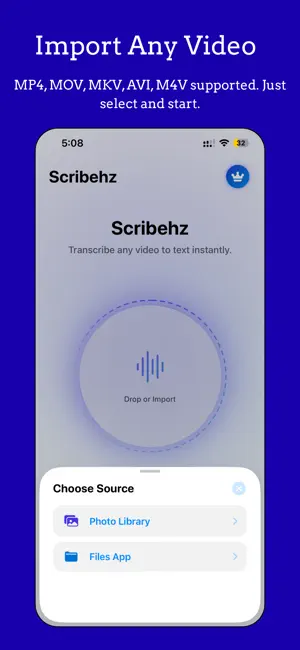
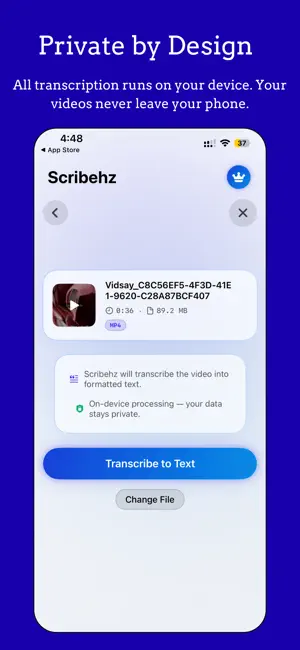
Scribehz turns any video into perfectly formatted text — entirely on your device. No internet connection needed, no cloud uploads, no data leaves your iPhone. Just tap, transcribe, and get your text in seconds. Whether you're capturing lecture notes, meeting transcripts, podcast content, or social media captions, Scribehz handles it all with Apple's on-device speech recognition engine. Every word is processed locally, ensuring your recordings stay completely private. HOW IT WORKS 1. Import a video from your Photo Library or the Files app 2. Preview your file with thumbnail, duration, and format details 3. Tap "Transcribe to Text" and watch real-time progress 4. Review your beautifully formatted transcription instantly SUPPORTED FORMATS Works with all major video formats including MP4, MOV, MKV, AVI, and M4V. Scribehz extracts the audio track automatically for the most accurate transcription possible. PREVIEW BEFORE YOU COMMIT Scribehz lets you preview transcription results before subscribing. See partial transcription output to evaluate quality and accuracy — saving, copying, sharing, and exporting require a Pro subscription. SCRIBEHZ PRO — UNLOCK EVERYTHING Upgrade to Pro to access the full suite of features: • Unlimited Transcriptions — no caps, no limits • Full Text Access — read, select, and copy your complete transcription • Copy to Clipboard — paste your transcript anywhere in one tap • Share Instantly — send your text via Messages, Mail, Notes, or any app • Export as PDF — generate a professionally formatted PDF document with metadata, word count, processing time, and branded layout • Transcription Library — access your complete history, search by file name or content, rename entries, and revisit past transcriptions anytime PRIVACY BY DESIGN Scribehz uses Apple's on-device speech recognition exclusively. Your audio is never uploaded to any server. No accounts, no tracking, no data collection. What's on your device stays on your device. BUILT FOR YOUR WORKFLOW • Real-time transcription progress with partial text preview • Automatic paragraph formatting for clean, readable output • Video preview player — watch your source file directly in the app • Dark mode, light mode, or system-matched appearance • Haptic feedback throughout for a premium tactile experience • Elegant glassmorphic UI with smooth animations TRANSCRIPTION LIBRARY Every transcription is automatically saved to your Library. Search across all your transcripts, view word counts and durations, rename entries for better organization, and delete what you no longer need. Your history is always a tap away. CONTENT PROTECTION For non-Pro users, transcription content is protected from screen recording and screenshots, ensuring the value of the full text remains exclusive to Pro members. SUBSCRIPTION OPTIONS • Weekly Plan: $4.99/week — flexible, cancel anytime • Yearly Plan: $29.99/year — just $2.49/month, best value Payment is charged to your Apple ID account at confirmation of purchase. Subscriptions automatically renew unless canceled at least 24 hours before the end of the current period. Your account is charged for renewal within 24 hours prior to the end of the current period. You can manage and cancel your subscriptions in your App Store account settings. Any unused portion of a free trial period will be forfeited when you purchase a subscription. Terms of Use (EULA): https://www.apple.com/legal/internet-services/itunes/dev/stdeula/ Privacy Policy: https://1kbapps.com/scribehz-new/
What’s new
Version 1.5 · Updated April 29, 2026
Version 1.5 — Redesigned • Brand New Interface — stunning glassmorphic design with smooth animations throughout • Floating Navigation Bar — sleek new bottom tab bar for faster navigation between Home, Library, and Settings • Redesigned Paywall — cleaner layout with plan comparison and trust indicators • PDF Export — generate professionally formatted PDF documents from your transcriptions • Video Preview — watch your source video directly in the app before transcribing • Transcription Library — search your history, rename entries, and manage past transcriptions • Content Protection — screen recording detection and screenshot deterrent for non-Pro users • Personalized Onboarding — interactive questionnaire that tailors your experience • Appearance Settings — choose between Dark, Light, or System theme • Performance & Stability — improved transcription engine with better error handling
App privacy
The developer, Vikram Singh, reported these privacy practices to Apple.
Data Not Collected
The developer does not collect any data from this app.
Alternatives to Video Transcriber: Scribehz
Looking for apps like Video Transcriber: Scribehz? Here are 6 similar apps on the App Store. The highest rated is ReSerch: Transcribe Video (5.0/5), and all 6 are free to download.
-
 ReSerch: Transcribe Video
5.0
ReSerch: Transcribe Video
5.0
-
 Asring : Video & Audio To Text
-
 SpeakSave
-
 Private Recorder & Transcribe
-
 AudioQuill Transcriber
-
 Reco: Offline AI Note Taker
| App | Rating | Price | Last updated | Compare |
|---|---|---|---|---|
| Video Transcriber: Scribehz | – | Free | April 29, 2026 | |
| ReSerch: Transcribe Video | 5.0 / 5 (2) | Free | May 28, 2026 | Compare |
| Asring : Video & Audio To Text | – | Free | Feb 13, 2025 | Compare |
| SpeakSave | – | Free | Sep 9, 2026 | Compare |
| Private Recorder & Transcribe | – | Free | Sep 3, 2026 | Compare |
| AudioQuill Transcriber | – | Free | Jun 2, 2026 | Compare |
| Reco: Offline AI Note Taker | – | Free | Apr 6, 2026 | Compare |