

Blink – Camera Messages
Priidu Zilmer Photo & Video iPhoneiPadiPod touch
Blink – Camera Messages is a free Photo & Video app for iPhone and iPad by Priidu Zilmer. Rated 5.0/5 from 1 ratings. Requires iOS 26.0.
- Rating
- 5.0
- 1 ratings
- Price
- Free
- on the App Store
- Size
- 2 MB
- Age 4+
- Updated
- Apr 13
- 2026 · v1.1
Screenshots
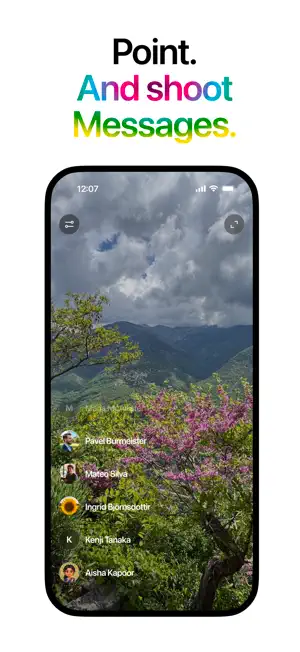
About Blink – Camera Messages
Blink puts the people you care about right inside the Camera. Point. Shoot — straight to Messages. That's it. Few more tricks up its sleeve: - Flip between front and back camera - Pinch and zoom, tap to focus - Long-press a contact to record and send 10-second video clips - Switch to left-handed camera layout - Hide and shorten names, view landscape - Supports Lock Screen or Action Button Blink doesn't save your photos — they live in Messages if you choose to send them. No contact storage, no data collection. Just fast, simple camera messaging. Blink is free. Enjoy.
What’s new
Version 1.1 · Updated April 13, 2026
• Shorten Names: contacts now show first names by default for a cleaner look. Toggle "Shorten Names" in settings to see full names. • Selfie camera fix: front camera no longer appears rotated in portrait mode. • Long-press to remove: long-press any contact to remove them from your list. • Hold for Movies: when enabled, hold down on a contact's avatar to record a video message. • Improved animations: smoother transitions when removing contacts and interacting with menus.
App privacy
The developer, Priidu Zilmer, reported these privacy practices to Apple.
Data Not Collected
The developer does not collect any data from this app.
Alternatives to Blink – Camera Messages
Looking for apps like Blink – Camera Messages? Here are 6 similar apps on the App Store. The highest rated is Uhella (5.0/5), and all 6 are free to download.
-
 Image Converter: HEIC JPG WebP
-
 Uhella
5.0
Uhella
5.0
-
 SnapBackdrop - BG Eraser
4.0
SnapBackdrop - BG Eraser
4.0
-
 Filter Album - Photo Organizer
4.0
Filter Album - Photo Organizer
4.0
-
 Reeled VHS Filter
5.0
Reeled VHS Filter
5.0
-
 Montaj - Video Editor
3.0
Montaj - Video Editor
3.0
| App | Rating | Price | Last updated | Compare |
|---|---|---|---|---|
| Blink – Camera Messages | 5.0 / 5 (1 rating) | Free | April 13, 2026 | |
| Image Converter: HEIC JPG WebP | – | Free | Sep 10, 2026 | Compare |
| Uhella | 5.0 / 5 (2) | Free | Oct 31, 2026 | Compare |
| SnapBackdrop - BG Eraser | 4.0 / 5 (2) | Free | Mar 27, 2026 | Compare |
| Filter Album - Photo Organizer | 4.0 / 5 (2) | Free | Mar 28, 2026 | Compare |
| Reeled VHS Filter | 5.0 / 5 (1) | Free | Jul 18, 2026 | Compare |
| Montaj - Video Editor | 3.0 / 5 (2) | Free | May 28, 2026 | Compare |