

Bonus Alarm: Smart Alarm Clock
David Ring Utilities iPhoneiPadiPod touch
Bonus Alarm: Smart Alarm Clock is a paid Utilities app for iPhone and iPad by David Ring. Requires iOS 26.1. Updated November 20, 2026.
- Price
- 0.99 USD
- on the App Store
- Size
- 17 MB
- Age 4+
- Updated
- Nov 20
- 2026 · v1.19
Screenshots
Save to Pinterest

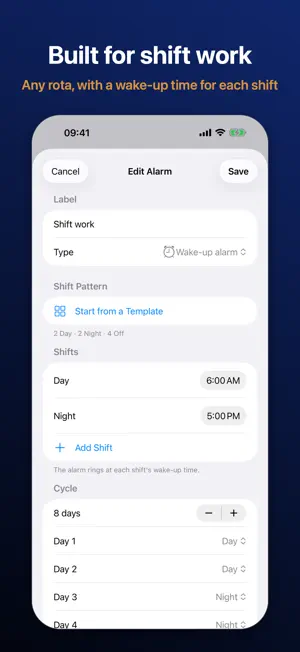

About Bonus Alarm: Smart Alarm Clock
Shift work, odd weeks, rotations that change: Bonus Alarm rings on the right days, at the right time, for each shift. Skip a day or change it just once, and the rest of your schedule stays the same. FOR SHIFT WORK AND IRREGULAR SCHEDULES • Shift Patterns — Build any shift rotation, like 2 day, 2 night, 4 off, with its own wake-up time for each shift. Start from a ready-made template; the alarm shows which shift it's for. • Skip & Change Once — Skip the next alarm on a day off, or move a single alarm just this once. The rest of your schedule stays the same. • Next 7 Days & Calendar — See every upcoming alarm at a glance and skip one with a single tap, plus a calendar with week numbers and odd/even weeks. • Odd/Even Weeks & Week Numbers — Ring only on odd or even weeks, or on the weeks you pick (1–53). Perfect for alternating weeks. • Every Few Days — Repeat an alarm every 2 to 30 days, independent of weekdays. • Specific Date — Set a one-time alarm for any date and time, like an early flight or an appointment. • Holiday Pause — Silence selected alarms between two dates, just your wake-up alarms or your routines and reminders too. They start again automatically when you're back. WAKE UP YOUR WAY • Wake-Up, Routines & Reminders — Keep wake-up alarms, everyday routines like training or medicine, and reminders for a single day apart, each with its own list and widget. • Pre-Alerts & Bedtime Reminders — Get a notification before a routine or reminder rings, so you have time to get ready, and a reminder at bedtime to get the sleep you want before a wake-up alarm. • Gentle Wake-Up Sounds — Sounds that start quietly and slowly get louder, plus 25 built-in alarm sounds. • Colors & Defaults — Give each alarm its own color, and choose the sound, color and snooze that new alarms start with. • Duplicate Alarms — Touch and hold an alarm to start a new one with the same settings. • Light & Dark — Use the app in light or dark mode, or let it follow your device. • Custom Snooze — Snooze for 1 to 15 minutes, or turn it off. • Widgets & Live Activity — See your next wake-up alarm, routine or reminder on the Home Screen, the Lock Screen and in Control Center, and your snooze countdown on the Lock Screen. The large Home Screen widget also lists the coming days. • Ring History — See which alarms rang today, how many times you snoozed and when you turned them off. Bonus Alarm uses Apple's alarm system, so your alarms ring reliably, even in Silent mode and Focus. Terms of use: https://www.apple.com/legal/internet-services/itunes/dev/stdeula/
What’s new
Version 1.19 · Updated November 20, 2026
What's new: - Pre-alerts: get a notification before a routine or reminder rings, and skip it right from the notification - Bedtime reminders: a notification when it's time for bed before a wake-up alarm, so you get the sleep you want - New Sleep settings: how much sleep you want, time to fall asleep and when to be reminded - Tap an alarm in Next 7 Days to see it large, with Skip and Change Time - Settings shows when your next notification comes
App privacy
The developer, David Ring, reported these privacy practices to Apple.
Data Not Collected
The developer does not collect any data from this app.
Alternatives to Bonus Alarm: Smart Alarm Clock
Looking for apps like Bonus Alarm: Smart Alarm Clock? Here are 6 similar apps on the App Store. The highest rated is n9witch (5.0/5), and all 6 are free to download.
-
 普通闹钟+
-
 Alarm Pro: Flexible Alarms
4.7
-
 手机闹钟 –无广告智能闹钟
-
 Font Finder: Font Locator
2.3
-
 Lumin+
1.6
-
 n9witch
5.0
| App | Rating | Price | Last updated | Compare |
|---|---|---|---|---|
| Bonus Alarm: Smart Alarm Clock | – | 0.99 USD | November 20, 2026 | |
| 普通闹钟+ | – | Free | Oct 28, 2026 | Compare |
| Alarm Pro: Flexible Alarms | 4.7 / 5 (11) | Free | Oct 8, 2026 | Compare |
| 手机闹钟 –无广告智能闹钟 | – | Free | Apr 16, 2026 | Compare |
| Font Finder: Font Locator | 2.3 / 5 (3) | Free | Apr 7, 2026 | Compare |
| Lumin+ | 1.6 / 5 (7) | Free | Sep 18, 2026 | Compare |
| n9witch | 5.0 / 5 (3) | Free | Nov 7, 2026 | Compare |