

Reader AI: Markdown Reader
Thinking Systems LLC Productivity iPhoneiPadiPod touch
Reader AI: Markdown Reader is a free Productivity app for iPhone and iPad by Thinking Systems LLC. Requires iOS 15.0. Updated July 2, 2026.
- Price
- Free
- on the App Store
- Size
- 15 MB
- Age 12+
- Updated
- Jul 2
- 2026 · v1.3.3
Screenshots


About Reader AI: Markdown Reader
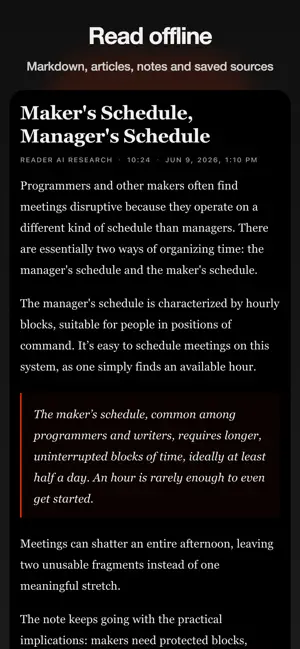
Reader AI is a focused Markdown reader for offline sources, saved articles, notes, YouTube videos, AI summaries, prompts, and exports. It is built for reading first. Save Markdown, text notes, web articles, YouTube videos, and useful links in one organized library. Read sources in a clean layout with themes, typography controls, font size, and spacing that help you focus. Keep useful material available in a durable workspace instead of losing it in tabs, chats, or one-off AI outputs. When you need help moving faster, Reader AI can turn long sources into clear takeaways, structured notes, transcripts, recommendations, risks, questions, decisions, and custom prompt outputs. Use Reader AI to: • Read Markdown, notes, articles, and saved sources in one focused library • Read offline when sources are available locally • Customize themes, font size, spacing, and reading layout • Save YouTube videos, web articles, Markdown, notes, and text • Stream YouTube transcripts and readable source captures • Summarize long content into clear takeaways • Ask custom prompts to analyze, evaluate, and structure sources • Organize work across workspaces • Choose your default AI output language • Export finished work to PDF, EPUB, email, Kindle, Markdown, or plain text • Sync your library across mobile and web Reader AI is not just a summarizer. It is a better reading workspace: Markdown-friendly, offline-first where it matters, themeable, and ready for AI analysis only when you need it. Use it for: • Markdown reading and personal notes • YouTube talks, lectures, and interviews • Article summaries and news digestion • Research notes and literature review • Study notes and learning workflows • Product, strategy, and market analysis • Briefs, summaries, and decision support • Personal knowledge management Reader AI access includes renewing credits for AI-powered work such as summaries, analysis, prompts, and exports. Optional top-ups are available when you need more. Reader AI is powered by Xevol. Terms: https://xevol.com/terms Privacy Policy: https://xevol.com/privacy
What’s new
Version 1.3.3 · Updated July 2, 2026
This update improves the native subscription paywall with clearer auto-renewal and cancellation information, Terms of Use and Privacy Policy links, and more reliable purchase and restore flows.
App privacy
The developer, Thinking Systems LLC, reported these privacy practices to Apple.
Data Linked to You
The following data, which may be collected and linked to your identity, may be used for the following purposes:
- Purchases: Purchase History
- Contact Info: Email Address, Name
- User Content: Customer Support, Other User Content
- Identifiers: User ID
Used for: Analytics, App Functionality
Alternatives to Reader AI: Markdown Reader
Looking for apps like Reader AI: Markdown Reader? Here are 6 similar apps on the App Store. The highest rated is ReelBreaker (5.0/5), and all 6 are free to download.
-
 PickMD: Markdown Reader
-
 PageVault: Offline Reader
-
 Ogma AI: Offline AI Chat
-
 ReelBreaker
5.0
ReelBreaker
5.0
-
 Artiful Reader: Read & Listen
5.0
Artiful Reader: Read & Listen
5.0
-
 Caliu - Markdown Notes
5.0
Caliu - Markdown Notes
5.0
| App | Rating | Price | Last updated | Compare |
|---|---|---|---|---|
| Reader AI: Markdown Reader | – | Free | July 2, 2026 | |
| PickMD: Markdown Reader | – | Free | Oct 14, 2026 | Compare |
| PageVault: Offline Reader | – | Free | Oct 13, 2026 | Compare |
| Ogma AI: Offline AI Chat | – | Free | Oct 23, 2026 | Compare |
| ReelBreaker | 5.0 / 5 (1) | Free | Feb 23, 2026 | Compare |
| Artiful Reader: Read & Listen | 5.0 / 5 (12) | Free | Oct 23, 2026 | Compare |
| Caliu - Markdown Notes | 5.0 / 5 (5) | Free | Oct 23, 2026 | Compare |