

Tough Talk — Co-Parent Coach
Sergii Koval Productivity iPhoneiPadiPod touch
Tough Talk — Co-Parent Coach is a free Productivity app for iPhone and iPad by Sergii Koval. Requires iOS 17.0. Updated June 6, 2026.
- Price
- Free
- on the App Store
- Size
- 20 MB
- Age 9+
- Updated
- Jun 6
- 2026 · v1.4
Screenshots
About Tough Talk — Co-Parent Coach
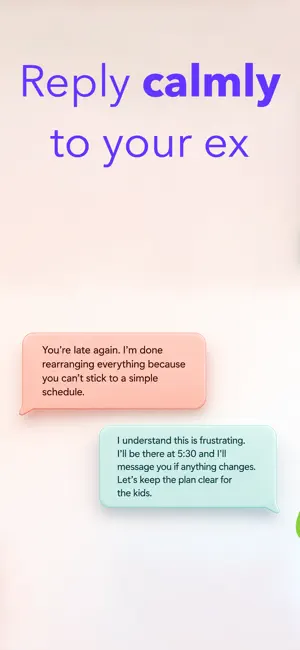
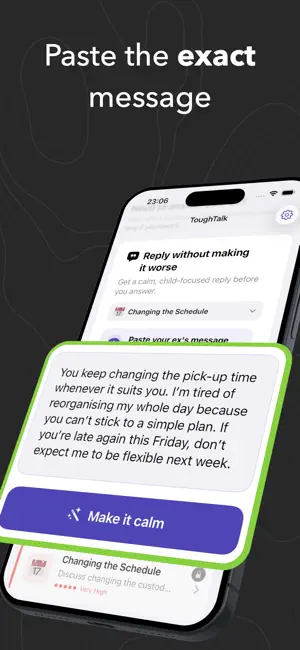
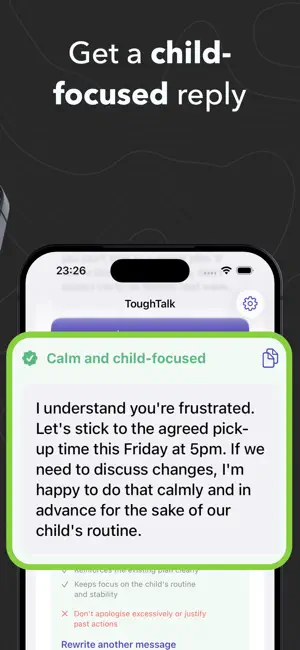
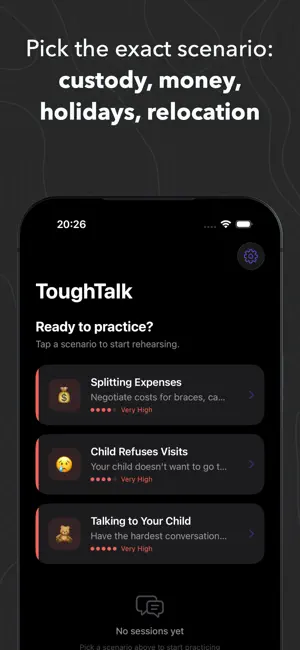
Have a hard message from your ex sitting on your screen? Paste it into ToughTalk and get a calmer, clearer, child-focused reply before you send anything. For co-parents dealing with custody changes, money arguments, holiday plans, last-minute drama, or the usual “how did this become a fight?” nonsense. ToughTalk helps you pause before replying, lower the heat, and choose words that keep the conversation focused on your child. WHAT TOUGH TALK DOES • Rewrite difficult messages — paste what your ex sent and get a calm reply you can edit • Keep it child-focused — avoid blame, threats, sarcasm, and escalation • Understand why it works — see what the reply changes and what to avoid • Practise harder conversations — rehearse realistic roleplay when a simple rewrite is not enough • Get feedback after roleplay — see where you stayed calm, where tension rose, and what to say better next time HOW IT WORKS 1. Paste the message from your ex or co-parent 2. Choose the situation if needed: custody, expenses, holidays, schedules, communication, conflict 3. Tap Make it calm 4. Read the suggested reply 5. Copy it, edit it, or rewrite another message WHEN YOU NEED MORE PRACTICE ToughTalk also includes AI roleplay for bigger conversations. Choose a scenario and practise with an AI that can respond in different communication styles: • The Fighter — loud, blaming, threatens court • The Sniper — sarcastic, undermining, “fine, whatever” • The Actor — guilt-tripping, twisting the story, playing victim • The Ghost — avoids, deflects, goes silent, never commits SCENARIOS YOU CAN WORK THROUGH • Changing the custody schedule • Splitting expenses for braces, camp, tutoring, and more • Planning holidays and special occasions • Your ex breaking what was agreed • A new partner being introduced to the kids • Relocation discussions • A child refusing visits • Difficult conversations with your child DETAILED FEEDBACK FOR ROLEPLAY After practice sessions, ToughTalk can score and explain: • Calm Score — did you stay composed? • Child Focus Score — did you keep the child at the centre? • Argumentation Score — were your points clear? • Tension Timeline — where the conversation heated up • Better Ways to Say It — weaker lines rewritten with explanations • Tactical Advice — what to change before the real conversation Works in many languages. No account required. Stop replying in the heat of the moment. Paste first. Calm it down. Then decide what to send. This is a communication training tool, not therapy or legal advice. If you're in crisis, please contact a mental health professional. Privacy Policy: https://www.kovallux.com/privacy-policy/ Terms of Use: https://www.apple.com/legal/internet-services/itunes/dev/stdeula/
What’s new
Version 1.4 · Updated June 6, 2026
• New main flow: paste a difficult message from your ex and get a calmer, child-focused reply before you send it • Added a larger, clearer message input for pasting real texts • Added an improved calm reply result view with copy and rewrite actions • Moved AI consent out of onboarding and into the moment you first use an AI feature • Removed the old onboarding hardwall behaviour • Updated onboarding with a clearer before-and-after message preview • Added a cleaner “reply coach is ready” onboarding step • Moved the soft paywall to appear after the first successful reply, not before the user sees value • Improved scrolling after “Rewrite another message” so the app returns to the input area • Made the keyboard dismiss when tapping “Make it calm” • Updated roleplay so AI consent appears only when starting a practice conversation • Updated analytics events for reply rewrites, consent choices, and first value seen • Refreshed paywall copy around calm replies and co-parenting practice • Updated localisation keys for the new onboarding, consent, reply, and roleplay text • General cleanup and stability improvements
App privacy
The developer, Sergii Koval, reported these privacy practices to Apple.
Data Not Linked to You
The following data, which may be collected but is not linked to your identity, may be used for the following purposes:
- Diagnostics: Crash Data
Used for: Other Purposes
Alternatives to Tough Talk — Co-Parent Coach
Looking for apps like Tough Talk — Co-Parent Coach? Here are 6 similar apps on the App Store.
-
 Liano : Co-Parenting
-
 MyCourses Lists
-
 Clarix: Message Rewrite
-
 Mockivator
-
 Custody Calendar - Relay
-
 911Lawyer
| App | Rating | Price | Last updated | Compare |
|---|---|---|---|---|
| Tough Talk — Co-Parent Coach | – | Free | June 6, 2026 | |
| Liano : Co-Parenting | – | Free | Jun 29, 2026 | Compare |
| MyCourses Lists | – | Free | Sep 24, 2026 | Compare |
| Clarix: Message Rewrite | – | Free | May 30, 2026 | Compare |
| Mockivator | – | Free | May 7, 2026 | Compare |
| Custody Calendar - Relay | – | Free | Aug 25, 2026 | Compare |
| 911Lawyer | – | Free | Aug 8, 2024 | Compare |