

AI Meeting Recorder
David Mendez Productivity iPhoneiPadiPod touch
AI Meeting Recorder is a free Productivity app for iPhone and iPad by David Mendez. Requires iOS 15.1. Updated October 20, 2026.
- Price
- Free
- on the App Store
- Size
- 4 MB
- Age 4+
- Updated
- Oct 20
- 2026 · v1.1.0
Screenshots


About AI Meeting Recorder
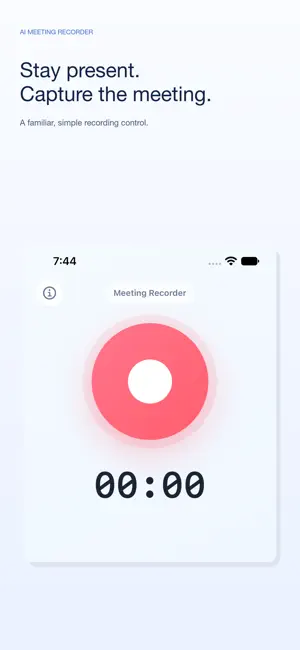
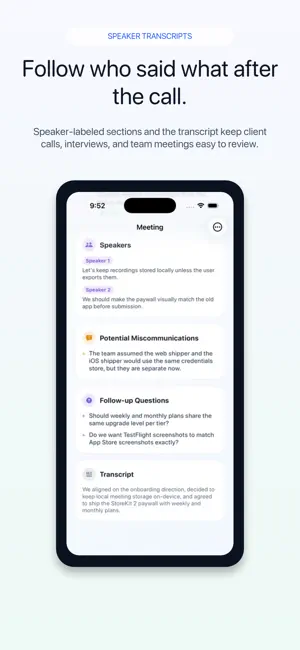
Stay present in the meeting. AI Meeting Recorder captures the conversation and turns it into a clear record you can review and share. Record a meeting or import audio, then get a readable transcript and AI-generated summary, discussion points, action items, and follow-up questions. Speaker-labelled excerpts help you review who said what. Check off action items as you complete them, copy your transcript and notes, or export a PDF. Keep your recordings together in History, with clear processing and ready states. Reopen a meeting to review its summary, transcript, and next steps. Designed for iPhone Duo Open the inner display for a spacious recorder that keeps the familiar recording control and timer easy to see. Partly fold the device in tabletop mode to see recording status above the fold and keep the recording control within reach below. In book mode, recording status and the control sit on opposite sides of the fold. With the inner display opened wide, browse History beside the selected meeting. Rotate to a tall layout or close the device to continue on the outer display. Record, History, and Info remain available as the layout changes. The familiar recorder is also available on other supported iPhones and iPads. Use AI Meeting Recorder for team meetings, interviews, client meetings, one-on-ones, and planning sessions. Internet access is required for transcription and AI processing. Audio is uploaded for processing, and recording, importing, and processing are subject to plan limits. The app includes optional auto-renewing subscriptions. Terms of Use (EULA): https://www.apple.com/legal/internet-services/itunes/dev/stdeula/
What’s new
Version 1.1.0 · Updated October 20, 2026
A simpler, focused design for iPhone Duo. • A spacious recorder on the opened inner display. • Recording status above the fold and an easy-to-reach control below in tabletop mode. • Recording status and controls on separate sides in book mode. • History and the selected meeting together on the wide inner display. • Layouts that adapt when you rotate or close the device, with Record, History, and Info navigation available throughout. The familiar recording screen remains on other iPhones and iPads.
App privacy
The developer, David Mendez, reported these privacy practices to Apple.
Data Linked to You
The following data, which may be collected and linked to your identity, may be used for the following purposes:
- Purchases: Purchase History
- User Content: Audio Data, Other User Content
- Identifiers: Device ID
- Usage Data: Other Usage Data
Used for: App Functionality
Alternatives to AI Meeting Recorder
Looking for apps like AI Meeting Recorder? Here are 6 similar apps on the App Store. The highest rated is Meeting Recall (5.0/5), and 5 of the 6 are free to download.
-
 Cuememo-recorder
-
 Meeting Master: AI Recorder
-
 EchoVault Voice Note Recorder
-
 Ai Notes: Summaries & Meetings
-
 Meeting Recall
5.0
Meeting Recall
5.0
-
 Sunshine: Alarm Clock & Timer
| App | Rating | Price | Last updated | Compare |
|---|---|---|---|---|
| AI Meeting Recorder | – | Free | October 20, 2026 | |
| Cuememo-recorder | – | Free | May 25, 2026 | Compare |
| Meeting Master: AI Recorder | – | Free | Oct 2, 2026 | Compare |
| EchoVault Voice Note Recorder | – | Free | Jul 1, 2026 | Compare |
| Ai Notes: Summaries & Meetings | – | Free | Sep 17, 2026 | Compare |
| Meeting Recall | 5.0 / 5 (2) | Free | May 18, 2026 | Compare |
| Sunshine: Alarm Clock & Timer | – | 1.99 USD | Jul 8, 2026 | Compare |